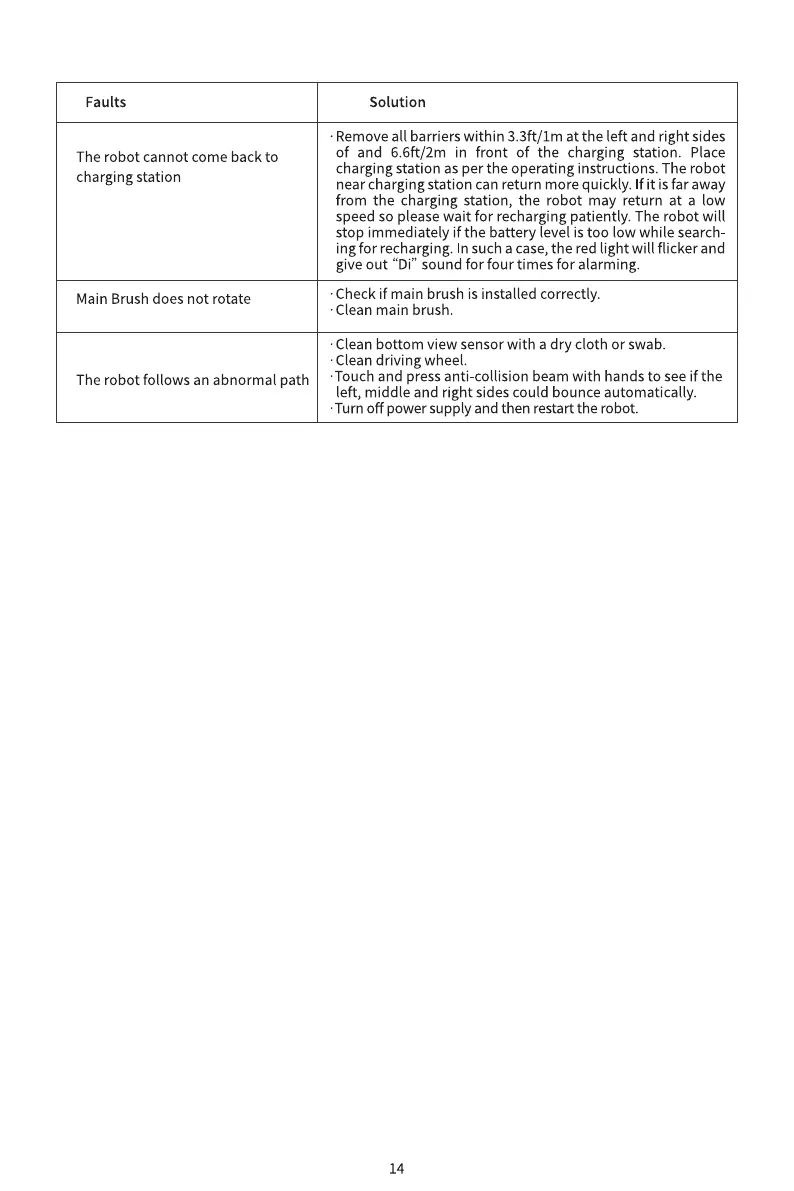
Faults
The robot cannot come back to
charging station
Main Brush does not rotate
The robot follows an abnormal path
Solution
•Remove all barriers within 3.3ft/Im at the left and right sides
of and 6.6ft/2m in front of the charging station. Place
charging station as per the operating instructions. The robot
near charging station can return more quickly. If it is far away
from the charging station, the robot may return at a low
speed so please wait for recharging patiently. The robot will
stop immediately if the battery level is too low while search-
ingfor recharging. In sucha case,the red light will flicker and
give out "Di" sound for four times for alarming.
•Check if main brush is installed correctly.
•Clean main brush.
•Clean bottom view sensor with a dry cloth or swab.
Clean driving wheel.
•Touch and press anti-collision beam with hands to see if the
left, middle and right sides could bounce automatically.
•Turn off power supply and then restart the robot.
14


 To Previous Page
 Loading...