Need help?
Do you have a question about the VADDIO IntelliSHOT and is the answer not in the manual?
This guide covers physical features, installation tips, connection information, and camera power-on.
Details integrated camera and audio, IntelliFrame, zoom, video outputs, microphone, and remote control.
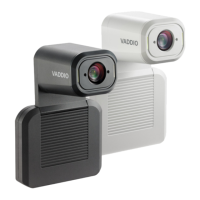
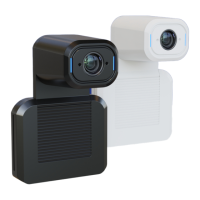
Describes the camera's availability in black or white and its physical features like lens and microphone.
Includes PoE+, USB 3.0, HDMI output, IP button, audio input, and audio output ports.
Cautionary advice on indoor use, avoiding liquids, and handling dropped or damaged products.
Preparation steps including viewing angles, lighting, obstructions, and cable continuity checks.
Recommendations for Cat-5e or better cable, shielding, and high-quality connectors.
Instructions on how to retrieve the camera's IP address using the IP button on the connector panel.
The IntelliSHOT Auto-Tracking Camera is an integrated camera and audio system designed for small to medium conference rooms. It features an intelligent framing algorithm called IntelliFrame™ that reliably keeps participants in view without relying on facial recognition. This makes it a versatile tool for various conferencing applications.
The IntelliSHOT camera serves as a comprehensive solution for video conferencing, offering both high-quality video and integrated audio capabilities. It captures video at up to 1080p/30, with an HDMI output capable of 1080p/60. The camera provides simultaneous HDMI, uncompressed USB 3.0, and H.264 IP streaming (RTSP or RTMP), allowing for flexible integration into different conferencing setups.
The integrated phased microphone array eliminates the need for external microphones in typical installations, capable of picking up voices up to 10 ft. (3 m) away. This microphone system also features echo cancellation, ensuring clear audio during calls. For external audio sources or amplified speakers, the camera includes audio line in and line out ports.
The camera supports Universal Video Class (UVC) and Universal Audio Class (UAC) drivers, making it compatible with most UC conferencing applications across Windows®, macOS®, and Linux operating systems. This broad compatibility ensures seamless integration into existing IT infrastructures.
For control and management, the IntelliSHOT offers full administrative control via a web interface, allowing remote management while monitoring the stream separately. It also supports integration-ready Telnet control for more advanced system integration. A presenter-friendly RF remote control is included for convenient operation during presentations.
The IntelliSHOT is designed for straightforward installation and operation. Before installation, a pre-installation functional check is recommended, especially if the camera will be in a hard-to-reach location. This involves connecting the camera in its minimum functional configuration to verify that it powers on and sends video. The camera's status lights, which illuminate the trim detail on its face, indicate its current state (e.g., initializing, active, audio muted, video muted, firmware update in progress, remote pairing mode, pairing error). These lights can be configured to remain off during normal operation if desired.
The camera's connector panel is located on its underside, featuring a PoE+ RJ-45 connector for network and power via a mid-span PoE+ power injector. This single connection provides both power and network access for IP streaming and camera control. A USB 3.0 Type B connector allows connection to a computer for use with soft conferencing applications, providing an uncompressed USB 3.0 stream. An HDMI output is available for video and audio output. An "IP button" on the connector panel allows users to display the camera's IP address and MAC address on video outputs, which is useful for initial setup or troubleshooting if the Vaddio Device Controller or Vaddio Deployment Tool is not used.
When selecting a location for the camera, it's important to consider viewing angles, lighting conditions, and line-of-sight obstructions. The camera performs best when pointed away from direct light sources like ceilings or windows. Mounting the camera at eye level is generally recommended for the best experience, though above eye level is preferable to below eye level if eye-level mounting is not feasible.
The camera is shipped with a wall mount, and other mounting options are available. For inverted installations, the camera offers an "Image Flip" setting in its configuration to correctly orient the video image and ensure tilt commands respond appropriately.
Cabling notes emphasize the use of Cat-5e or better shielded cabling, especially if cables are coiled, run tightly with other cables, or near sources of electromagnetic interference. High-quality connectors and crimping tools are recommended, and pass-through RJ-45 connectors should be avoided to prevent intermittent connections, degraded signal quality, and potential damage to the product's connectors, which could void the warranty.
For routine maintenance, the IntelliSHOT camera requires minimal effort. Smears or smudges on the product can be wiped with a clean, soft cloth. For the lens, a dedicated lens cleaner should be used. Abrasive chemicals should be avoided to prevent damage to the camera's surfaces.
The device should be kept away from food and liquids to prevent internal damage. It is designed for indoor use and should not be installed outdoors or in humid environments without appropriate protective enclosures. Operating or storing the device under extreme conditions such as temperatures above 104° F (40° C) or below 32° F (0° C), high humidity, condensing or wet environments, inclement weather, severe vibration, or dry environments with excessive static discharge should be avoided to ensure its longevity and proper functioning.
Users are explicitly warned not to attempt to take the product apart, as there are no user-serviceable components inside. In case of damage from dropping, liquid exposure, or other incidents, the camera should be returned to Vaddio for safety and functional testing to avoid voiding the warranty. During firmware updates, indicated by yellow status lights, power should not be removed, and the camera should not be reset, as interrupting this process can render the camera unusable.
 General
| Certification | CE, RoHS, TAA, UL Listed |
|---|---|
| Remote control function | Yes |
| Megapixel | 8.51 MP |
| Camera type | Single camera |
| Sensor type | CMOS |
| Aspect ratio | 3:2, 4:3, 16:9 |
| Combined zoom | 30 x |
| White balance | Auto, Manual, One push |
| Gain control type | Auto/Manual |
| Optical sensor size | 1/2.5 \ |
| Minimum illumination | 1.6 lx |
| Auto focusing (AF) modes | Auto, Manual, One Push Trigger |
| Horizontal field of view | 70.2 ° |
| Number of camera presets | 16 |
| Effective sensor resolution | 8.57 MP |
| Signal-to-Noise Ratio (SNR) | 50 dB |
| Horizontal field of view (wide) | 3.1 ° |
| Minimum working distance (wide) | 80 mm |
| Maximum frame rate | 30 fps |
| Supported video modes | 1080p |
| Video formats supported | H.264 |
| Maximum video resolution | 1920 x 1080 pixels |
| Supported graphics resolutions | 1920 x 1080 (HD 1080) |
| Product color | Black |
| Tilt angle range | -20 - 30 ° |
| HDMI version | 1.4 |
| Power source type | PoE |
| Operating temperature (T-T) | 0 - 40 °C |
| Operating relative humidity (H-H) | 20 - 80 % |
| Cables included | LAN (RJ-45), USB |
| USB cable length | 1.8 m |
| Microphone sensitivity | 64.3 dB |
| Harmonized System (HS) code | 85258900 |
 Weight and Dimensions
| Depth | 114.3 mm |
|---|---|
| Width | 152.4 mm |
| Height | 212.7 mm |
| Weight | 1930 g |

 To Next Page