Need help?
Do you have a question about the Vaillant VR 91 and is the answer not in the manual?
Intended use and safety guidelines for end users of the remote control unit.
Precautions for end users to prevent danger and material damage.
Intended use and qualifications required for competent persons.
Safety precautions for competent persons regarding qualifications and frost risks.
How to operate the remote control unit in conjunction with the system control.
Guidance on identifying and resolving common issues and faults.
Checking delivery scope, line requirements, and initial setup procedures.
Guidelines for mounting the remote control unit in a suitable living room location.
Procedures and considerations for electrical connections, including polarity and wiring.
Steps for initial system start-up, configuration, and setting adjustments.
Details on operating the remote control unit in conjunction with the VRC 700 system control.
Guidance on identifying and resolving system faults and error messages.
The Vaillant VR 91 is a remote control unit designed to enhance the functionality and user experience of a Vaillant heating system, specifically when paired with the VRC 700 system control. This device allows for the remote management of a heating zone via an eBUS interface, providing users with convenient access to various system settings and operational data.
The primary function of the VR 91 is to act as an interface between the user and the main system control (VRC 700). It sends crucial data, such as the current room temperature, to the system control, enabling precise regulation of the heating environment. Conversely, it receives data from the system control, which is then displayed on its screen for the user to monitor. This bidirectional communication ensures that the remote control unit accurately reflects the system's status and allows for effective adjustments.
Users can utilize the VR 91 to perform a range of adjustments, including setting the operating mode, defining time periods for heating or cooling, and adjusting temperature setpoints. It supports various operating modes such as "off," "Auto," "Day," and "Set-back" for both heating and cooling, offering flexibility in managing indoor climate. Advanced functions like "1 day at home," "1 day away from home," "Ventilation boost," and "Party function" are also available, providing quick adjustments for specific scenarios.
The device is equipped with a room temperature sensor, which, if activated in the system control settings, allows the VR 91 to contribute to the room temperature modulation or thermostatic control of the heating zone. This feature enhances comfort by ensuring the heating system responds to the actual conditions in the room where the remote control is located.
For installation, the VR 91 requires connection to the eBUS line of the heat generator. The installation process involves mounting the unit on an interior wall of the main living room at a recommended height of 1.5 meters to ensure accurate room temperature measurement. The eBUS connection does not require attention to polarity, simplifying the wiring process. Each remote control unit must be assigned a unique address within the system to ensure proper communication and control of specific zones.
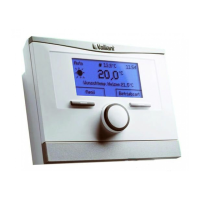
The VR 91 is designed for intuitive operation, primarily through a combination of a display, selection buttons, and a rotary knob. The display provides clear visual feedback on current settings, operating modes, and any system messages. The rotary knob allows for easy navigation through menus and adjustment of values, while the selection buttons facilitate confirming choices and accessing specific functions.
Users can access different operating levels: an end-user level for daily adjustments and an installer level for more advanced configuration and troubleshooting. The installer level is protected by a code, ensuring that only qualified personnel can make critical system changes. However, if the code is unknown, there is a function to reset to factory settings, which will clear all previously configured values.
The remote control unit can display maintenance messages and fault messages. When maintenance is required, a specific symbol and text appear on the display, prompting the user to consult the system control's instructions for detailed information and necessary actions. In the event of a fault in the heating installation, an exclamation mark symbol along with a fault message will be shown, indicating a need for a competent person to address the issue. The device also includes troubleshooting guidance for common issues such as a dark display, unresponsive controls, or display anomalies.
The VR 91 offers extensive customization for time programs, allowing users to set specific heating and cooling schedules for individual days or blocks of days. This includes defining start and end times for up to three periods per day, enabling energy-efficient operation tailored to the user's lifestyle. Additionally, "Days away from home" and "Days at home" scheduling functions provide options to adjust temperature settings for extended periods, further optimizing energy consumption.
Basic settings such as language, display contrast, button lock, and preferred display (heating or cooling) can be configured to personalize the user experience. An offset for room temperature can also be set, allowing for fine-tuning of the temperature measurement if needed.
Routine care for the VR 91 is straightforward, involving cleaning the casing with a damp cloth and a solvent-free soap. It is important to avoid using sprays, scouring agents, detergents, solvents, or cleaning agents containing chlorine, as these can damage the product.
For more in-depth maintenance or troubleshooting, the device provides access to system status information, including current room air humidity, current dew point, and fault status. The "Fault status" function allows users (or competent persons) to read whether a fault is present and, if so, to view a list of fault messages.
The VR 91 also allows for reading the software versions of the remote control unit, which can be useful for diagnostics or updates. In cases where the unit needs to be replaced or removed, instructions are provided for decommissioning the heating installation and safely detaching the product from the wall. This involves disconnecting the eBUS line and unscrewing the wall-mounting base.
The product is designed with recycling and disposal in mind, adhering to EU Directive 2012/19/EU for electrical and electronic units. Users are instructed on how to dispose of the packaging correctly and to hand in the product to a collection center for waste electrical or electronic equipment, rather than disposing of it with household waste. If the product contains batteries, these should also be disposed of at a designated collection point. Before disposal, users are advised to ensure that no personal data remains on or in the product.
 General
| Communication | eBUS |
|---|---|
| Protection class | IP20 |
| Product type | Remote control |
| Ambient temperature | 0 - 50 °C |
| Compatibility | Vaillant heating systems with eBUS |
| Functions | Temperature control, programming |
| Display | Yes, LCD |
| Connectivity | eBUS |

 To Next Page