Figure 3 (Handlebar)
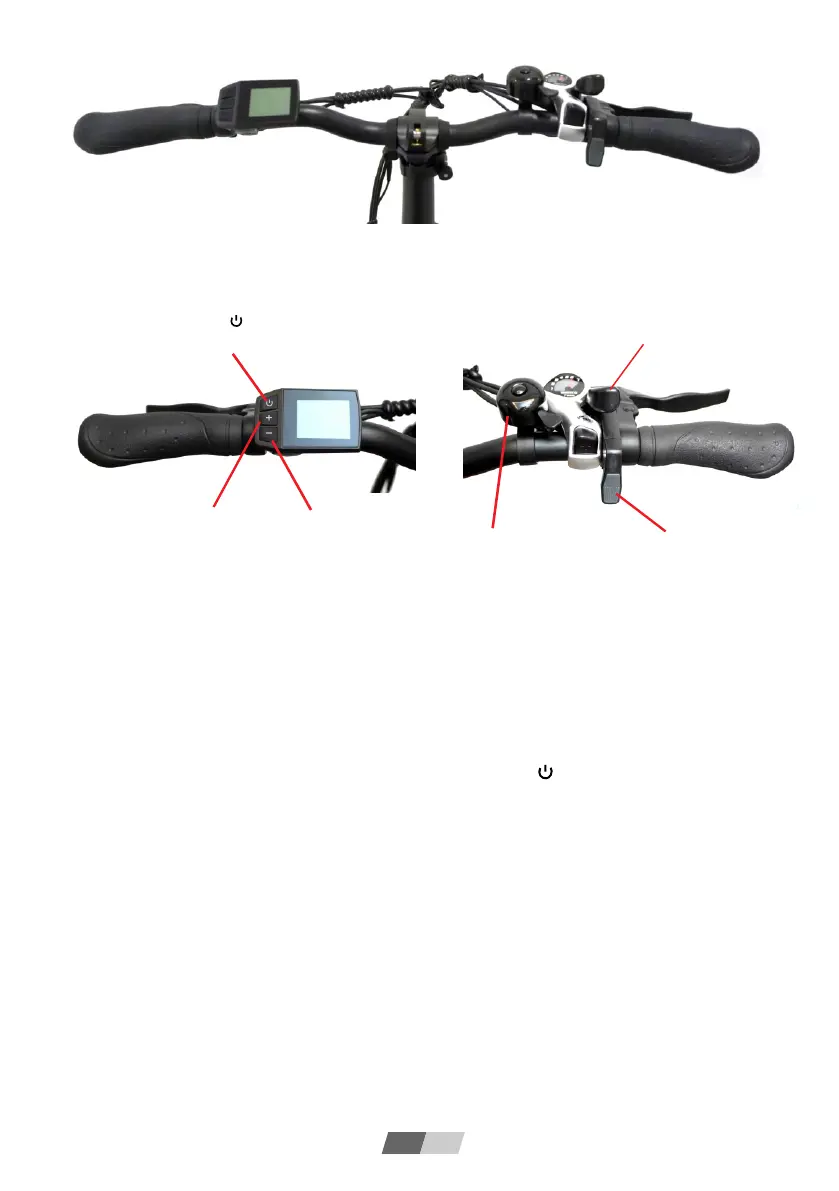
Figure 4 (Left Handlebar)
Figure 5 (Right Handlebar)
EN 04
Function introduction:
1. Charging: Refer to item 27 of Figure 2, the charging hole can be seen on the left
side of the frame, and it can be charged by connecting the charger.
When the battery is full and the charger indicator turns from red to yellow-green, it
means it is fully charged.
2. Turn on/off: refer to Figure 4 and press and hold the " " button to turn on/off
the power of the display.
3. Display: The display screen lights up after power on, displaying information such
as power, speed, motor speed, mileage, etc. The power speed is initially 0. Press the
"+" and "-" buttons to increase and decrease the power speed of electric drive mode.
4. Front light: Refer to Figure 4, long press the "+" button to turn on/off the front light.
5. Power-assisted mode: power-assisted riding, step on the pedals of the bicycle, and
automatically start electric power after a certain speed. If you don't need assistance,
you can turn off the power of the display.
6. Speed transmission: Refer to Figures 5, when the bicycle is running, you can
change the mechanical speed by flipping the shift levers.
7. Electric mode: Refer to Figure 5, press the thumb throttle, and the bicycle can
accelerate forward. The greater the pressing range, the faster the bicycle will run. For
safety reason, please press the thumb throttle lightly and accelerate slowly.
Rear gear shift lever
"+" is the speed shift
button; long press it to
turn on the front light
"-" is the speed downshift
button; long Press it to push
the bicycle with power
Mechanical bell
Thumb throttle
Long press the " " button
to turn on/off the power


 To Next Page
 Loading...