23
EN
Using the appliance
B
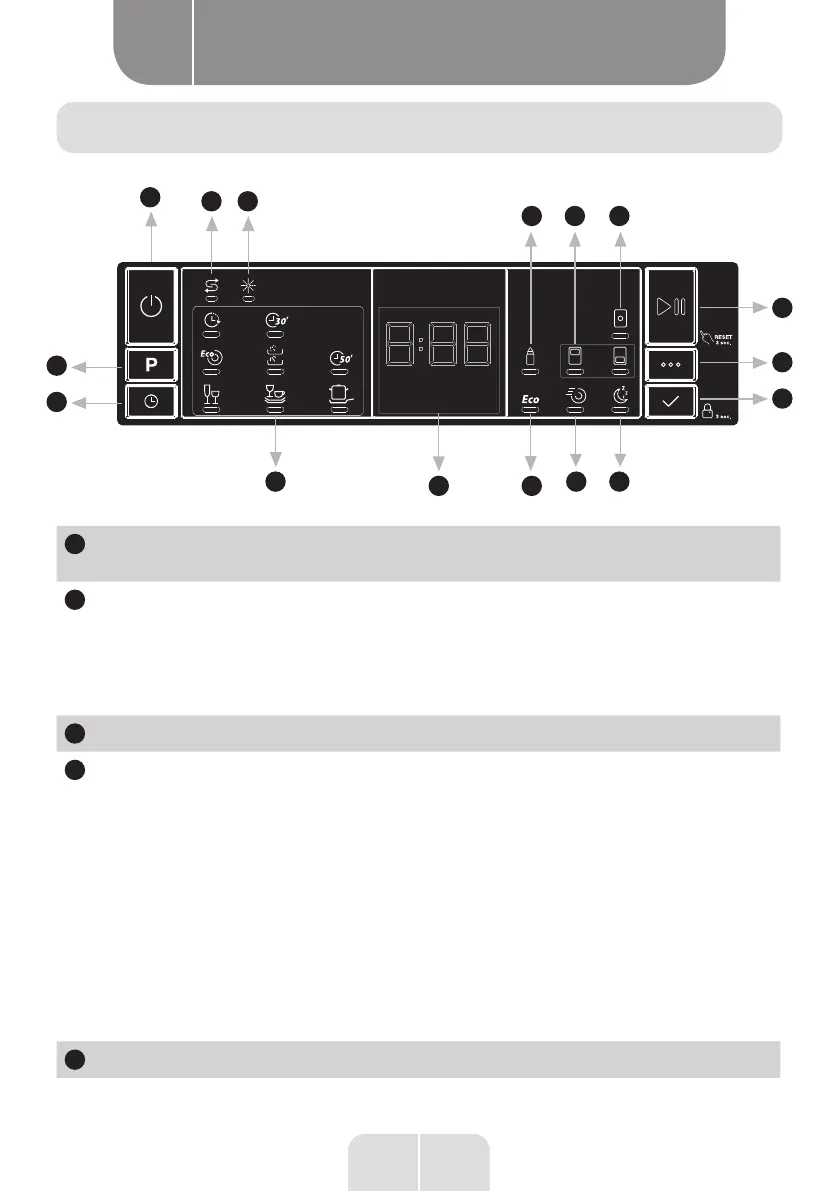
The control panel
1
2
3
8 9
2.1
3.1
4
11 12 10
13 14
5
6
7
Display name Description
1
Start/Stop button
Turn on the appliance by pressing the Start/Stop button.
2
Programme setting button
Select a suitable programme by pressing the
Programme button. The selected programme indicator
(2.1) will turn on.
For details of the programmes see the Programme
Table section.
2.1
Programme indicators
3
Delayed Start button
You can delay the start time of the programme for
1-2...24 hours by pressing the Delayed Start button
(3) before the programme starts. The delay indicator
(3.1) will turn on. If you wish to change the time of the
delayed programme,
first press the Start/Pause button and then press
Delayed Start to select the new delayed programme. To
activate the new delayed programme, press the Start/
Pause button To cancel the delayed programme, you
must switch to 0 hours using the delayed programmer
when the appliance is paused.
3.1
Delay indicator




 To Next Page