Need help?
Do you have a question about the Valeton DAPPER LOOPER Mini and is the answer not in the manual?
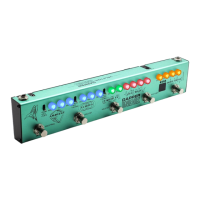
The Valeton Dapper Looper Mini is a compact and powerful 3-footswitch looper effect strip designed for musicians seeking a straightforward and high-quality looping experience. This device integrates essential looping functionalities within an optimal-sized package, making it a versatile tool for practice, performance, and creative exploration.
The Dapper Looper Mini offers a comprehensive set of looping features, including recording, playback, overdubbing, and memory storage. Its intuitive design allows for easy operation, making it accessible for both beginners and experienced users. The device supports unlimited overdubs, providing ample creative freedom, and includes an undo/redo function for correcting mistakes or experimenting with different layers.
A key feature is its 24-bit 44.1kHz high-quality recording and playback, ensuring that your loops maintain excellent audio fidelity. The looper is equipped with 8 savable loop memories, allowing users to store and recall different loop ideas or song sections. The total recording time is an impressive 240 minutes, with each of the 8 memories capable of holding up to 30 minutes of audio.
The device's control scheme is designed for efficiency. It features a dual-footswitch control for REC/PLAY and STOP functions, along with multi-function switching for various operations. The PHRASE footswitch allows users to switch between loop memories, while a 3-way toggle provides forward/backward selection of loop memories.
Basic Looping Operations: The Dapper Looper Mini features two main control knobs: REC LEVEL and LOOP LEVEL. REC LEVEL controls the input signal's recording level, while LOOP LEVEL adjusts the playback volume of the loop. LEDs located under these knobs indicate the current looping status, providing visual feedback during operation.
Footswitch Operations and LED Display: The manual provides a detailed table outlining the various footswitch operations and their corresponding LED displays:
| Operation | Func./Status | LEDs Display |
|---|---|---|
| Power on (no data) | Empty | None |
| Power on (with data) | Stop | Green LEDs flash |
| Tap REC/PLAY footswitch (no data) | Record | Red LEDs light up |
| Tap REC/PLAY footswitch when recording/overdubbing | Play | Green LEDs light up |
| Tap REC/PLAY footswitch when playing | Overdub | Red LEDs light up |
| Hold REC/PLAY footswitch when playing | Undo/Redo (last recording) | Green LEDs flash fast |
| Tap STOP footswitch when playing/recording/overdubbing | Stop | Green LEDs flash |
| Hold STOP footswitch when playing | Clear (current Loop Memory) | Green LEDs flash fast |
| Recording approaches 30 minutes | Memory nearly full | Red LEDs flash |
Note: If there is no overdub, holding the REC/PLAY footswitch while playing will clear the Loop Memory.
Loop Memories: The device features bi-color LEDs (1, 2, 3, 4) above the numbers to indicate the current Loop Memory. Loop Memories 1-4 are displayed in green, while Loop Memories 5-8 are displayed in red. Loop Memory 1 is the default. A 3-way toggle switch allows for selecting a Loop Memory forward or backward. The PHRASE footswitch can also be tapped to switch forward through Loop Memories.
Saving Loops: To save a loop without overdub to the current Loop Memory:
Connections: Getting started is straightforward. Plug your instrument into the INPUT jack and connect the OUTPUT jack to your amplifier, mixer, or audio interface. The device also includes a PHONES jack for silent practice, allowing users to plug in earphones. It is recommended to turn down the volume knobs before plugging in headphones to prevent hearing damage.
USB and Software: The Dapper Looper Mini offers robust loop management capabilities through its free PC/Mac software. Users can download and install the software from www.valeton.net. By connecting the device to a computer via a USB cable (not included), users can import, export, and manage their loops. When exporting a loop from a single Loop Memory, all recordings (including overdubs) are combined into one audio file. If overdubs are not desired, the save function can be used to create a clean loop file.
While the manual does not explicitly detail maintenance procedures, the USB connectivity and accompanying software facilitate efficient management of loop data. This allows users to back up their loops, organize them, and clear memory as needed, which contributes to the longevity and usability of the device. The robust construction and straightforward design suggest a durable product, and proper handling as outlined in the usage instructions will help maintain its performance.
 General
| Brand | Valeton |
|---|---|
| Model | DAPPER LOOPER Mini |
| Category | Music Equipment |
| Language | English |


 To Next Page