
 To Next Page
F
FBA Jam MembersSep 19, 2026
gp200 valeton deactivate the cab simulation only for the balnced output

gp200 valeton deactivate the cab simulation only for the balnced output
wie deaktiviere ich beim gp200 valeton die cab simulation für den balnced output
wie deaktiviere ich beim gp200 valeton die cab simulation für den balnced output
Guide on how to safely use the product and important usage suggestions.
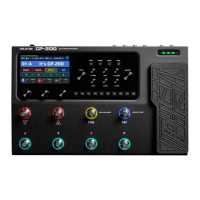
Details the 4.3" full-color LCD display showing preset numbers, names, and info.
Describes various knobs for parameter adjustment, volume control, and saving.
Explains the function of navigation and mode selection buttons.
Details the function of foot switches and the expression pedal.
Covers guitar input, aux in, send/return, and various outputs.
Details USB, MIDI, Power, and GND/LIFT switch.
Guide on selecting and using the 256 preset tones.
Displays key information about current presets after booting.
Instructions for using the built-in tuner.
Guide on using the phrase loop function.
Instructions for using the drum machine feature.
How to use the built-in expression pedal for real-time control.
Interface for editing effect parameters and chain sequence.
How to rearrange effect modules in the signal chain.
Settings related to presets, including knobs, pedals, and loops.
Saving preset parameters and personalizing preset locations.
Adjusting input and output parameters like impedance and gain.
Settings for using the GP-200 as a USB sound card.
Setting up foot switch templates and functions.
Calibrating the expression pedal for accurate response.
Adjusting parameters for connected EXP/FS interface devices.
Setting MIDI signal source, channels, and clock.
Adjusting display parameters like brightness and sleep mode.
Adjusting connection status between AMP and CAB modules.
Setting the global equalization function for overall tone.
Viewing firmware and hardware version information.
Restoring the GP-200 to its original shipped state.
Connecting to full-range equipment like sound cards, PA systems, etc.
Connecting GP-200 output to a guitar cabinet's input.
Using FX-Loop to connect GP-200 with a guitar cabinet.
Utilizing FX-Loop for connecting GP-200 to the rear of a guitar box.
Connecting GP-200 via 4CM for split effect chain routing.
Using GP-200 as a sound card for computers and mobile phones.
Details various pre-effect types and their parameters.
Explains wah effects, including manual and pedal-controlled options.
Lists and describes distortion effect types and parameters.
Details amplifier simulations, their characteristics, and parameters.
Explains noise gate effects and their adjustable parameters.
Lists various cabinet simulations and their parameters.
Describes global equalization effects and their frequency adjustments.
Details modulation effects like chorus, flanger, and vibrato.
Lists delay effects, including types and parameter controls.
Explains reverb effects, simulating different spaces.
Pure volume control without adding tonal changes.
Check power connection and adapter for boot issues.
Troubleshoot no sound, low volume, or abnormal sound behavior.
Diagnose and resolve unwanted noise in the audio signal.
Address issues with the expression pedal and its settings.
Overview of technical specs, A/D conversion, sampling rate, S/N ratio.
Details analog and digital connection types and impedances.
Information on GP-200's functionality as a USB audio interface.
Covers size, weight, and power supply requirements.
 Technical Specifications
| A/D/A conversion | 24-bit |
|---|---|
| sampling rate | 44.1 kHz |
| signal to noise ratio | 110 dB |
| effect modules | 11 |
| number of presets | 256 preset positions |
| phrase looper maximum recording time | 180 seconds |
| built-in rhythm patterns | 100 |
| MIDI connectors | 5-pin standard-MIDI-connector |
Analog Input Connections| guitar input | 1/4″ non-balanced input (TS) |
|---|---|
| input impedance (acoustic guitar) | 1 M-Ohm |
| input impedance (electric guitar) | 4.7 M-Ohm |
| input impedance (linear input) | 10 k-Ohm |
| return input | 1/4″ non-balanced input (TS) |
| return input impedance | 100 k-Ohms |
| aux input | 1/8″ stereo sound input (TRS) |
| aux input impedance | 10 k-Ohms |
Analog Output Connections| left and right unbalanced output | 1/4″-TS connector |
|---|---|
| left and right non-balanced output impedance | 1 k-Ohms |
| left and right balanced output | XLR connector |
| left and right balanced output impedance | 1 k-Ohms |
| send output | 1/4″ non-balanced output (TS) |
| send output impedance | 1 k-Ohms |
| earphone output | 1/8″ stereo sound output (TRS) |
| earphone output impedance | 22-Ohms |
Digital Connection| USB interface | USB2.0-Type-C interface |
|---|
USB Recording Specifications| sampling frequency | 44.1 kHz |
|---|---|
| sampling depth | 16 bit or 24 bit |
Power Supply| power requirements | DC-9V, 1000mA |
|---|
Size and Weight| size | 345 mm (length) × 220 mm (width) × 62.5 mm (high) |
|---|---|
| weight | 2.37 kg |