3
Panel introduction
4 5 6 7
12
1
8 8 8
2
3
8 8 8
9
10
10 10
11 11
11 11
11
11 11
11
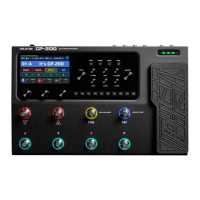
1. LCD display screen-
The 4.3" full-color LCD display shows the GP-200's preset numbers,
names, and other operating information.
7.-Save button-
When a preset parameter is changed, the default name of the main interface
A "*" will be displayed next to the save prompt, press the SAVE
button, you can save, dump and change the preset name;
Press to save quickly at the current location.
2.-PARA knob (with key rotary encoder)
Rotate to select menu or adjust parameters, press to enter the menu
Or switch the parameter page.
8.-Box head control knob
The AMP module of the GP-200 can be adjusted by using the real sound
box to easily control the changes in the music scene environment.
3.-Main volume knob-
Control the total output volume of GP-200.
9.-Module button-
Press this button to quickly enter the effect menu of the corresponding module.
Press to switch the corresponding module.
4.-Back button-
Press this button to return to the previous menu, press to return to the main interface.
10.-Quick adjustment knob
Rotate this knob to quickly adjust the
Corresponding parameters, this knob performs different functions in different
Yes, depending on the operating field you are in.
5.-Global button-
Press this button to enter the global setting interface, where you can proceed
Specific settings such as input/output and foot pedal.
6.-鼓machine button-
Press this button to turn on/off the machine, press this button to
Enter the computer editing interface to switch more parameters (such as grid,
Rhythm type, volume).
11.-Foot switch
The foot pegs can be set for a variety of functions, including switching presets
Settings, switch effects, dotting and recording, etc.
12.-Expression pedal
Use the expression pedal to perform real-time adjustment of one to multiple parameters
control.


 To Next Page
 Loading...