SELECTING THE FUNCTIONS
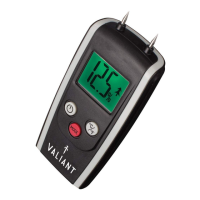
1. Press the power button for 1 second to turn on. The
LCD screen shows the last used feature.
2. To measure moisture in wood, press MODE button
to indicate, or wood, for plastered walls in
buildings or Room Temperature.
3. To measure temperature, press MODE button, until the
temperature is displayed, switch between F and C by
pressing button.
USING YOUR METER
1. Select the required function.
2. If measuring moisture, remove the protective cover,
take care-the probes are sharp and are not replaceable.
Be careful not to damage the tips.
3. Push the probes 1mm into the wood, or till it makes
rm contact in building materials. The display will read
Lo if not detecting moisture.
READING MEASUREMENT IN FIREWOOD
4. Between 6-15% the display will glow GREEN – The
wood is good and perfect for burning brightly, safely
with optimum heat.
5. Between 15-20% the display will glow AMBER - The
wood is OK to burn and should give safe and OK
performance.
6. Above 20% the display will glow RED – The wood
should be allowed to dry further before use as soot, tar
and dirty glass may result causing long term damage
to ue liner or in worst cases contribute to a chimney
re.


 To Next Page