START USING THE 18W-PD 20000MAH POWER BANK
1) Download AdorHealth app
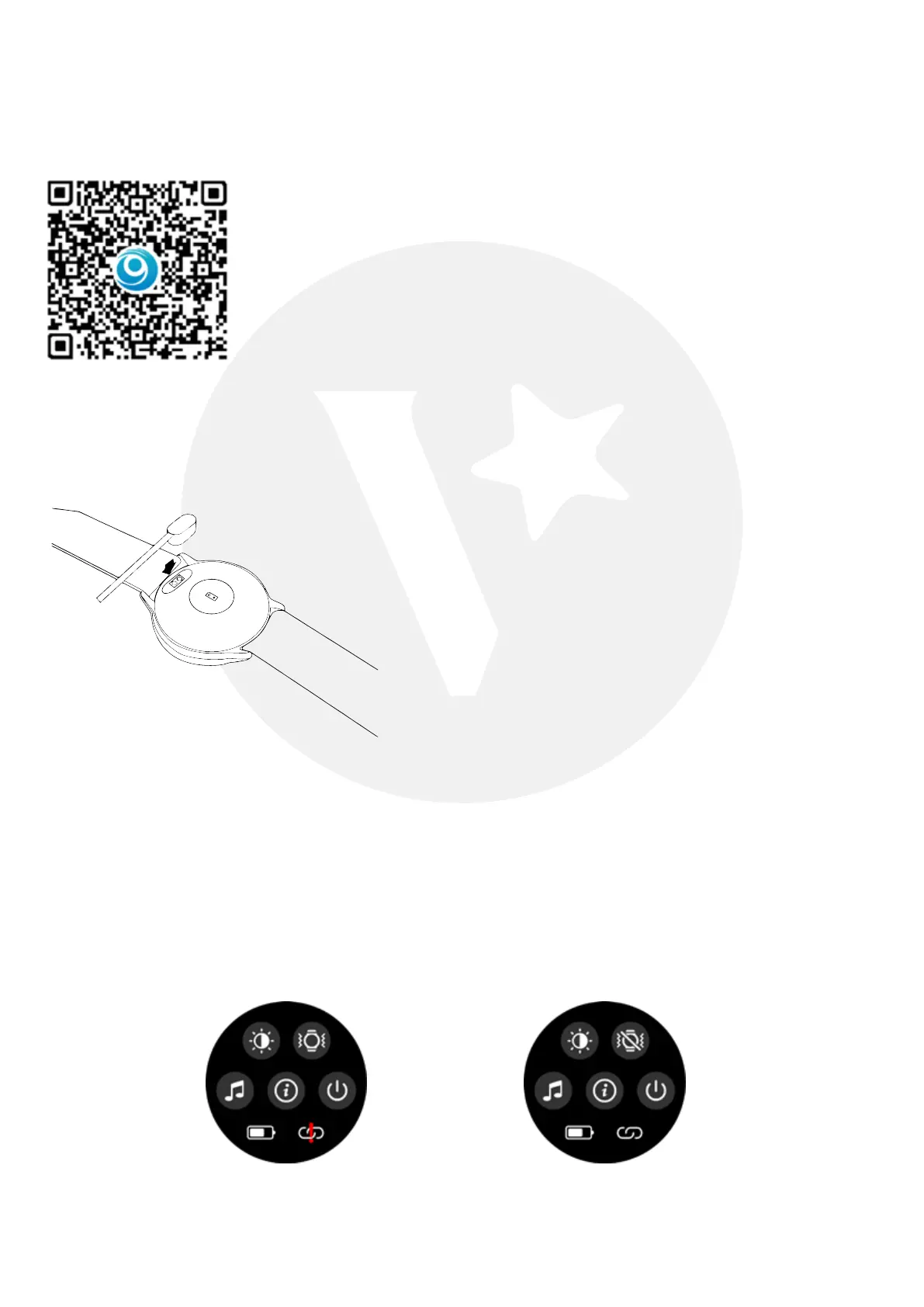
Scan the qr code below to download and install the app client
2) Watch charging and activation
Charge the device to active before the first use.
To charge the device, plug the charging cable into adaptor or USB port on your computer.
3) Bluetooth connection
1. Open the mobile location service and AdorHealth APP location
2. Open AdorHealth APP→Device→Add device→Search for Bluetooth and link
Please scan code and download APP
※ Do not connect Bluetooth via the background of phone. Be sure it is via APP search
Bluetooth and link. If not, it will cause the Bluetooth of the watch to be occupied,
the AdorHealth APP will not be able to search for the Bluetooth. At this time, the Bluetooth in
the Phone’s background must be ignored and released. Then Go back to the AdorHealth
APP to search an connect.
There is no red line in the Bottom
right, which means the watch has
been connected and occupied.
There is a Red line in the Bottom
right, which means that the watch’s
Bluetooth is not connected and
occupied.


 To Next Page