EasyManua.ls Logo

Value VRR12L-R32 - Liquid Push;Pull Mode

Value VRR12L-R32
16 pages
Print Icon
To Next Page IconTo Next Page
To Previous Page IconTo Previous Page
Loading...
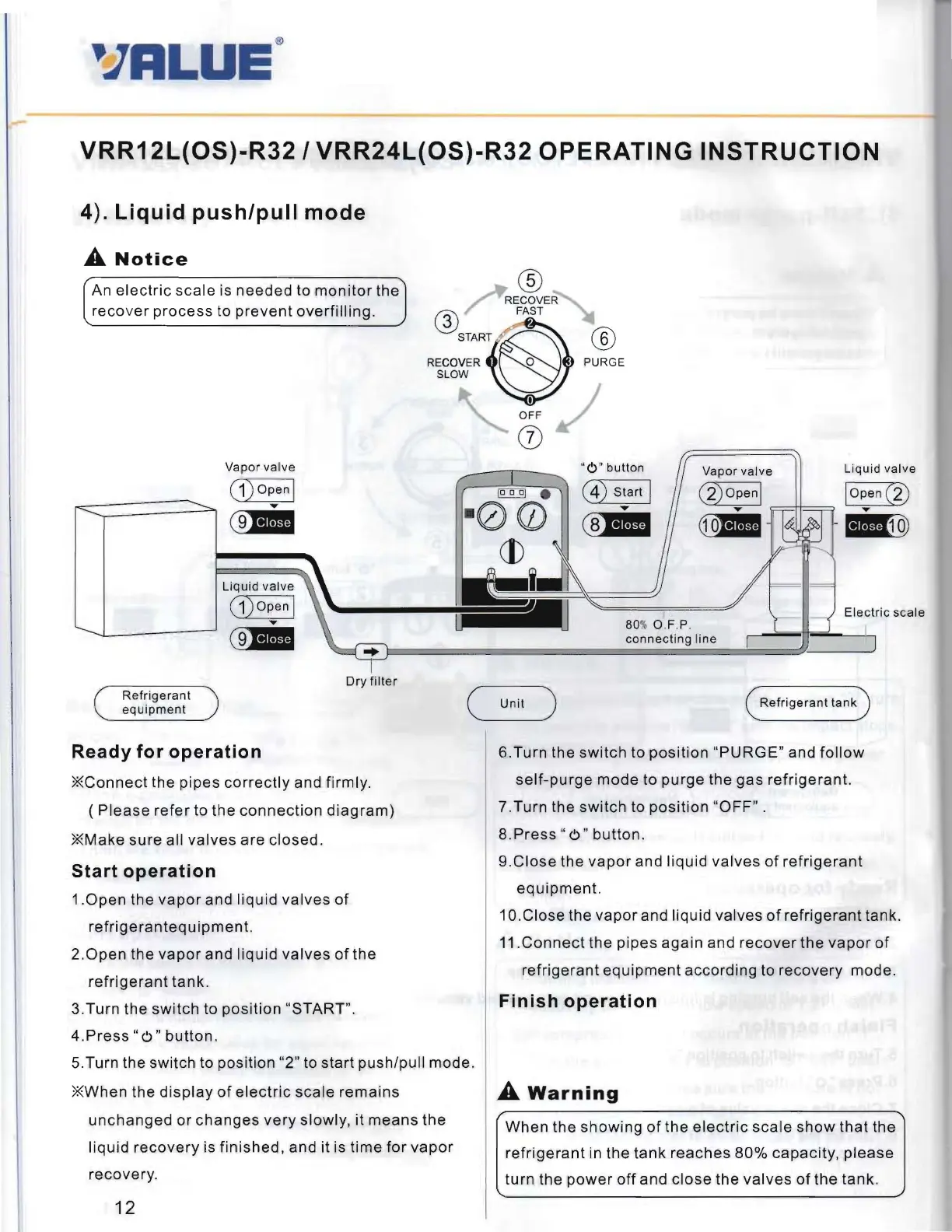
VRR12L(OS)-R32/
VRR24L(OS)-R32
OPERATING
INSTRUCTION
4). Liquid
push/pull
mode
A
Notice
An
electric
scale
is
needed
to
monitor
the
®
RECOVER
reco
ver
process
to
prevent
overfilling.
@ FAST
REco::RTS~
P~E
SLOW
Vapor valve
(1
) Open I
....
~
Liquid valve
(
1)
o p
en
l
....
~
Dry
filter
Refrige
rant
equ
ipment
(
Ready
for
operation
*Connect
the
pipes
correctly
and firmly.
(
Please
refer
to
the
connection
diagram)
* Make
sure
all
valves
are
closed
.
Start
operation
1.0pen
the
vapor
and
liquid
valves
of
refrigeranteq
u
ipment.
2.0pen
the
vapor
and
liqu
id
valves
of
the
refrigerant
tank
.
3.Turn
the
switch
to
position
"START".
4.Press
" 0 "
button.
5.Turn the
switch
to
posit
ion "2" to
start
push/pu
ll
mode
.
* When the
display
of
electric
scale
remains
unchanged
or
changes
very
slowly,
it
means
the
liquid
recovery
is
finished,
and it is
time
for
vapor
recovery
.
12
U
I
OFF
(j)
"0 " button
(4)
Start
I
....
(§]III
Vapor valve
Liqu id valve
(
2)
o pen
l
lopen
(2
)
....
==++=
=
....
~
-
j-
B])
E
lectric
scale
80%
OF
.P.
I
connect
ing line
Refrigerant
tank
Unit
)
6.Turn
the
switch
to
posit
ion
"PURGE
" and
follow
self-purge
mode
to
purge
the
gas
refrigerant.
7
.Turn
the
switch
to
position
"OFF"
.
8.
Press
"
0"
button.
9.Close
the
vapor
and
liquid
valves
of
refrigerant
equipment.
1O.Close
the
vapor
and liquid
valves
of
refrigerant
tank.
11.Connect
the
pipes
again
and
recover
the
vapor
of
refrigerant
equipment
according
to
recovery
mode.
Finish
operation
A
Warning
When
the
showing
of
the
electric
scale
show
that
the
refrigerant
in
the
tank
reaches
80%
capacity
,
please
turn
the
power
off
and
close
the
valves
of
the
tank.

Related product manuals