- 25 -
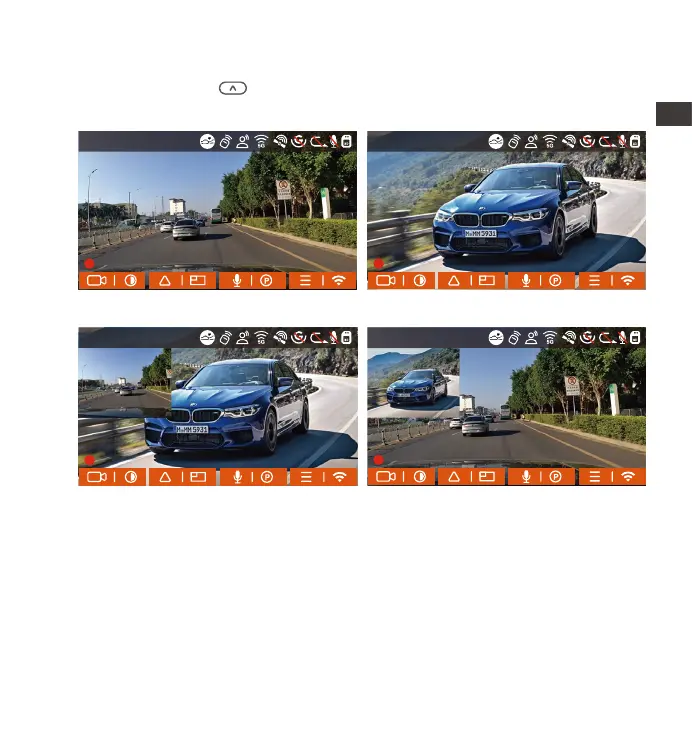
4.2.3 Switch the front and rear camera window display
You can press the button to switch display to make the front or rear
camera shows bigger on the LCD.
4.2.4 Low-light Night Vision in Parking Mode
In order to enhance the safety of parking at night, we make full use of the
lens performance combined with low-light night vision technology to
improve the night vision effect in parking mode. This function is in the open
mode by default. It will be triggered only after entering the parking mode
and will not affect normal recording.
EN
EN
EN
EN
Single Front Recording Display Single Rear Recording Display
Front(Small)+Rear(Big) Front(Big)+Rear(Small)
14:39:07 11-18-2022
00:00:37
MP/H
35
14:39:07 11-18-2022
00:00:37
MP/H
35
14:39:07 11-18-2022
00:00:37
MP/H
35
14:39:07 11-18-2022
00:00:37
MP/H
35
1440P+1440P 30FPS
1440P+1440P 30FPS 1440P+1440P 30FPS
1440P+1440P 30FPS



 To Next Page