The SPECTRO 1™ by Variable is a compact, matte black, anodized aluminum device designed for color measurement and matching. It connects to a mobile app via Bluetooth, allowing users to scan colors, find matches, compare samples, and save color data.
Function Description:
The SPECTRO 1™ is a portable colorimeter that accurately measures and identifies colors. It works in conjunction with the "Spectro by Variable" mobile application, available on the App Store and Google Play Store. The device's primary function is to scan colors from various surfaces and provide corresponding color matches, LAB values, and spectral curves within the app. It also allows for comparison between a sample color and a standard color, and the organization and sharing of saved color data.
Important Technical Specifications:
The device features a matte black anodized aluminum shell, a charging port, a button for scanning and pairing, and an LED ring that indicates device status. While specific technical details like battery capacity or sensor type are not explicitly listed in the provided pages, the LED ring indicators provide information on battery charge levels and pairing/scanning status.
Usage Features:
Getting Started:
- Download the App: Users need to download the "Spectro by Variable" app from their respective app stores or from www.variableinc.com.
- Launch and Account Creation: Upon launching the app, users create an account by entering their name and email. Brand preferences can be selected during setup and modified later in the app's settings.
- Connect to Spectro 1™:
- Ensure Bluetooth is enabled on the mobile device.
- In the app, press "Connect Device" and follow on-screen instructions.
- Double-press the scan button on the Spectro 1™ to enter pairing mode.
- The LED ring will fade from green to blue, indicating pairing mode.
Calibrate Device:
- Calibration Tiles: The device comes with three calibration tiles. These should be removed before calibration.
- Scanning Tiles: When prompted by the app, each tile must be scanned separately by clicking the button on the Spectro 1™ or the in-app scan button.
- Calibration Notification: Once successfully calibrated, the app will notify the user. Calibration is required every 500 scans. Users are advised to keep the tiles clean and safe for future calibrations.
Scan Colors:
- Dust Cap Removal: Remove the dust cap (a lanyard is included to help keep track of it). The Spectro 1™ does not require calibration before each scan.
- Placement: Place or hold the Spectro 1™ flat against the surface to be scanned.
- Initiate Scan: Click the top button on the Spectro 1™ or press "Scan" in the app.
- View Results: The scanned color and its representation will appear at the top of the app screen. The LED ring on the device will also briefly display the scanned color. (Note: LED and screen color representation may not be entirely accurate).
App Interface (Color Match Screen):
- Remote Scan Button (1): Triggers a color scan from the device via the app.
- Color Match (2): Displays a list of closest or exact color matches to the scanned color, ordered from most to least compatible.
- Scanned Color (3): Shows the most recent scanned color and its LAB values at the top of the screen. Clicking on this section reveals scan details, Lab plot, and spectral curve.
- Filters Bar (4): Allows users to apply filters for matches based on brand, category, collection, and location.
- ΔE Difference (5): Indicates the Delta E difference between the scanned color and the matching result, quantifying the color difference.
App Interface (Compare Screen):
- Allows users to compare a sample color with a standard color using Lab values and spectral curves. This is useful for quality control or verifying color accuracy.
App Interface (Saved Colors Screen):
- Enables users to sort scans and matches into folders.
- Folders can be synced to Variable Cloud.
- Users can share folders or export data as CSV files.
LED Ring Indicators:
Pairing and Scanning:
- Aqua (Scanning): Two LEDs rotate clockwise, then all LEDs flash twice. After the scan, the LEDs show the scanned color.
- Green and Blue (Pairing Mode): LEDs fade from green to blue every 2 seconds.
- Blue (Paired): LEDs fade in blue for 2 seconds, then dark for 4 seconds (repeats).
Battery Status:
- Blue (Paired and Charging): Ring fills from 1 LED to 4 LEDs.
- Blue (Paired, 75% - 100% Charged): Ring fills from 1 LED to 4 LEDs and flashes once.
- Blue (Paired, 50% - 75% Charged): Ring fills from 1 LED to 3 LEDs and flashes once.
- Green (Charging): Ring fills from 1 LED to 4 LEDs.
- Green (75% - 100% Charged): Ring fills from 1 LED to 4 LEDs and flashes once.
- Green (50% - 75% Charged): Ring fills from 1 LED to 3 LEDs and flashes once.
- Yellow (25% - 50% Charged): Ring fills from 1 LED to 2 LEDs and flashes once.
- Red (0% - 25% Charged): Flashes once.
Maintenance Features:
- Calibration Tiles: Users are advised to keep the calibration tiles clean and in a safe place for future calibrations, as the device requires recalibration every 500 scans.
- Dust Cap: The included lanyard helps keep track of the dust cap, protecting the device's sensor when not in use.

 Need help?
 General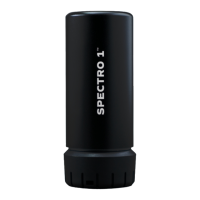

 To Next Page