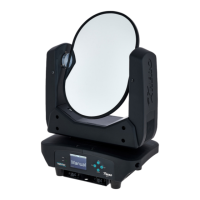
The VARYTEC Hero Mirror Moving Head is a professional lighting device designed for deflecting light and laser beams, making it suitable for various event and stage applications. It is not intended for household use. This device features a highly reflective, double-sided mirror with 99% reflection and minimal light loss, ensuring bright and clear projections. Its two moving axes allow for dynamic light shows: the pan axis offers a 540° rotation, while the tilt axis provides endless rotation, enabling versatile positioning and movement of the light beam.
Control of the Hero Mirror Moving Head can be achieved through multiple methods. Users can operate the device via DMX, utilizing either a 4-channel or an 8-channel DMX mode, which allows for precise control over its functions. Alternatively, the device can be controlled directly using the buttons and display located on the unit itself. For automated performances, the Hero Mirror comes with built-in automatic show programmes, offering a range of pre-set light sequences. It also supports sound control, where the light movements synchronize with the rhythm of background music or other detected sounds through its integrated microphone. Additionally, the device can be configured in Master/Slave mode, allowing multiple units to operate in a synchronized fashion, with one unit controlling the others for a coordinated light show.
The device's robust construction, featuring a combination of metal and plastic housing, ensures durability and reliability in professional environments. For installation, the Hero Mirror Moving Head can be used standing or hanging. It must be securely mounted to a solid surface or clamped to an approved truss. The Quick Lock mounts on the bottom of the housing facilitate secure attachment of mounting brackets, which can then accommodate adapters such as half couplers, trigger clamps, or c-hooks. Safety eyelets are also provided on the bottom for threading secondary safety attachments like safety cables or chains, ensuring secure installation and preventing accidental falls.
When starting up the device, it is crucial to make all connections while the unit is off. Upon powering on, the fans will start, and the head will move to its home positions for pan and tilt, indicating that the device is operational. The main menu, accessed via the [SET] button, allows users to navigate through various settings and operating modes. The display turns off after 30 seconds of inactivity but can be reactivated with a short press of any button. All settings are retained even after the device is switched off and disconnected from the mains.
The 'DMX Address' menu allows users to set the DMX address, which must match the configuration of the DMX controller. The 'Running Mode' menu is where users select their preferred DMX mode (4-channel or 8-channel) or activate the automatic programmes. In the automatic programmes mode, users can choose from eight pre-programmed shows and adjust their running speed from slow to fast. The sound control mode also offers eight sound-controlled programmes and allows adjustment of microphone sensitivity. For manual operation, the 'Manual Control' submenu provides options to set the angle of rotation (Pan), angle of inclination (Tilt), and the speed of pan and tilt movements, as well as endless tilt rotation.
The 'Setting' menu offers a comprehensive range of adjustments for basic device parameters. This includes 'Pan Reverse' and 'Tilt Reverse' to invert the direction of rotation or inclination, 'Pan Limit' and 'Tilt Limit' to define the starting and ending points of movement, and 'Reset Motor' to perform a motor reset. The 'Factory Reset' option allows users to revert all settings to their default values. The 'Home Position' menu, protected by a password ('018'), enables precise adjustment of the rotary and inclination home positions.
The 'DMX fail' setting determines the device's behavior in case of DMX control failure, offering options such such as 'Hold' (maintaining the last DMX signal), 'Blackout' (turning off the light), 'Auto Mode' (switching to automatic programmes), 'Manual Control' (switching to manual mode), or 'Sound Mode' (switching to sound control). The 'Fan Mode' can be set to 'Max' (maximum speed), 'Automatic' (temperature-dependent speed), or 'Silent' (silent mode). 'AutoCorrection' can be activated to ensure the device returns to its starting position if unintentionally adjusted. The 'Display Backlight' can be set to 'ON' for permanent illumination or 'OFF' to turn off after 60 seconds. 'Display Reverse' allows the text on the display to be inverted. The 'Autolock' feature provides a key lock that activates after 60 seconds of inactivity, preventing accidental changes, and can be cancelled by pressing [SET] for 5 seconds. A 'Test' function is also available to perform a function test, with a caution that the device will move during this test.
The 'System Info' menu provides useful information such as 'Current Time' (current running time), 'Total Time' (total running time), 'Current Mode' (current operating mode), 'Temperature Base' (current temperature of the device base), and 'Software Version' (current software version).
Maintenance of the Hero Mirror Moving Head involves regular cleaning to ensure optimal performance. The optical lenses, which are accessible from the outside, should be cleaned regularly to maintain light output, especially in dusty or smoky environments. A soft cloth and a suitable lamp and lens cleaner should be used, and the parts must always be dried carefully. The fan grids also require regular cleaning to remove dust and other contaminants. Before cleaning, the device must be switched off and disconnected from the mains. Only pH-neutral, solvent-free, and non-abrasive cleaning agents should be used, applied with a slightly damp, lint-free cloth.
For DMX connections, the device offers both 3-pin and 5-pin XLR sockets for DMX input and output. It is crucial to use dedicated DMX cables and avoid ordinary microphone cables to prevent data transmission errors. The pin assignments for 3-pin XLR are: Pin 1 (Ground, shielding), Pin 2 (Signal inverted DMX-, 'cold signal'), and Pin 3 (Signal DMX+, 'hot signal'). For 5-pin XLR, the assignments are: Pin 1 (Ground, shielding), Pin 2 (Signal inverted DMX-, 'cold'), Pin 3 (Signal DMX+, 'hot'), Pin 4 (unused / second connection DMX-), and Pin 5 (unused / second connection DMX+). Never connect DMX input or output to audio devices.
In case of troubleshooting, common issues like the unit not working or no response to the DMX controller are addressed. Users are advised to check the mains connection, main fuse, DMX status LED, DMX connectors, cables, address settings, and DMX polarity. If problems persist, contacting the service center is recommended.
The device's packaging materials are environmentally friendly and recyclable. The device itself is subject to the European Waste Electrical and Electronic Equipment Directive (WEEE) and should not be disposed of with normal household waste. It must be disposed of through an approved waste disposal firm or local waste facility, adhering to country-specific rules and regulations.


 To Next Page
 General