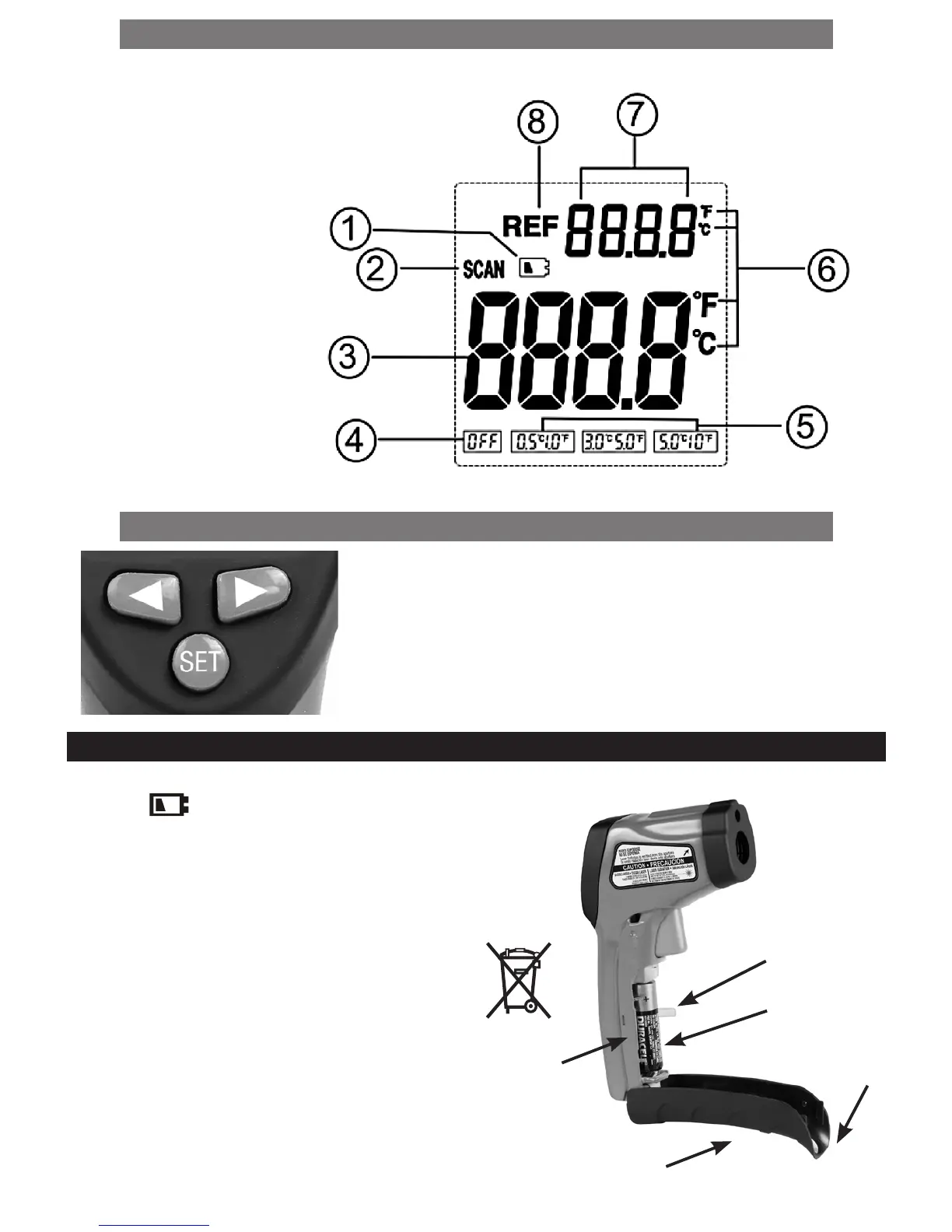
LCD INDICATIONS AND SYMBOLS
1. Low Battery Indication
2. Measurement Icon
3. Current Reading
4. Switch Off “REF” function
5. Threshold Value Selection
6. Temperature Unit (°C/°F)
7. Reference Temperature
8. REF Icon
BUTTON FUNCTIONS
• SET button: Sets Reference Temperature, °C or °F unit and Emissivity
adjustment mode.
• Shift Left/Right Buttons: Sets Threshold values {0.5° C (1° F), 3° C (5° F)
, 5° C(10° F), OFF} and Emissivity (0.1 to 1.0).
BATTERY INSTALLATION/REPLACEMENT
To maintain reading accuracy, when the low
battery icon appears, replace thermometer’s battery.
1. Place fingers behind the battery housing cover tabs
and gently pull open the cover.
2. Pull the plastic ribbon under the batteries to pull the
batteries out.
3. Insert two fresh AA Alkaline batteries (with correct
polarity as shown by the marking on the side of
battery housing) over the plastic ribbon inside the
housing. Close the cover.
• Always purchase the correct size and grade of battery
most suitable for the intended use. Always replace
both batteries and install with correct polarity inside
thermometer.
4
PLASTIC RIBBON
HOUSING COVER
BATTERY
POLARITY
MARKING
BATTERY
COVER TAB


 To Next Page