11
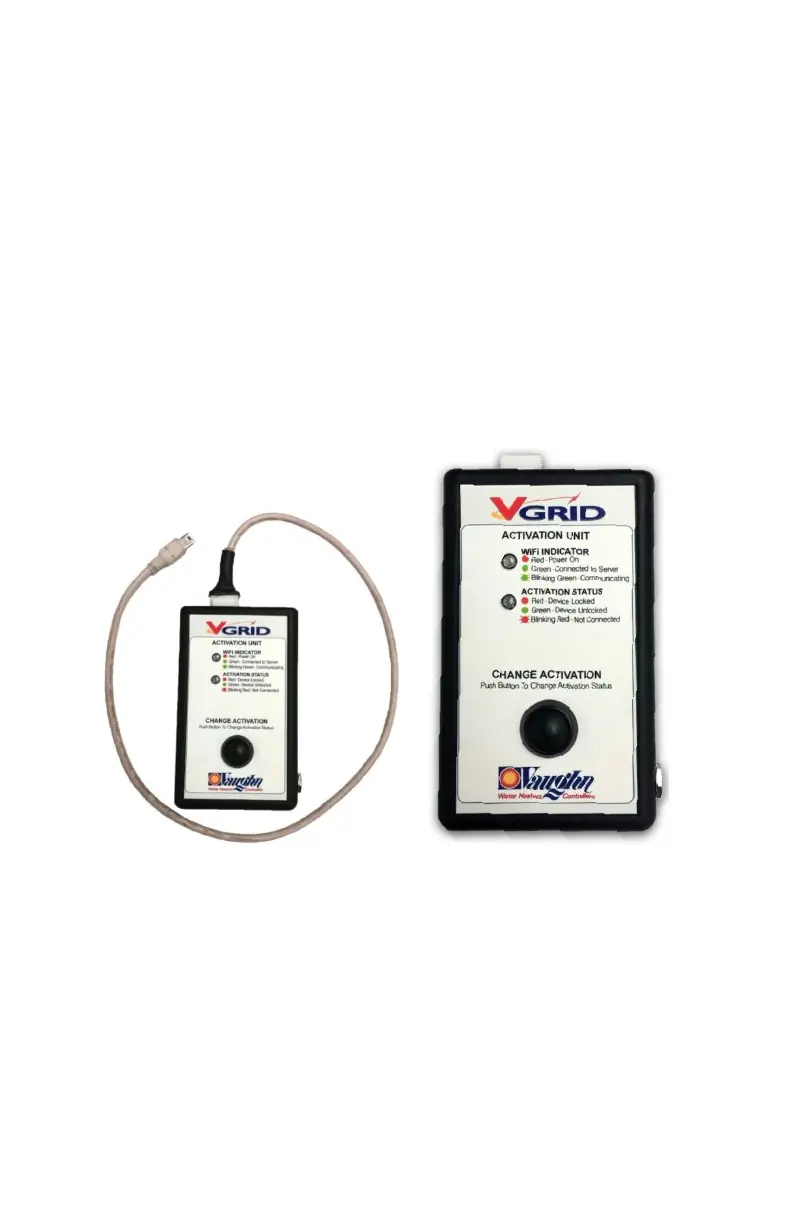
port on the left side of the electronic controller.
These are not USB compatible connections. The V-
Grid AU can be powered from the included DC
power supply with output rated 12V, 0.5 Amps. The
power supply is not required when connected to a
control that has power.
V-Grid Activation Status Indicator
o Red – Device locked
o Green – Device Unlocked
o Blinking Red – Not connected, trying to connect.
o Blinking Green – Status change is in progress.
WIFI Status Indicator
o Red LED on, not blinking: Power is on.
o Green LED on, not blinking: The device is linked to
the factory servers.
o Green LED blinking once per second: The device is
communicating with the factory servers.
D. INSTALLING THE REMOVABLE ELEMENT ASSEMBLY
Element Assembly is installed at the factory. The following is
provided for servicing or removing the Element Assembly.
Insert Element Assembly with plastic O-ring housing and
align top fittings so the Top Element (Red Wires) faces
forward.
WARNING: Plastic O-ring housing must be properly
installed. (See FIGURE 2) Failure to do this will void the
warranty.
Install and secure the clamp and nut in the following manner:
o Place the clamp around the flange and coil plate.



 To Next Page