EasyManua.ls Logo

Vaunn Medical vB100A - User Manual

Vaunn Medical vB100A
28 pages
Print Icon
To Next Page IconTo Next Page
Loading...
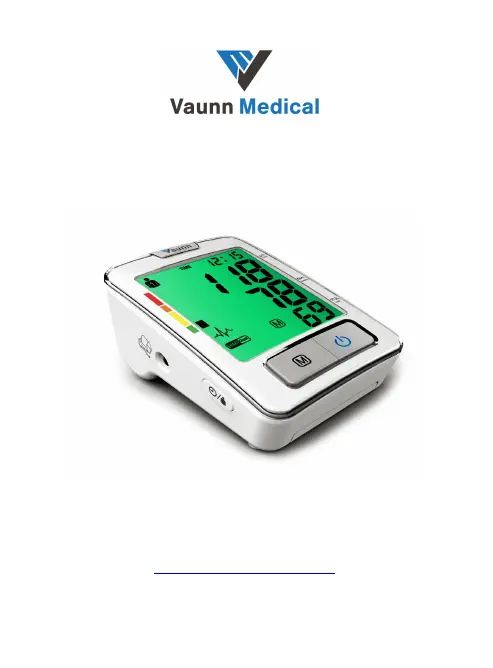
Digital Upper Arm Blood Pressure Monitor
Model vB100A
User Manual (Ver1.2)
Distributed by:
Einstein Associates LLC
10101 Stafford Centre Drive Suite B
Stafford, TX 77477
http://www.beyondmedshop.com

Questions and Answers

Summary

About the Vaunn Medical vB100 A Product

Features of the Vaunn Medical vB100 A

Details the automatic operation, dual user mode, guest mode, SmartCheck technology, GentleRead technology, IHD, warnings, display, and functions.

Important Information About Self-Measurement

Provides guidelines on using the monitor, limitations, and advice regarding pacemakers and electromagnetic interference.

Understanding Blood Pressure and Measurement

Causes of High Blood Pressure

Explains how blood pressure and heart rate are controlled and influenced by bodily functions and external factors.

Blood Pressure Value Classification

Classifies blood pressure readings into four levels based on AHA guidelines with corresponding recommendations and colors.

SmartCheck Technology for Accurate Readings

Details the technology that enhances reliability and accuracy through automatic analysis of multiple measurements, even during arrhythmia.

Irregular Heartbeat Detection (IHD)

Explains the detection of pulse irregularity, its meaning, and when to consult a doctor.

Traffic Light Blood Pressure Indicator

Describes the colored bars and backlight indicating blood pressure ranges according to AHA guidelines.

Components of the Blood Pressure Monitor

Measuring Unit Overview

Identifies and describes the function of each component of the main measuring unit, including buttons and connectors.

LCD Screen Display and Symbol Guide

Explains the symbols and indicators on the LCD screen, including user status, readings, and warnings.

Blood Pressure Monitor Cuff

Describes the extended range upper arm cuff, its material, closure, and circumference compatibility.

Setting Up the Blood Pressure Monitor

Battery Installation and Replacement

Instructions for inserting and replacing AA batteries, including attention points for battery indicators.

Connecting the Arm Cuff

Step-by-step guide on how to connect the arm cuff tube to the measuring unit's connector.

Setting Date and Time

Procedure for setting the year, month, day, and time on the device for accurate measurement logging.

Adjusting Device Sound Settings

Instructions on how to turn the device beeper sound on or off using the buttons.

Displaying Date and Time

How to view the current date and time on the device display by pressing a specific button.

Selecting User Profile (User 1, User 2, Guest)

Guide to selecting between User 1, User 2, or Guest mode for measurement and data storage.

Operating the Blood Pressure Monitor

Preparation Before Measurement

Recommendations for factors to avoid and conditions to ensure before taking a blood pressure measurement.

Common Sources of Measurement Error

Identifies common mistakes during measurement, such as arm position, cuff fit, and user posture, affecting accuracy.

How to Fit the Arm Cuff Correctly

Detailed steps for properly fitting the arm cuff on the upper arm, including alignment and tightness.

Selecting Measurement Mode (Single or SmartCheck)

Explains how to choose between a single measurement or the SmartCheck™ mode for taking readings.

Measuring Procedure Steps

Step-by-step guide for performing a blood pressure measurement, including inflation, deflation, and pulse detection.

Discontinuing a Measurement

How to stop or interrupt a measurement process at any time using the Start/Stop button.

Switching the Device Off

Instructions on how to manually turn off the device or how it switches off automatically.

Recalling Recorded Measurement Data

How to access and view previously stored blood pressure readings, including date and time stamps.

Clearing Recorded Measurement Data

Instructions on how to delete all stored measurement data from the device's memory.

Setting Alarm Clock Reminders

Guide to setting up one or two alarms for medication or measurement reminders.

Error Messages and Troubleshooting Guide

Care and Maintenance of the Monitor

Device Handling and Protection

Guidelines on protecting the device from extreme conditions, proper handling of the cuff, and cleaning instructions.

Reference to Standards and Compliance

Technical Specifications of the Monitor

Product Guarantee and Warranty Information

Vaunn Medical vB100A Specifications

General IconGeneral
Product NameVaunn Medical vB100A
CategoryBlood Pressure Monitor
Measurement MethodOscillometric
Measurement Range - Pressure0-280 mmHg
DisplayLCD
Irregular Heartbeat DetectorYes
WHO IndicatorYes
AccuracyPressure: ±3 mmHg, Pulse: ±5%
TypeUpper Arm
Measurement Range - Pulse40-199 bpm
Power SourceAC adapter
Cuff Size8.7"-15.7" (22-40cm)