13
ELCARE NORDIC: service.vaya@elcare.com
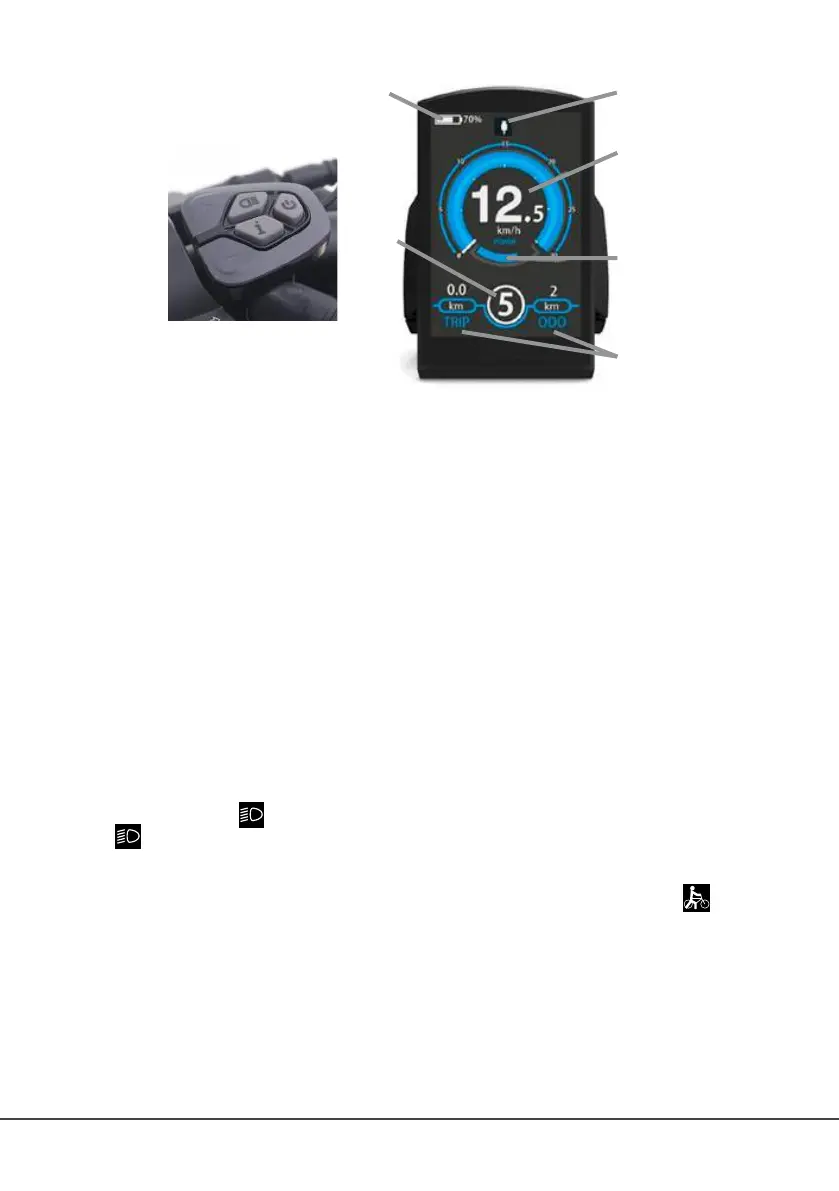
LCD DISPLAY
11 66
33
55
22
44
1. BATTERY INDICATOR
Shows how much battery capacity is left. Remember to charge the battery when it
is low on power. The motor will slowly begin to feel weaker as the battery power
indicator goes down.
2. MULTIFUNCTION DISPLAY AREA
Shows different settings. Refer to the section OPERATING PRINCIPLES for
further information.
3. SPEED
Shows the current speed.
4. PADDLE ASSIST SYSTEM (PAS)
Shows the PAS gear.
5. MOTOR POWER INDICATOR
Shows the current motor power output.
6. USB CONNECTION ICON
If the icon is displayed, then the display is connected to a USB device.
OPERATING PRINCIPLES
• Press and hold the ON / OFF button to power the e-bike on or off.
• Short press the + button to increase the pedal assist gear.
• Short press the – button to decrease the pedal assist gear.
• Press and hold the
button for 2 seconds to turn on/off the front and rear lights. If
the
icon is displayed, the lights are turned on. This bike comes with a sensor that
will automatically turn on/off the lights when used in daylight or darkness.
• Press and hold the – button to activate the walk assist. It will start after 2 seconds.
As soon as you release the – button, the walk assistance is turned off. The
icon is
displayed when the walk-assist mode is activated.
• Short pressing the i button will show different display settings:
O ODO: Total accumulated mileage riding the e-bike.
O MAX. SPEED: Maximum achieved speed.
O AVG. SPEED: Average speed while using the bike.
O TIME: Shows how long the e-bike has been turned on.
• Trip is always shown on the display:



 To Next Page
 Loading...