
 To Next Page
P
pschultzAug 5, 2025
What to do if my VDO Bike computer is not displaying speed?
- DDiana MoralesAug 5, 2025
If your VDO Bike computer isn't displaying speed, the transmitter battery might be dead. Try replacing the battery in the transmitter.

What to do if my VDO Bike computer is not displaying speed?
If your VDO Bike computer isn't displaying speed, the transmitter battery might be dead. Try replacing the battery in the transmitter.
Why does my VDO Bike computer show no speed?
If your VDO Bike computer isn't displaying speed, it could be due to incorrect wheel circumference settings. Ensure that the wheel circumference is properly set.
How to fix no speed displayed on VDO Bike computer?
If your VDO Bike computer isn't displaying speed, the distance between the sensor and the magnet might be too large. Adjust the positions of the sensor and magnet to correct this.
Why is the display on my VDO Bike computer weak?
If the display on your VDO Bike computer is weak, the battery may be dead. Check the battery and replace it if necessary.
What to do if VDO Bike computer displays half segments?
If half segments appear on the display of your VDO Bike computer (for example, after a battery change), the computer software may not be running correctly. Remove and re-insert the battery to resolve this issue.
Details the current speed display and its maximum measurable range.
Explains the current distance tracking and its maximum value before resetting.
Describes the current ride time tracking and its maximum measurement range.
Covers setting the clock in 24-hour or 12-hour AM/PM format.
Explains the cumulative total distance tracking and its limits.
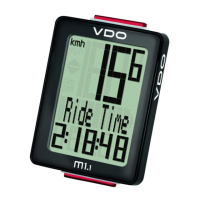
The VDO M1.1 WR is a high-quality cycle computer designed to provide essential cycling data. It features a large, easy-to-read display that is divided into three distinct areas, ensuring that key information is always visible at a glance. The top line of the display permanently shows the current speed, along with an indicator for kilometers per hour (kmh) or miles per hour (mph), and "am" or "pm" if the 12-hour clock format is selected. The middle line clearly displays the name of the currently selected function, while the bottom line shows the corresponding value for that function.
The device is operated using two buttons: "BIKE" and "SET". In function mode, the "BIKE" button allows users to access various functions and, when pressed and held, resets trip data to zero. In setting mode, it is used to scroll through the setting menu and change data values. The "SET" button, in function mode, scrolls backwards through functions and, when pressed and held, opens the setting mode. In setting mode, it opens a specific setting, confirms the setting once ready, and exits the setting mode, returning to function mode.
The VDO M1.1 WR offers several core functions to enhance the cycling experience. It displays the current speed, with a maximum possible speed of 199 kmh or 124 mph, based on a wheel circumference of 2,155 mm. The current distance tracks up to 999.99 km or miles, resetting to zero if this maximum is exceeded. The current ride time counts up to 99:59:59 (HH:MM:SS), also resetting to zero if the maximum is surpassed. The current time can be displayed in either a 24-hour or 12-hour format. Additionally, the total distance, a cumulative value for all trips, counts up to 99,999 km or miles, resetting if this maximum is exceeded or if the unit is switched from miles to km and the conversion result exceeds 100,000 km.
During cycling, users can easily navigate through the display functions by pressing the "BIKE" button to view the next function or the "SET" button to scroll backwards. The computer also features a convenient sleep mode, activating after five minutes of inactivity when the device is in its bracket. An auto-start function ensures that the VDO M1.1 WR instantly switches back to function mode and displays the current speed when cycling resumes.
Installation of the VDO M1.1 WR involves attaching the sensor and magnet to the bike. The sensor is placed on the fork side corresponding to the desired handlebar mounting position, with the sensor mark pointing towards the spokes. The spoke magnet is attached to an outside spoke, aligning its rod-shaped core with the sensor mark at a distance of approximately 1-5 mm. Cable ties are used to secure both components. The cable is then routed along the fork and brake line to the handlebars. The handlebar bracket can be rotated 90° for either handlebar or stem attachment, achieved by undoing and re-tightening screws. Cable ties secure the bracket, and protruding cable ends can be snipped off for a tidy finish. A helpful attachment video is available online for visual guidance.
Inserting the computer into the bracket is facilitated by the VDO twist-click system. The computer is placed into the bracket in a 10 o'clock position, then rotated right into the 12 o'clock position until it clicks securely. A noticeable resistance indicates proper engagement. To remove the computer, it is simply rotated to the left without pushing or pulling. A memory aid, "Rigid to the Right, Loose to the Left," helps users remember the process.
Function testing is recommended after sensor attachment. By inserting the computer into the bracket, lifting, and spinning the front wheel, a speed should be displayed. If no speed is shown, troubleshooting steps, detailed in a dedicated section, can be followed.
The VDO M1.1 WR offers extensive customization through its settings menu. Users can select from various display languages, including German, English, French, Italian, Spanish, Dutch, and Polish. The wheel circumference can be precisely set to ensure accurate speed and distance measurements. A wheel size table provides values for common wheel sizes, or users can measure the roll circumference directly by marking the valve position, rolling the bike one full rotation, and measuring the distance between the marks. The unit settings allow users to specify whether speed is displayed in kmh or mph. The clock can be set in either 12-hour AM/PM or 24-hour format, with options to adjust hours and minutes. The total distance ridden can also be set, allowing users to input their data, for example, at the start of a new cycling season. The M1.1 WR features a data memory, ensuring no data is lost when the battery is replaced.
Resetting trip data after a ride is straightforward. By pressing and holding the "BIKE" button for a few seconds, "RESET Tour Data" appears on the display. Continuing to hold the button resets the current distance and ride time to zero, preparing the computer for the next trip. It's important to note that the total distance (cumulative kilometers ridden) is not reset during this process.
Maintenance includes a low battery indicator, which displays "Computer low" when the battery is running down. Pressing the "BIKE" button acknowledges this warning, and users can continue using the computer for approximately a week, but replacement is recommended as soon as possible. Replacing the battery annually is advised to ensure full functionality. The process involves using a coin to remove the battery compartment cover, removing the old battery, waiting 10 seconds for the electronics to recognize the change, inserting a new 3V 2032 battery with the +pole up (ensuring it's not tilted and the rubber seal lies smoothly), and then re-inserting and turning the compartment cover with a coin. Settings, total distance, and total ride time information are retained during battery replacement.
The VDO M1.1 WR comes with a two-year guarantee covering material and processing defects on the computer, sensor/transmitter, and handlebar bracket, starting from the date of purchase. Cables, batteries, and mounting materials are not covered. The guarantee is valid only if components have not been opened (except the battery compartment), no force has been used, and there is no sign of willful damage. In case of a legitimate complaint, a comparable replacement device will be provided. The purchase receipt should be stored as it is required for complaints. Technical support and additional information are available through a hotline and the company website.
 General
| Type | Wired |
|---|---|
| Current Speed | Yes |
| Trip Distance | Yes |
| Ride Time | Yes |
| Odometer | Yes |
| Clock | Yes |
| Display | LCD |
| Water resistance | Yes |
| Battery type | CR2032 |
| Battery life | Approx. 1 year |
| Functions | Speed, distance, time, clock |