125 Powder Forest Drive • PO Box 2003 • Simsbury, CT 06070 • ©2020 Veeder-Root • P/N 576047-345
Technical Support Hours: M-F EST: 8am-7pm
technicalsupport@veeder.com
veeder.com/support
1-800-323-1799
Refer to veeder.com for additional product information.
Address Book
Menu Setup Automatic Events Address Book
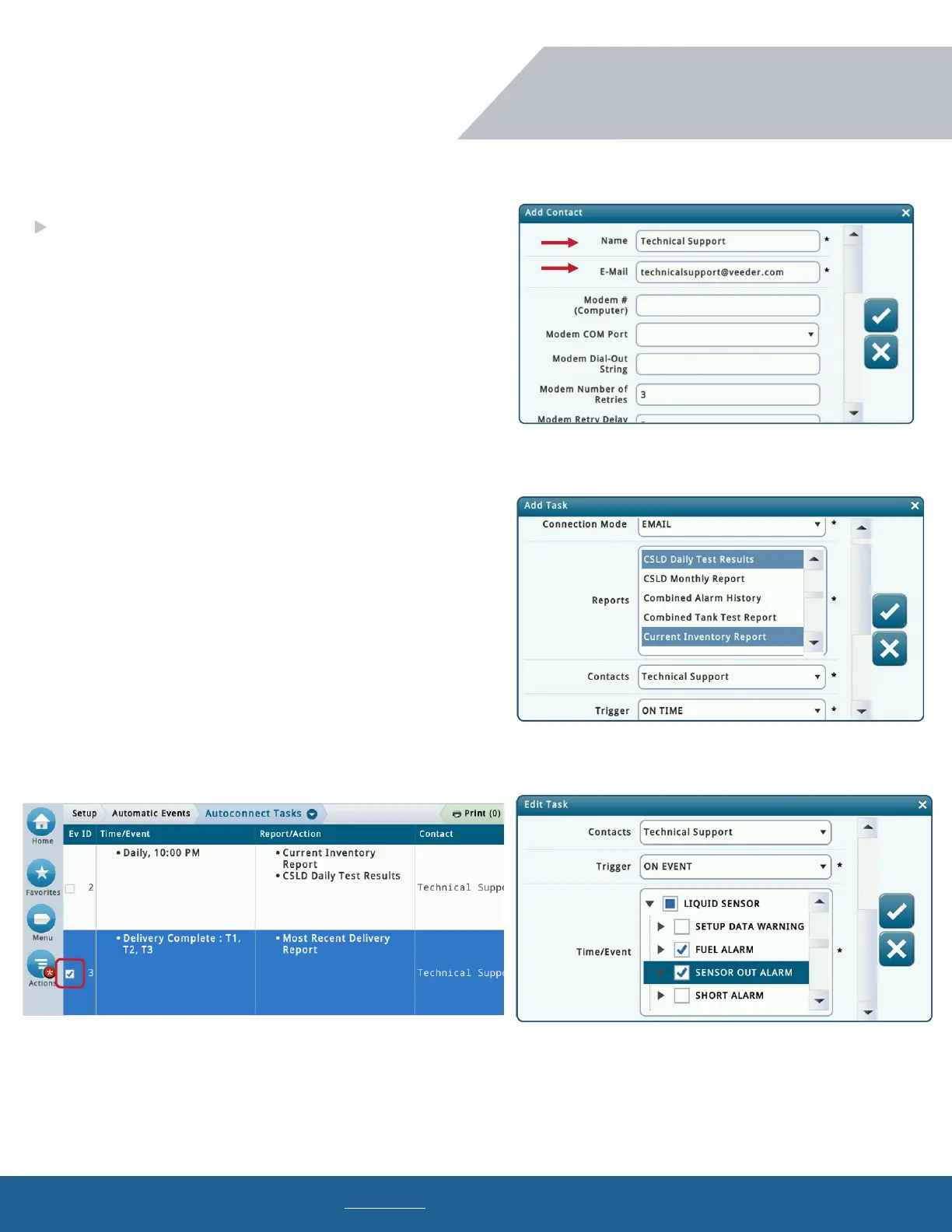
To add a new contact, select Actions Add Contact
Name: Contact’s name.
Email: Contact’s email address.
Autoconnect Tasks
Menu Setup Automatic Events Autoconnect Tasks
To add a new task, select Action Add Task
Connection Mode: Email
Reports: Select all reports to be emailed to the contact.
Contacts: Select the contact’s name.
Trigger: Select “on time” or “on event.”
On Time: Select the date and time for the email to be sent.
On Event: Select the event and/or alarm for an email to be sent.
To edit or delete a task, select the check box, then select
Actions
Edit Task or Remove Task
Programming (continued)
TLS4 Series Programming
Email Setup & Troubleshooting


 To Next Page
 Loading...