EasyManua.ls Logo

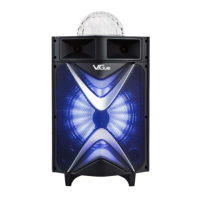
VeGue VS-0808 - User Manual

VeGue VS-0808
2 pages
Print Icon
To Next Page IconTo Next Page
Loading...
Trouble shooting guide
Product features
Charging instructions
Common function description
VolAdjust volume
TrebleAdjust treble
Bass: Adjust bass
Mic VolAdjust microphone volume
EchoAdjust echo
MicWired microphone input
When charging, connect the supplied power adapter to AC 90V-240V~ for charging. The
charging time should be 6 ~ 8 hours. After being fully charged, unplug the power supply to avoid
damage to the battery due to long-term charging.
Battery level indicator: There is a battery level indicator on the display.
When the battery power is low, the entire power indicator icon will flash,
so please charge in time. When charging, the battery indicator icon will
flash. After the flashing stops, the battery should continue to charge for
1 ~ 2 hours, which can prolong the battery life.
Note: If the battery is used out, please recharge the battery within 48 hours.Do not leave
the empty battery for a long time, otherwise the battery will be damaged.
Main technical specifications
Output power-----------------------------------
Input sensitivity-----------------------------
SNR-----------------------------------------
Frequency response------------------------
Power supply----------------------------
250W
500±30mV
65dB
26Hz~18KHz
AC 90V-240V~
Instruction Manual
*Above specifications are the specifications of the sampling machine and are for reference purpose only.
*Because of continuous product improvement.specifications will keep changing at any time without prior
notification.
This system can be used with PC, DVD, VCD, MP3, Electronic Piano and any device with
audio output.
The amplifying circuit is designed with high performance and high fidelity, and equipped with
professional and high quality speaker, it can make the sound field positioning clear and layered.
The system voice effect is outstanding, the bass is surging and shocking, the middle tone is
strong and bright, the treble is crisp and pleasant.
Professional electronic frequency division circuit, so that the division point of the machine more
accurate, better effect.
The use of professional design and manufacture of large capacity batteries, as well as audio
power supply capacitor makes the local power reserve margin more larger,more stable,better
dynamic,higher SNR.
VS-0808VS-0808VS-0808
Portable SpeakerPortable SpeakerPortable Speaker
Common
problems
Possible Cause
Solution
There is
no sound
when
power is
on
Distortion
of sound
Mic
is silent
MP3
is silent
1. No input source.
2. The main volume is at the
minimum position.
1. Use better music signals.
2. Adjust the volume appropriately.
1.Turn down the main volume.
2. Check whether the speaker is
damaged or not.
If it so, it needes to be repaired.
1.Volume is adjusted to max.
2.Speaker may be damaged.
1.USB song format is wrong.
2. Improper operation leads to
procedural chaos.
3. The USB/TF card is not
inserted properly.
1. Convert the format to MP3.
2. Restart the machine.
3.
Unplug and re-plug into
the USB/TF card.
1. The microphone switch is not
on.
2.
Mic volume is at 0 position.
3. Low battery of wireless
microphone.
1. Turn on the microphone switch.
2. Adjust the microphone volume
appropriately.
3. Replace the wireless microp-
hone battery.
Question and Answer IconNeed help?

Do you have a question about the VeGue VS-0808 and is the answer not in the manual?

Summary

Main Technical Specifications

Output Power

Specifies the audio output power of the speaker.

Input Sensitivity

Indicates the signal level required for optimal input.

SNR

Signal-to-Noise Ratio, indicating audio clarity.

Frequency Response

Defines the range of audible frequencies the speaker can reproduce.

Power Supply

Details the power input requirements for the device.

Common Function Description

Volume Control

Adjusts the overall volume level of the speaker.

Tone Controls

Adjusts treble and bass frequencies for sound shaping.

Microphone Volume & Echo

Controls microphone input level and echo effect.

Wired Microphone Input

Port for connecting a wired microphone.

Product Features

System Compatibility

Can be used with various audio devices like PC, DVD, and MP3 players.

Audio Quality

High-fidelity amplifying circuit and professional speaker for clear sound.

Electronic Frequency Division

Ensures accurate and better sound division effects.

Power System

Large capacity batteries and audio power supply for stable performance.

Charging Instructions

Charging Procedure

Connect adapter to AC 90V-240V~; charge for 6-8 hours.

Battery Level Indicator

Icon flashes when power is low; flashes during charging.

Battery Maintenance

Recharge within 48 hours of depletion to prevent damage.

Remote Control Instructions

Operating Range & Conditions

Use within 20 feet, point at receiver, avoid strong light.

Battery Usage

Do not mix old and new batteries; check for replacement needs.

Description of Controls

Remote Control Functions

Labels and functions for mute, volume, input selection, playback, and more.

Speaker Interface Ports

Identifies TF, USB, audio output, and microphone input interfaces.

Rear Panel Connections

Details power switch, AC input, light switch, and DC 12V IN.

Guitar and USB;TF Operation

Guitar Input

Connect guitar via jack and adjust volume.

USB;TF Card Usage

Format to FAT32, copy MP3/WMA, play based on file name.

Microphone Controls and Basic Operation

Microphone Activation

Toggle microphone on/off and view screen status.

Recording and Playback Functions

Audio Recording

Insert card, press '/' to record, pause, resume, or quit.

Recording Playback

Automatically plays recordings; use PREV/NEXT to select.

Music Playback

Supports USB/TF MP3, WMA, WAV; use 'M' for input selection.

Bluetooth Operation

Bluetooth Connection

Press 'M' on speaker, connect phone to VS-0808.

Troubleshooting & Range

Restart device/phone if connection fails; range is 32ft.

VeGue VS-0808 Specifications

General IconGeneral
Speaker TypePortable Bluetooth Speaker
PlaytimeUp to 10 hours
Charging Time3-4 hours
Frequency Response100Hz-18kHz
Bluetooth Version5.0
ConnectivityBluetooth
Power SourceBattery Powered
FeaturesBuilt-in Microphone, LED Lights

Related product manuals