EasyManua.ls Logo

VeGue VS-0866 - User Manual

VeGue VS-0866
3 pages
Print Icon
To Next Page IconTo Next Page
Loading...
Product features
Common function description
Vol:Adjust volume
Treble:Adjust treble
Bass: Adjust bass
Mic Vol:Adjust microphone volume
Echo:Adjust Echo
Mic:Wired microphone input
This system can be used with PC, DVD, VCD, MP3, Electronic piano and any device with
audio output.
The amplifying circuit is designed with high performance and high fidelity, and equipped with
professional and high quality speaker, it can make the sound field positioning clear and layered.
The system voice effect is outstanding, the bass is surging and shocking, the middle tone is
strong and bright, the treble is crisp and pleasant.
Professional electronic frequency division circuit, so that the division point of the machine
more accurate, better effect.
The use of professional design and manufacture of large capacity batteries, as well as audio
power supply capacitor makes the local power reserve margin more larger,more stable,better
dynamic,higher SNR.
Charging instructions
When charging, connect a matched power adapter to AC 100~240V.Charging time is
approximately 6 to 8 hours.Once fully charged unplug the power supply as leaving a full battery
on charge may cause damage to the battery.
Battery charge indicator:LED panel has battery status indicator.In the
middle of the shape of the battery have four horizontal lines,each horizontal line
represents 25% of electricity remaining.When no horizontal line in the shape of
the battery or the shape flashes,please power off and promptly charge to avoid
damage to the battery.When charging,the charge indicator on the back of the
speaker flashes.The indicator stop blinking after full charged.Then please contiue to charge the
battery for 1-2 hours to extend the battery life.
Warning:If the battery is under voltage,please fully charge it within 48 hours.If the speaker
have to be left unused for a long time,please let the battery fully charged,otherwise it will cause
damage to the battery!
In the process of playing,keep unit away from high temperature environments,high
magnetic fields and high frequencies.If the system is fails to work,turn off the power source or
pull out the USB disc/TF card,then reinsert it and it will resume play.
Output power------------------------------------
Input sensitivity----------------------------------
SNR------------------------------------------
Frequency response--------------------------
Power supply---------------------
30W
320mV
71dB
60Hz~20KHz
AC 100-240V~,60Hz/50Hz
Main technical specifications
Portable bLUEBOOTH speaker sPortable bLUEBOOTH speaker sPortable bLUEBOOTH speaker
VS-0866VS-0866VS-0866
Instruction Manual
Trouble shooting guide
*Above specications are the specifications of the sampling machine and are for
reference purpose only.
*Because of continuous product improvement.specifications will keep changing at
any time without prior notication.
Question and Answer IconNeed help?

Do you have a question about the VeGue VS-0866 and is the answer not in the manual?

Summary

Troubleshooting and Common Issues

No Sound Troubleshooting

Addresses issues when no sound is produced, covering input source and volume settings.

Sound Distortion Solutions

Explains causes and solutions for distorted audio output, including volume and speaker integrity.

Microphone Silence Resolution

Provides steps to resolve microphone silence issues, checking switches, volume, and battery.

MP3 Playback Issues

Offers solutions for MP3 playback silence, including file format and USB/TF card insertion.

Device Function Descriptions

Volume, Treble, and Bass Controls

Explains adjustments for overall volume, treble, and bass frequencies.

Microphone and Echo Settings

Details microphone volume adjustment and the echo effect settings.

Product Capabilities and Design

System Compatibility and Audio Quality

Highlights system compatibility with various devices and sound field positioning.

Electronic Components and Power

Mentions electronic division circuits and battery capacity for stable performance.

Technical Specifications

Output Power and Input Sensitivity

Specifies output power (e.g., <30W) and input sensitivity (e.g., 320mV).

SNR and Frequency Response

Details the Signal-to-Noise Ratio (SNR) and frequency response range (60Hz-20KHz).

Power Supply Requirements

Outlines the required AC power supply voltage and frequency (100-240V~, 60Hz/50Hz).

Charging and Usage Guidance

Charging Procedure and Time

Explains how to charge the device with a matched adapter and the estimated time.

Battery Indicator and Maintenance

Describes the battery status indicator and provides battery care advice.

Operational Precautions

Provides warnings regarding temperature, magnetic fields, and handling during use.

Remote Control Operations

Remote Control Button Functions

Lists and describes the functions of each button on the remote control.

Remote Control Usage Guidelines

Offers tips for effective and optimal use of the remote control, including range and placement.

Device Controls Overview

Front Panel Ports and Inputs

Details the various input/output ports on the front of the speaker unit.

Rear Panel Controls

Explains the functions of the controls located on the rear panel.

Guitar Input

Connecting and Adjusting Guitar Volume

Instructions for connecting a guitar and adjusting its volume.

USB and TF Card Playback

USB;TF Card Formatting and File Playback

Guides on formatting and playing music files from USB/TF cards.

Microphone Usage

Microphone Controls and Screen

Describes how to turn the microphone on/off and the screen display.

Recording and Playback

Recording Audio to Media

Instructions for recording audio onto USB or TF cards.

Playback of Recorded Files

Details how to play back recorded files and select them using playback controls.

Bluetooth Connectivity

Pairing Speaker with Bluetooth Devices

Step-by-step guide for connecting the speaker via Bluetooth.

FM Radio Functionality

Tuning and Channel Selection

Instructions for using the FM radio function, including auto-scan and channel switching.

Regulatory Compliance (FCC)

Operational Conditions and Interference

Outlines conditions for operation and potential interference issues.

Modification and Compliance Warnings

Warns against unauthorized modifications that could void user authority.

Radiation Exposure Information

Wireless Microphone Exposure Limits

Specifies RF radiation exposure limits for the wireless microphone.

Portable Speaker Exposure Limits

Details FCC radiation exposure limits for the portable speaker.

Overview

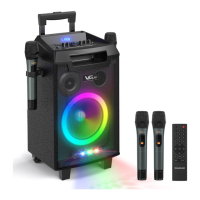
The VEGue VS-0866 is a portable Bluetooth speaker designed for versatile audio playback and performance.

Function Description:

The speaker features a comprehensive set of controls for audio adjustment and input selection.

  • Vol: Adjusts the overall volume.
  • Treble: Adjusts the treble frequency.
  • Bass: Adjusts the bass frequency.
  • Mic Vol: Adjusts the microphone volume.
  • Echo: Adjusts the echo effect for the microphone.
  • Mic: Provides input for a wired microphone.
  • Input Selection: Allows switching between external audio, MP3/Bluetooth, and FM radio functions.
  • Recording: Enables recording to a USB or TF card.
  • Playback Controls: Includes Play/Pause, Previous, and Next buttons for media navigation.
  • LED Light Control: Manages the speaker's LED lighting.
  • Guitar Input: Dedicated input for connecting a guitar with a separate volume control.

Product Features:

The VS-0866 is compatible with various audio sources, including PC, DVD, VCD, MP3 players, electronic pianos, and any device with audio output. Its amplifying circuit is engineered for high performance and fidelity, utilizing professional-grade speakers to deliver clear and layered sound. The system boasts an outstanding voice effect with surging bass, strong and bright mid-tones, and crisp, pleasant treble. A professional electronic frequency division circuit ensures accurate division points for enhanced audio quality. The speaker is equipped with large-capacity batteries and audio power supply capacitors, providing a stable, dynamic, and high signal-to-noise ratio (SNR) performance.

Important Technical Specifications:

  • Output Power: <30W
  • Input Sensitivity: 320mV
  • SNR: ≥71dB
  • Frequency Response: 60Hz~20KHz
  • Power Supply: AC 100-240V~, 60Hz/50Hz

These specifications are based on sampling machines and are subject to change due to continuous product improvement without prior notification.

Usage Features:

Remote Control:

The remote control operates within approximately 20 feet and 30 degrees of the reception window. It should be pointed directly at the receiver window without obstructions. Strong light near the receiving window may interfere with remote control functionality. Users are advised to avoid mixing new and old batteries and to regularly check battery status.

USB/TF Card Playback:

  • Music files on USB and TF cards must be formatted as FAT32.
  • Playback order is determined by file names (e.g., "01," "02," "03").
  • It is recommended to delete unnecessary files and folders to improve card reading speed.
  • Supports MP3, WMA, and WAV music formats.

Recording Function:

  • Insert a USB or TF card, then press the record button to enter recording mode.
  • A "RECORD" folder will be created, and recordings will be saved as REC0001, REC0002, etc.
  • Press the record button to pause/resume recording.
  • Press INPUT or the record button again to exit recording mode.
  • To play recordings, press the record button to enter recording-play mode. The last recorded music plays first. Use PREV/NEXT buttons to navigate, and the Replay button on the remote control to replay single or all tracks.

Bluetooth Operation:

  • Turn on the speaker and press the 'INPUT' key until 'bT' or 'bLUE' appears on the screen.
  • Connect to the speaker's Bluetooth name, "VS-0866," from your phone.
  • If connection fails, restart both devices.
  • The Bluetooth range is approximately 32ft in open areas.

FM Function:

  • Select "INPUT" to switch to FM radio.
  • Use the search button for automatic station searching and saving.
  • Use the channel buttons to switch between saved channels.

Microphone Usage:

  • Ensure the microphone switch is on.
  • Adjust the microphone volume appropriately.
  • Replace wireless microphone batteries if low.

Troubleshooting:

  • No Sound: Check input source and main volume. Use better music signals and adjust volume.
  • Distortion: Turn down main volume. If speaker is damaged, it needs repair.
  • Mic Silent: Turn on mic switch, adjust mic volume, replace wireless mic battery.
  • MP3 Silent: Ensure USB song format is correct (convert to MP3 if needed), restart the machine, or reinsert the USB/TF card.

Maintenance Features:

Charging Instructions:

  • Connect the matched power adapter (AC 100-240V).
  • Charging takes approximately 6-8 hours.
  • Unplug the power supply once fully charged to prevent battery damage from overcharging.
  • Battery Charge Indicator: The LED panel shows battery status with four horizontal lines, each representing 25% of charge. If no lines or the shape flashes, charge immediately to prevent damage.
  • The charge indicator on the back of the speaker flashes during charging and stops blinking when full. Continue charging for 1-2 hours to extend battery life.
  • Warning: If the battery is under voltage, fully charge within 48 hours. If the speaker is unused for a long time, keep the battery fully charged to prevent damage.
  • Keep the unit away from high temperature environments, high magnetic fields, and high frequencies during use. If the system malfunctions, turn off the power or reinsert the USB disc/TF card to resume play.

This device complies with Part 15 of the FCC rules, ensuring it does not cause harmful interference and accepts any interference received. It has been tested and found to comply with Class B digital device limits, providing reasonable protection against harmful interference in residential installations. Users are advised to reorient/relocate the receiving antenna, increase separation between equipment and receiver, or connect the equipment to a different circuit if interference occurs. Changes or modifications not expressly approved by the responsible party could void the user's authority to operate the equipment.

For wireless microphones, the device complies with RF radiation exposure limits for an uncontrolled environment. The transmitter must not be co-located or operating in conjunction with any other antenna or transmitter. For the portable speaker, the equipment complies with FCC radiation exposure limits for an uncontrolled environment and should be installed and operated with a minimum distance of 20cm between the radiator and the user's body.

VeGue VS-0866 Specifications

General IconGeneral
BrandVeGue
ModelVS-0866
CategoryKaraoke System
LanguageEnglish