Note: (1) The VK1560Pro shortcut keys are designed to work with US English.
Keys may not function correctly with the other keyboard languages.
(2) By default, the VK1560Pro shortcut keys are mapped to standard
Photoshop keyboard shortcuts. The function of the keys can be customized
according to the software you use.
(3) Most creative software will not accept keystroke inputs when P03 pen is
still in use. To avoid invalid keystroke actions, hold the pen away from the
screen before pressing your shortcut keys.
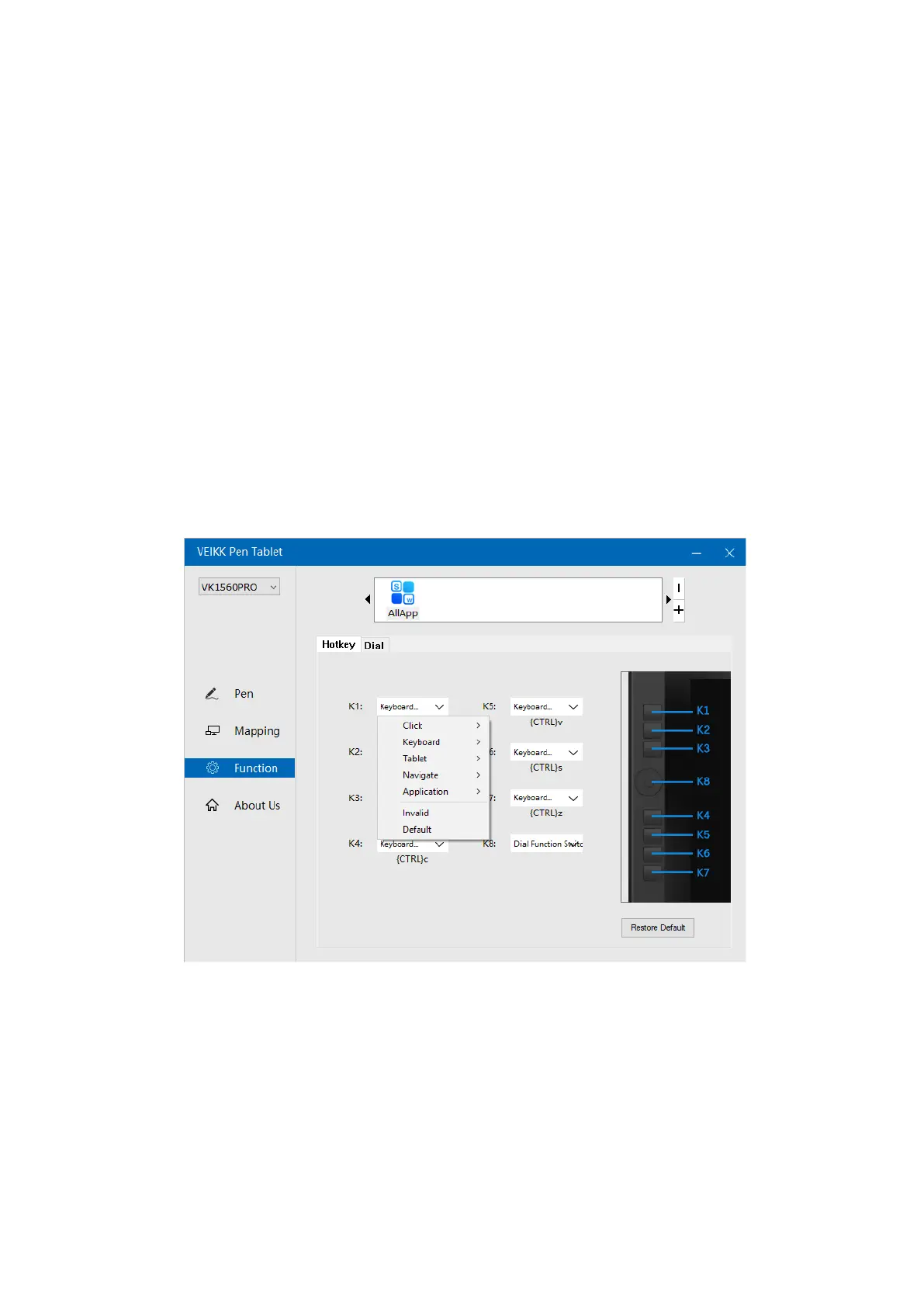
2.3.1 Hotkeys
Redefine Hotkey: Click on the title of the hotkey. A dropdown menu will appear with a
list of tool options. Choose the one you want to use.Custom Define: At the bottom of
the dropdown menu, choose Custom. This will allow you to input a custom keyboard
shortcut.
2.3.2 Dial
You can define the functions of the Dial. Tap on Dial button to select the function you
would like to use. To switch between functions, press down the middle button of the
Dial. You will see the function name briefly at the bottom of the screen when switched.
12



 To Next Page