The VEINSIGHT VS500 is a portable vein finder designed to assist medical practitioners in locating superficial veins for various medical procedures. It utilizes near-infrared light to project an image of the veins onto the skin surface, making them visible to the user.
Function Description
The VS500 vein finder helps to find superficial veins, which are crucial for procedures like venipuncture. It can identify superficial veins and, due to its physical characteristics, the depth of the vein search is limited. The device projects a real-time image of the veins, allowing medical practitioners to assess the location, depth, and other characteristics of the veins. It offers different projection colors (cyan, green, skin color, red, blue) and modes (universal, inverse, fine detail, venipuncture hint-point) to enhance visibility. The device also allows for image freezing and saving, with the capacity to store up to 20 pictures. These images can be exported to a computer via a Type-C USB cable using the VS_Image_Viewer software.
Important Technical Specifications
- Weight: 420g
- Dimensions: 60x60x210mm
- Battery: Lithium-ion Battery, 3.6V, 4.3Ah
- Battery Life: 5 hours
- Charging Time: 3 hours
- Adapter Specifications: Model: FJ-SW328U0502000N, Rated Input: 100-240V AC, 50-60Hz, 0.4A, Rated Output: 5V DC, 2A
- Peak Wavelength of Infrared Light: About 850nm
- Valley Wavelength of Visible Light: About 530nm
- Atmospheric Pressure (working and storage): 700hPa to 1060hPa
- Working Environment Humidity: 10-90% RH (non-condensing)
- Working Environment Temperature: 10°C ~ 30°C
- Storage Humidity: 10-90% RH (non-condensing)
- Storage Temperature: -20°C to 50°C
- Protection against electric shock: ME equipment with built-in power supply, without application parts
- Protection against ingress of water or particulate matter: IPX0 (Not waterproof)
- Method(s) of sterilization: By methods validated and described by the manufacturer
- Mode of operation: Continuous operation
The VS500 is not waterproof and should be protected from water ingress during use and storage. It is designed for continuous operation.
Usage Features
The VS500 is operated via a control panel with several buttons.
- Main Switch (Power Button): Turns the device on/off. A short press (0.5 seconds) powers on the device, while a longer press (2 seconds) turns it off. The projector light will also turn on/off with the device.
- Projection Color Button: Changes the projection color. Five colors are available: cyan, green, skin color, red, and blue. The default color is cyan. A long press inverts the vein image.
- Fine Detail Mode Button: Switches between universal mode and enhanced (fine detail) mode. A long press switches to depth mode.
- Brightness Adjustment Button: Adjusts the brightness. There are five degrees of brightness. A long press changes the size of the vein image (full size, 2/3 size, 1/2 size). The default size is full size.
- Freeze Image Button: Freezes the image. A long press saves the image, and an image number appears on the upper-left corner. Pressing the button again unfreezes the image.
- Gallery Button: Enters the image gallery. A short press browses saved images, and a long press exits the gallery.
- Venipuncture Hint-Point Mode Button: Activated by pressing the fine detail mode button and the brightness adjustment button simultaneously. This mode serves as a reference for locating veins and should be used by a qualified medical practitioner.
- Distance-sensing function: The device has a distance-sensing function, indicated by a yellow dot that appears at the bottom-right corner of the projected image. This dot helps in optimal focusing; when it becomes the same color as the vein image, the distance is optimal. The projected vein width is thicker or thinner than the actual width due to factors such as the distance between the VS500 to the skin, the patient's physical features, and different observation modes.
- Charging: The device can be charged using the charging cradle. The battery indicator is on the bottom right corner of the projected image. The indicator light on the charging cradle is blue when fully charged and green when charging. If the indicator light flashes, the battery temperature may be abnormal or the battery is over-discharged.
Maintenance Features
- Cleaning: The VS500 should be cleaned regularly. The supports should be removed before cleaning. The power cable should be unplugged, and the device turned off. The lens window should be cleaned every month with a dust-free cloth and 95% alcohol. The body of the imaging unit should be cleaned every two months with a dust-free cloth dipped in 70% alcohol. Avoid scratching the lens window.
- Sterilization: The device should not be immersed in any liquid or heated/pressurized for sterilization. Organic solvents or rough cleaning tools should not be used.
- Battery Care: The built-in battery is inside the imaging unit. The battery should be charged fully before first use. Complete discharging of the battery should be avoided. The battery should be checked every two months for charging and discharging. Used batteries must be disposed of according to local regulations. Only the original adapter should be used for charging. If the battery is less than 3%, the device beeps continuously. A short press of the power button (about 0.5 seconds) will stop the beep. If the device is rebooted in low battery, the "beep" sound will start again before the battery is charged.
- Regular Examination: The VS500 requires regular examination. Follow the requirements of your institution to clean and sterilize the device every time before using.
- Damage: If there is abrasion or dirt on the lens window, do not use the VS500. If the window is damaged or broken, contact the authorized dealer or manufacturer for repair.
- Storage: Store and transport the device in an environment where temperature and humidity are not too high or too low, and it is free of dust. The device should be kept away from flammable and explosive gas sources.
Warranty and Disposal
The service life for the device is five years from the manufacture date. The warranty period for the VS500 is 18 months for the imaging unit and 6 months for the battery after the purchasing date. The device is of high-quality materials, workmanship, and conforms to the manufacturer's specifications. Defective parts can be repaired or replaced free of charge within the warranty period. The replaced parts will come with a Return of Material Authorization (RMA) number. The newly repaired or replaced parts will enjoy a 90-day warranty period from the date of receipt. Any damage caused by disassembling the machine without the permission of the manufacturer is not covered by the warranty. The warranties do not cover damages caused by misuse, abuse or force majeure.
The device must be properly disposed of after its expiry date, following local regulations and the country's environmental protection law. It must not be discarded in household trash cans.

 Need help?
 General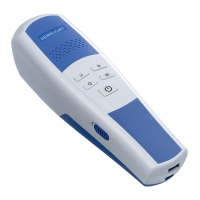

 To Next Page