
 Need help?
Do you have a question about the Velkase Velka 7 and is the answer not in the manual?
Details dimensions, weight, materials, I/O ports, security features, and PCIe riser specification.
Information on compatible motherboard, power supply, CPU cooler, graphics card, memory, and storage types.
Steps to test components with the graphics card and PCIe riser before final assembly for functionality.
Instructions for removing the front panel, side panels, struts, and motherboard tray.
Guidance on installing CPU, cooler, memory, M.2, motherboard, PCIe riser, graphics card, and PSU.
This document describes the assembly and features of the Velkase Velka 7 rev 2.0, a compact computer case designed for small form factor builds. The manual provides detailed instructions for assembling the various components, highlighting key considerations for optimal performance and ease of maintenance.
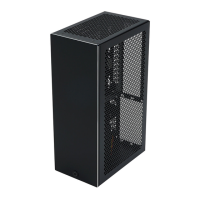
The Velkase Velka 7 rev 2.0 is a small form factor (SFF) computer case designed to house standard PC components, including a motherboard, power supply unit (PSU), graphics card, and storage drives. Its primary function is to provide a compact and organized enclosure for these components, facilitating a high-performance system in a minimal footprint. The case is engineered to support specific hardware dimensions, ensuring compatibility and efficient use of internal space. It features a modular design, allowing for a structured assembly process and easy access to internal components for upgrades or maintenance. The case's design also incorporates considerations for cable management and airflow, crucial for maintaining system stability and longevity in a compact build.
The Velka 7 rev 2.0 offers several usage features that enhance the building experience and the overall functionality of the assembled system. The assembly process is designed to be straightforward, with clear steps for installing each component. For instance, the motherboard subassembly is inserted into the case as a single unit, simplifying the installation of multiple components. The case supports various motherboard types, including Mini ITX, and is compatible with specific PSU sizes, such as SFX and SFX-L, offering flexibility in component selection.
One notable feature is the emphasis on cable management. The instructions advise plugging in all cables before certain assembly steps, such as completing the frame, to ensure a tidy and efficient internal layout. This is particularly important in SFF cases where space is limited. The design also accounts for the graphics card installation, providing guidance on how to route video cables to prevent interference and damage.
The case includes provisions for multiple storage drives, allowing users to configure their system with adequate storage capacity. The storage drive holder and the method of attaching storage drives are clearly outlined, ensuring secure installation. The power button mechanism is also detailed, with instructions on how to install and secure it, and how to connect its wires to the motherboard.
For user convenience, the side panels of the case offer multiple positions for mounting, allowing for customization based on aesthetic preference or acoustic performance. Users can choose between flush mount positions for a sleek look or other mounting holes for quieter operation. The inclusion of adhesive rubber pads further enhances usability by providing stability and reducing vibrations.
The Velka 7 rev 2.0 incorporates several features that facilitate maintenance and component access. The modular design of the case allows for easy disassembly, making it convenient to access internal components for cleaning, upgrades, or troubleshooting. For example, the instructions detail how to remove the front and side panels, as well as the top and bottom screws, to gain access to the internal chassis.
The case's structure is designed to be taken apart in a logical sequence. Steps such as removing the motherboard tray and the drive cage are clearly described, enabling users to isolate specific components for maintenance without fully disassembling the entire system. This is particularly useful for tasks like cleaning dust from fans or replacing a faulty drive.
The instructions also highlight the importance of proper cable routing during assembly, which contributes to easier maintenance. Well-managed cables not only improve airflow but also make it simpler to identify and disconnect specific components when needed. The guidance on routing video cables to avoid creases near connectors helps prevent damage, reducing the need for repairs.
Furthermore, the case's construction with various screw types (e.g., countersunk, round head) for different components ensures that each part is securely fastened, contributing to the overall durability and stability of the system. This robust construction minimizes the likelihood of components coming loose, which can lead to system instability or damage, thereby reducing the frequency of maintenance interventions. The ability to reposition brackets behind the front panel for a "more loose fit" also suggests a degree of flexibility in assembly that can aid in future adjustments or component swaps.
 General
| Material | Steel |
|---|---|
| Expansion Slots | 2 |
| Case Type | Mini-ITX |
| Motherboard Support | Mini-ITX |
| Power Supply Support | Flex ATX |
| Form Factor | Mini-ITX |
| Drive Bays | 2x 2.5" |
| GPU Support | Up to 180mm |
| CPU Cooler Height | 37mm |
| Color | Black |
| CPU Cooler Height Limit | 37mm |

 To Next Page