PS3005D
V. 01 – 06/08/2012 7 ©Velleman nv
Main Screen
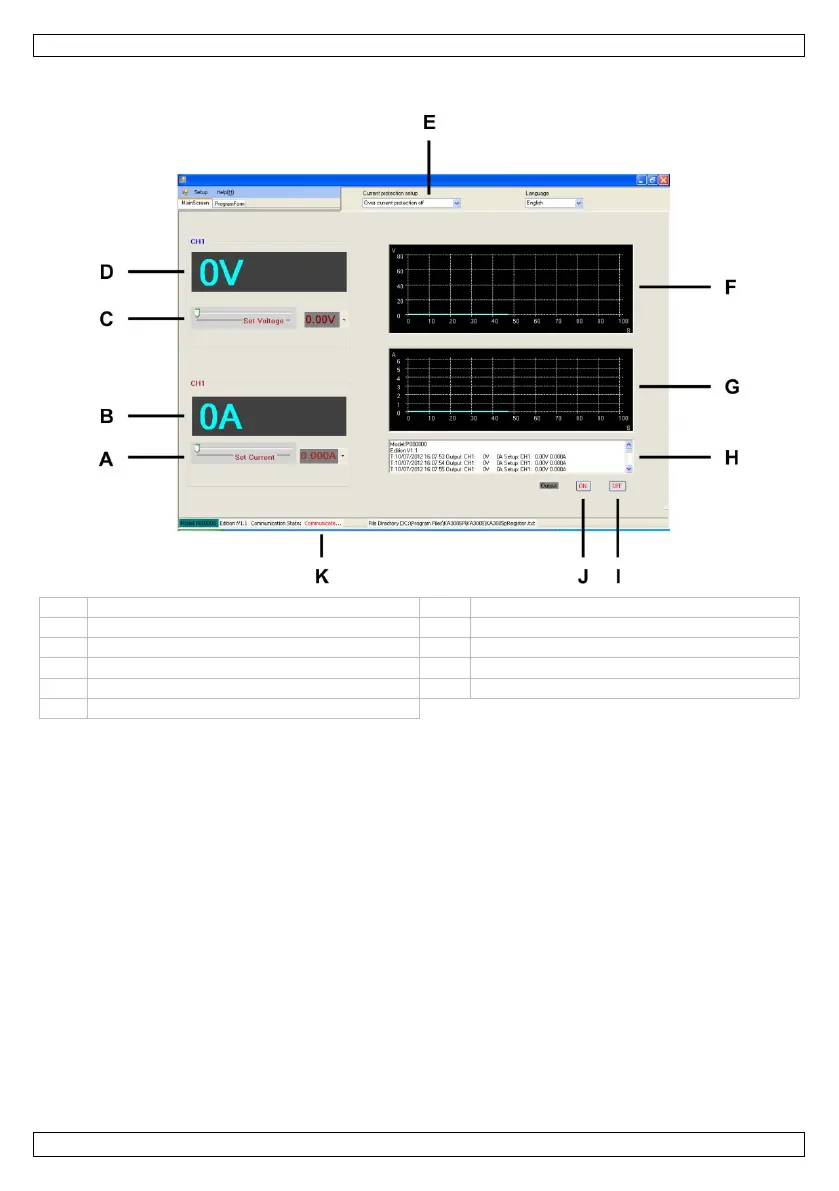
The main screen of the remote control software:
A Current adjustment G Current graph: shows the current over time
B Current display (ampere) H Log
C Voltage adjustment I Output off
D Voltage display (volt) J Output on
E Overcurrent protection
Communication status
F Voltage graph: shows the voltage over time
Setting Voltage and Current
To set the voltage and current [A,C] you can:
• select a value from the list
• drag the sliders. Tip: you can click on the slider and use the scroll wheel of your mouse.
The set value appears in the box to the right of the slider.
Applying Voltage to the Load
Press the ON key [J] to apply voltage to the load.
Press the OFF key [I] to switch the output off.
Using Overcurrent Protection
To protect against overcurrent, set up the maximum current and then select Output switch off in the
Current protection setup box [E].
To switch overcurrent protection off, select Overcurrent protection off.



 To Next Page