EasyManua.ls Logo

Velleman WC50D - User Manual

Velleman WC50D
20 pages
Print Icon
To Next Page IconTo Next Page
Loading...
WC50D
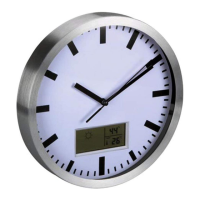
DCF WALL CLOCK
DCF-WANDKLOK
HORLOGE MURALE DCF
RELOJ DE PARED DCF
DCF-WANDUHR
RELÓGIO DE PAREDE DCF
ZEGAR ŚCIENNY DCF
USER MANUAL 3
GEBRUIKERSHANDLEIDING 5
MODE D’EMPLOI 7
MANUAL DEL USUARIO 9
BEDIENUNGSANLEITUNG 11
MANUAL DO UTILIZADOR 13
NSTRUKCJA OBSŁUGI 15
Question and Answer IconNeed help?

Do you have a question about the Velleman WC50D and is the answer not in the manual?

Summary

Introduction

Introduction

Provides essential information about the product's environmental impact and safe disposal.

Safety Instructions

Safety Instructions

Outlines crucial safety precautions for operating the device, especially regarding children and environmental factors.

General Guidelines

General Guidelines

Details general advice on product care, usage, warranty, and limitations to ensure proper operation.

Features

Features

Lists the key functionalities and characteristics of the DCF wall clock, such as radio control and legible dial.

Overview

Overview

Refers to the illustrations on page 2, identifying key components like reset pins and battery compartment.

Working Principle

Working Principle

Explains how the clock receives and uses the DCF77 radio signal for automatic time synchronization and optimal placement.

Operation

Manual Setting

Describes the procedure for manually adjusting the clock's time when radio signal reception is unavailable.

Forced Receiving

Details how to manually initiate the radio signal synchronization process for the clock.

Reset

Explains the method to reset the clock's time and memory to default settings.

Cleaning and Maintenance

Cleaning and Maintenance

Provides instructions on how to clean and maintain the clock to ensure its longevity and performance.

Battery

Battery

Specifies the type of battery required and the correct procedure for insertion.

Technical Specifications

Technical Specifications

Lists the technical details of the clock, including power supply, dimensions, and weight.

Velleman Service and Quality Warranty

General Warranty Conditions

Details the 24-month warranty, its exclusions, and the process for making a claim.

Summary

Introduction

Introduction

Provides essential information about the product's environmental impact and safe disposal.

Safety Instructions

Safety Instructions

Outlines crucial safety precautions for operating the device, especially regarding children and environmental factors.

General Guidelines

General Guidelines

Details general advice on product care, usage, warranty, and limitations to ensure proper operation.

Features

Features

Lists the key functionalities and characteristics of the DCF wall clock, such as radio control and legible dial.

Overview

Overview

Refers to the illustrations on page 2, identifying key components like reset pins and battery compartment.

Working Principle

Working Principle

Explains how the clock receives and uses the DCF77 radio signal for automatic time synchronization and optimal placement.

Operation

Manual Setting

Describes the procedure for manually adjusting the clock's time when radio signal reception is unavailable.

Forced Receiving

Details how to manually initiate the radio signal synchronization process for the clock.

Reset

Explains the method to reset the clock's time and memory to default settings.

Cleaning and Maintenance

Cleaning and Maintenance

Provides instructions on how to clean and maintain the clock to ensure its longevity and performance.

Battery

Battery

Specifies the type of battery required and the correct procedure for insertion.

Technical Specifications

Technical Specifications

Lists the technical details of the clock, including power supply, dimensions, and weight.

Velleman Service and Quality Warranty

General Warranty Conditions

Details the 24-month warranty, its exclusions, and the process for making a claim.

Velleman WC50D Specifications

General IconGeneral
BrandVelleman
ModelWC50D
CategoryClock
LanguageEnglish

Related product manuals