20 VELUX
®
VELUX
®
21
1
4
7
2
5 6
8
3
KLI 310/311/312 KLR 200
KLR 200
KLR 200 KLR 200
KLR 200 KLR 200 KLR 200
KLI 310/311/312 KLR 200
Set-up of KLI 310/311/312 to operate products already registered
in control pad KLR 200
Important: The KLI must be the universal KLI 310 or the model match-
ing the product.
1
Tap .
2
Tap "New product".
3
Tap "Prepare one-way control".
4
Tap "Choose products".
5
Scroll down the display and choose product type
1
.
Tap
2
.
6
Scroll down the display and tap the product to be added
1
.
Note: The individual products can be identified by tapping the icon.
Tap
2
.
You now have 10 minutes to execute step 7 with the KLI wall switch.
7
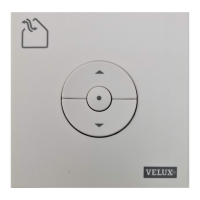
Press Rectangle button on the KLI wall switch for 1 second to regis-
ter the product.
8
Tap to finish.
Note: To add more products, tap "Choose more" and repeat
steps 5-8.
The products can now be operated with KLI 310/311/312 as well.
2 2
1
1
1 sec


 To Next Page