Please Note
1. When using the device, please do not cover the vents. The vents are used to cool the device.
Cover the vents may cause the device to overheat and switch to automac protecon mode
2. The device should not be damp or influent;
3. Do not use the device while bathing;
4. Do not place the device near the bathtub or sink;
5. Do not use the device when the plug or power cord is damaged;
6. Stop using any parts if the signal is damaged;
7. Do not open the protecve cover or disassemble the device, touch the internal parts. It is
forbidden to dismantle and repair;
8. Always keep the device power cord away from hot objects;
9. Do not operate the device in a flammable or explosive environment;
1. The device defaults to manual flash. It needs to press the flash buon to flash (Mainly used for
small area hair removal)
2. Aer the device turned on, press the flash buon for 3 seconds, the machine will switch to
automac flash, you only need to move the device slowly, it will automacally flash. (Mainly used
for large area hair removal)
4. Do not use it directly on eyebrows, or anywhere near or around the eyes which may cause damage;
5. Do not use it on the scalp, ears, neck, nipples, genitals or areas around the anus. These areas
are sensive and suscepble to damage;
6. It is not recommended to use in areas where the hair is expected to regenerate because the
hair-free effect is long-lasng;
7. Do not put the device in the same area for too long, or flash mulple mes in the same area,
which may cause excessive heat and easily cause skin discomfort;
Some users may have reddish skin aer use, which is normal. It will disappear within 24 hours.
If it has not disappeared for more than 48 hours, suspend use, please consult customer service
or doctor;
2
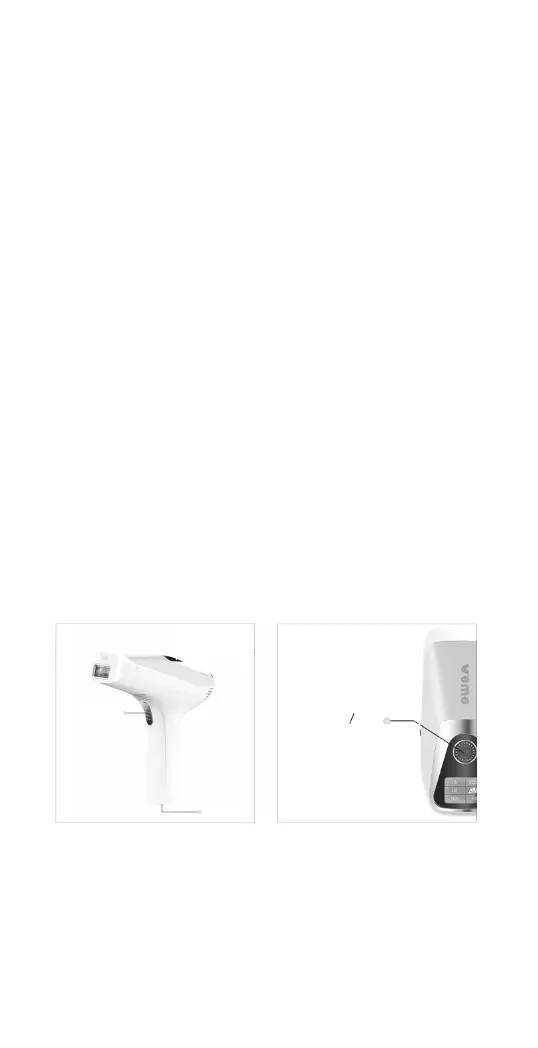
Introduction of key function of products
Please follow the above requirements. Failure to follow the above
instrucons may result in a malfuncon of the device circuit or
damage during operaon.
Manual �lash and automatic �lash setting
Power buon
Level-adjustment
Power
Interface
Flash buon


 To Next Page