
 Need help?
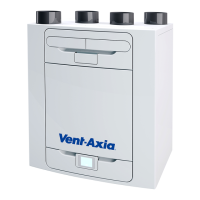
Do you have a question about the Vent-Axia 405215 and is the answer not in the manual?
Key safety instructions for installation, operation, and maintenance of the unit.
Methods to control the MVHR unit, including touch screen and WiFi.
How to navigate and operate the unit using the control panel buttons and menus.
Accessing and adjusting unit settings, monitoring performance indicators.
Accessing the menu for initial setup and configuration of the unit.
Procedure for cleaning or replacing the unit's air filters.
Steps to identify and resolve issues using warning codes and fault indicators.
Step-by-step instructions for securely mounting the unit to a wall.
Instructions for mounting the unit directly onto the floor.
Proper methods for connecting the air intake and extract ductwork.
Steps for safely accessing and working with the unit's electrical components.
Wiring instructions for external switches and sensors to control unit functions.
Procedures for safely connecting the unit to the mains electrical supply.
Accessing and changing unit parameters via the commissioning menu.
Detailed guide to adjusting country, language, date, time, and unit configuration.
Navigating the main commissioning menu and options like saving settings.
Details and installation of the WiFi module for smart device control.
 General
| Model Number | 405215 |
|---|---|
| Fan Type | Axial |
| Voltage | 230V |
| IP Rating | IP44 |
| Category | Ventilation |
| Mounting | Wall |


 To Next Page