22 EN
1
2 3 4
5
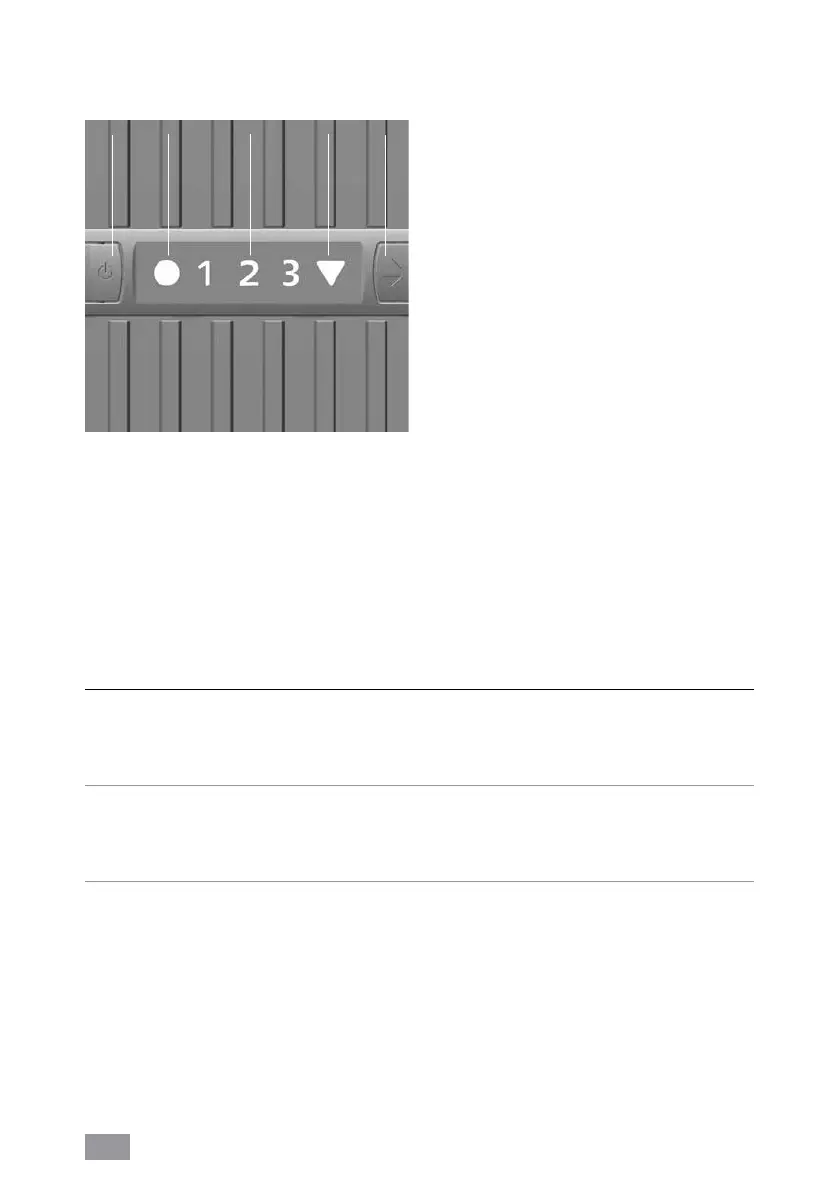
1 ON / OFF button
2 Operation display ON / OFF
Continuously lit: ON
Not lit: OFF
3 Fan setting display
1 - 2 (LW 15),
1 - 2 - 3 (LW 25/45)
4 4 Automatic switch-off display (see
“Automatic switch off”)
5 Fan setting selector button
1 - 2 (LW 15),
1 - 2 - 3 (LW 25/45)
CONTROL PANEL
The appliance will shut
off automatically if:
What can you do if
there is not enough water
in the lower housing?
Switch off appliance, disconnect power supply unit,
refill water and restart operation with button 1. See
also „Maintenance and cleaning“, „Daily“
the upper housing
has been opened?
Close the upper housing correctly by pressing down on
the outer ends of the locking latches. Switch appliance
off and on again with the power button 1.
the upper housing is not
placed atop or correctly
fitted to the lower hous-
ing?
Place upper housing correctly on lower housing.
Switch appliance off and on again with the power but-
ton 1.
AUTOMATIC SWITCH OFF
The appliance has an automatic switch-off feature that is indicated by the display 4 .


 To Next Page