26 EN
FUNCTIONS, SETTINGS
& DISPLAYS
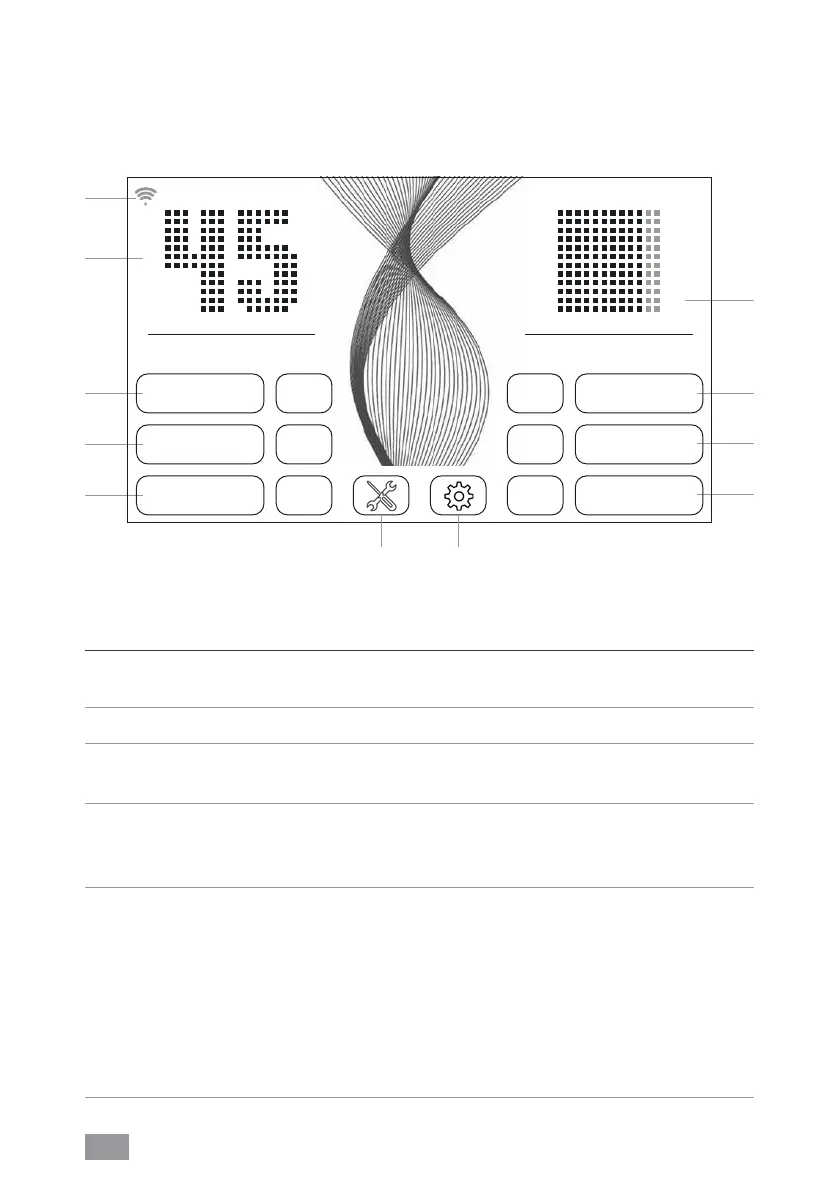
Function Setting
1 Humidity/
temperature
Display humidity or temperature.
Hold for 3sec. to switch back and forth between °C and °F.
2 Speed Fan stage 1 (low) – 5 (high).
3 Humidity OFF No humidification. 30 – 70% (in 5% increments). When
the set humidity is reached, the disk stack stops rotating.
4 Timer OFF / 1 / 3 / 5 / 7 / 9h (hours)
The appliance shuts off automatically after the preset hours
have expired.
5 Air quality
(EPA)
PM2.5
µg/m³ AQI US
0–12 0–50 Good GREEN
13–35 51–100 Moderate YELLOW
36–55 101–150 Unhealthy for sensitive people ORANGE
56–150 151–200 Unhealthy RED
151–250 201–300 Very unhealthy VIOLET
251–500 301–500 Dangerous BROWN
Select or change the setting by tapping the
function.
WiFi
2
1
3
4
10 9
SPEED 3
TIMER 1h
HUMIDITY 45%
AUTOOFF
CHILD LOCKOFF
SLEEP MODEOFF
AIR QUALITY
PM2.5 9 µg/m³
HUMIDITY
AH902
%
5
6
7
8


 To Next Page