
 Need help?
Do you have a question about the VENTINOVA MEDICAL Evone and is the answer not in the manual?
Overview of Evone ventilator and user training requirements.
Defines Evone's purpose as a mechanical ventilator for FCV® or jet modes.
Specifies Evone is for trained anesthesiologists or intensivists.
Details patient criteria, including ideal body weight and warnings.
Specifies use in operating rooms and ICU environments.
Outlines advantages and potential adverse effects of Evone use.
Lists general warnings on device use, accessories, and EMC.
Provides cautions on emissions, dead volume, and EMC standards.
Lists scientific references related to ventilation methods.
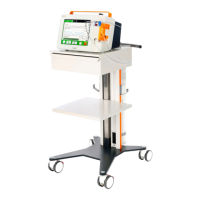
Describes the Evone Control Unit and its components shown in figures.
Details the Evone Breathing System, its configurations, and parts.
Lists and describes accessories like Tritube and adapters.
Explains Evone's integration with information systems for data export.
Explains FCV® mode, its operation, and key settings.
Details Jet Mode, its application, and operator settings.
Guides on assembling the Evone system and breathing circuit.
Details necessary connections: medical gases, power, and CO2 sensor.
Guides powering on Evone and performing initial self-checks.
Describes entering patient data for ventilation parameter settings.
Provides step-by-step guides for ventilation using Tritube and conventional tubes.
Covers general device settings like language, date, time, and sound level.
Explains FCV® Mode screen elements and controls.
Explains Jet Mode screen elements and controls.
Describes alarm display, priority, and management.
Details special functions like Ventilation Pause and Safety State.
Guides on proper device shutdown procedures.
Procedures for device preparation between patient uses.
General guidelines for cleaning Evone and its components.
Specific cleaning method for the Evone Control Unit.
Explains how to clean the CO₂ sensor and its cable.
Reprocessing steps for the reusable Evone airway adapter.
Instructions for charging the Evone's battery.
Guidelines for storing the Evone device.
Covers yearly and user maintenance tasks.
Information on warranty and obtaining technical support.
Guidance on proper disposal of the Evone Control Unit.
Instructions for disposing of Evone accessories.
Steps for upgrading Evone software via SD card.
Lists physiological alarms, conditions, actions, and priorities.
Lists technical alarms, conditions, actions, and priorities.
Lists physical, electrical, and standard parameters.
Pneumatic diagram of the control unit and component details.
Explains safety principles for pressure measurement and operation.
 General
| Manufacturer | Ventinova Medical |
|---|---|
| Model | Evone |
| Category | Medical Equipment |
| Application | Ventilation |
| Type | Ventilator |
| Display | Touchscreen |
| Connectivity | USB |

 To Next Page