EasyManua.ls Logo

Vents BU-1-60 TF - User Manual

Vents BU-1-60 TF
12 pages
Print Icon
To Next Page IconTo Next Page
Loading...
Users Manual
BU
Question and Answer IconNeed help?

Do you have a question about the Vents BU-1-60 TF and is the answer not in the manual?

Summary

Functions and Circuit Symbols

BU Product Overview and Functionality

Introduces the BU as a multifunctional fan control unit for accommodation spaces and its basic capabilities.

Function Mode Indicators

Explains the meaning of LEDs (red, yellow, green) indicating fan status and sensor actuation.

Package and Specifications

Package Contents

Lists the items included in the package: control unit, user's manual, and package box.

Technical Specifications

Details voltage, capacity, loading type, protection power, and dimensions of the device.

Operating Conditions and Safety

Operating Conditions

Specifies the environment temperature and humidity range for device operation.

Safety Requirements

Outlines crucial safety precautions, including professional installation, air quality, and voltage handling.

Description and Structure

Installation Location and Front Panel Overview

Recommends installing the BU under the fan and identifies front panel components like sensors and indicators.

Installation Guide

Moving Sensor Operating Range

Details the operative range and viewing angle of the moving sensor for optimal placement.

Step-by-Step Installation

Provides a guide for mounting the BU, including panel removal, drilling, and fixing steps.

Mounting Hole Design Note

Advises on the specific upward movement required for mounting due to the design of the mounting holes.

Connecting to Power Supply

Switch Clearance and Wire Marking

Specifies switch clearance and recommended wire marking for connections.

Power Connection Schemes

Illustrates connection diagrams for different BU models, vital for correct wiring.

Electrical Safety During Connection

Emphasizes performing installation only when power is off and handling electronics carefully.

Fan Wiring and Terminal Block Connection

Guides on opening the fan, connecting the supply wire to the input terminal block, and closing the fan.

BU Input Terminal Block Connection

Instructs to connect the BU input terminal block according to the provided schemes.

Finalizing Installation and Power On

Covers configuring the BU, reattaching the front panel, and turning the unit on.

Configuring and Set-up Modes

Hygrostat Mode Setup

Explains configuring the hygrostat function using regulators and switch settings, with LED indicators.

Photo Switch (Dark) Setup

Details setting up the photo switch mode for dark conditions, including activation delay and threshold.

Photo Switch (Light) Setup

Explains configuring the photo switch mode for light conditions, including activation delay and duration.

Outer Signal Control Setup

Describes setting up the outer signal control, including combinations with other modes.

Moving Sensor Setup

Details how to activate the moving sensor mode, specifying its operating range and activation switches.

Cyclic Mode Setup

Explains setting up the cyclic mode, including fan working and pause times.

Parameter Settings

Time Settings Configuration

Details how to configure time-based parameters using RP1/RP2 potentiometers with specific positions and times.

Moisture Settings Configuration

Explains configuring moisture threshold levels using RP1/RP2 potentiometers with specific positions and percentages.

Storage and Warranty

Storage Precautions

Specifies recommended temperature, humidity, and air quality for storing the BU.

Manufacturers Warranty

Outlines the 12-month warranty period, conditions, and exclusions for the BU.

Warranty Claim Procedure

Explains the customer's right to exchange the BU if a fault occurs due to the manufacturer's fault within the warranty period.

Acceptance and Warranty Card

Acceptance Certificate

Confirms the Fan control unit 'BU-1-60' is compliant with technical specifications and recognized as serviceable.

Warranty Card Information

Provides fields for recording inspector's stamp, seller's name, and selling date for warranty purposes.

Summary

Functions and Circuit Symbols

BU Product Overview and Functionality

Introduces the BU as a multifunctional fan control unit for accommodation spaces and its basic capabilities.

Function Mode Indicators

Explains the meaning of LEDs (red, yellow, green) indicating fan status and sensor actuation.

Package and Specifications

Package Contents

Lists the items included in the package: control unit, user's manual, and package box.

Technical Specifications

Details voltage, capacity, loading type, protection power, and dimensions of the device.

Operating Conditions and Safety

Operating Conditions

Specifies the environment temperature and humidity range for device operation.

Safety Requirements

Outlines crucial safety precautions, including professional installation, air quality, and voltage handling.

Description and Structure

Installation Location and Front Panel Overview

Recommends installing the BU under the fan and identifies front panel components like sensors and indicators.

Installation Guide

Moving Sensor Operating Range

Details the operative range and viewing angle of the moving sensor for optimal placement.

Step-by-Step Installation

Provides a guide for mounting the BU, including panel removal, drilling, and fixing steps.

Mounting Hole Design Note

Advises on the specific upward movement required for mounting due to the design of the mounting holes.

Connecting to Power Supply

Switch Clearance and Wire Marking

Specifies switch clearance and recommended wire marking for connections.

Power Connection Schemes

Illustrates connection diagrams for different BU models, vital for correct wiring.

Electrical Safety During Connection

Emphasizes performing installation only when power is off and handling electronics carefully.

Fan Wiring and Terminal Block Connection

Guides on opening the fan, connecting the supply wire to the input terminal block, and closing the fan.

BU Input Terminal Block Connection

Instructs to connect the BU input terminal block according to the provided schemes.

Finalizing Installation and Power On

Covers configuring the BU, reattaching the front panel, and turning the unit on.

Configuring and Set-up Modes

Hygrostat Mode Setup

Explains configuring the hygrostat function using regulators and switch settings, with LED indicators.

Photo Switch (Dark) Setup

Details setting up the photo switch mode for dark conditions, including activation delay and threshold.

Photo Switch (Light) Setup

Explains configuring the photo switch mode for light conditions, including activation delay and duration.

Outer Signal Control Setup

Describes setting up the outer signal control, including combinations with other modes.

Moving Sensor Setup

Details how to activate the moving sensor mode, specifying its operating range and activation switches.

Cyclic Mode Setup

Explains setting up the cyclic mode, including fan working and pause times.

Parameter Settings

Time Settings Configuration

Details how to configure time-based parameters using RP1/RP2 potentiometers with specific positions and times.

Moisture Settings Configuration

Explains configuring moisture threshold levels using RP1/RP2 potentiometers with specific positions and percentages.

Storage and Warranty

Storage Precautions

Specifies recommended temperature, humidity, and air quality for storing the BU.

Manufacturers Warranty

Outlines the 12-month warranty period, conditions, and exclusions for the BU.

Warranty Claim Procedure

Explains the customer's right to exchange the BU if a fault occurs due to the manufacturer's fault within the warranty period.

Acceptance and Warranty Card

Acceptance Certificate

Confirms the Fan control unit 'BU-1-60' is compliant with technical specifications and recognized as serviceable.

Warranty Card Information

Provides fields for recording inspector's stamp, seller's name, and selling date for warranty purposes.

Overview

The VENTS BU-1-60 X is a multifunctional fan control unit designed for operating fans in various accommodation spaces such as kitchens, bathrooms, and bedrooms. This device offers automatic control functions based on a range of sensors and timers, providing flexible operation modes to suit different situations.

Function Description:

The BU-1-60 X can include, depending on the specific model, an automatic control function based on the use of a moisture sensor (hygrostat), a lighting sensor (photo switch), a motion sensor, a timer, and manual control via inner and outer switches. It also provides a cyclic power on/off function. Users can set various function modes using the integrated switches. For example, in a toilet, the lighting sensor and timer can be used to turn the fan on when someone enters and keep it running for a set duration (e.g., 10 minutes).

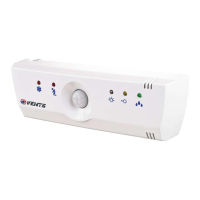
The front panel of the BU includes:

  • A motion sensor (optional).
  • A lighting sensor.

Function modes are indicated by LEDs:

  • Red LED: Indicates the fan is on.
  • Red LED: Indicates motion sensor actuation (optional).
  • Yellow LED: Indicates lighting sensor actuation.
  • Green LED: Indicates moisture sensor actuation (optional).

Specific Function Modes:

  1. Hygrostat (option): The fan turns on when the moisture level exceeds a set threshold, which is configured using the RP1 regulator. A green LED indicates moisture level exceeding and fan activation. After the moisture level drops, the fan continues to operate for a time set by the RP2 regulator. This mode is activated by setting switches 1 and 2 to the ON position.

  2. Photo Switch (Dark): The fan turns on 5 seconds after the room light turns OFF. The fan's working time is set by the RP2 regulator. The operating threshold is set by the RP1 regulator. A yellow LED indicates illumination threshold exceeding. This mode is activated by setting switch 1 to the ON position.

  3. Photo Switch (Light): The fan turns on 10 seconds after the room light turns ON. After the light turns off, the fan continues to work for a time set by the RP2 regulator. The operating threshold is set by the RP1 regulator. A yellow LED indicates illumination threshold exceeding. If the light remains on for over 60 minutes, the fan turns off. This mode is activated by setting switch 2 to the ON position.

  4. Outer Signal Control: The fan turns on 3 seconds after activation by an inner or outer switch. It continues to operate for a time set by the RP2 regulator. This mode is activated by setting switch 3 to the ON position and can be combined with hygrostat and photo switch modes.

  5. Motion Sensor (option): The fan turns on after detecting movement of a significant object (e.g., a human) within the sensor's operating range (5m distance, 130° viewing angle). After movement ceases, the fan continues to work for a time set by the RP2 regulator. This mode is activated by setting switches 3 and 4 to the ON position.

  6. Cyclic: The fan turns on periodically. It operates for a time set by the RP2 switch and remains off for a time set by the RP1 switch. This mode is activated by setting switches 1, 2, 3, and 4 to the OFF position.

Important Technical Specifications:

  • Voltage: 220-240 V, 50 Hz
  • Maximum Capacity: 60 W
  • Loading Type: Inductive, active
  • Protection Power: IP34
  • Dimensions: Less than 151x46x27 mm
  • Environment Temperature: 0 °C ... +40 °C
  • Adjust Range of Moisture Threshold: 40-100 %
  • Motion Sensor Operative Range: 5 m
  • Motion Sensor Viewing Angle: 130°

Usage Features:

  • Installation: The BU should be installed directly under the fan for optimal design and effect. Installation requires removing the front panel, choosing a position, outlining it, drilling holes for dowels, screwing in screws, mounting the back panel, connecting to the supply network, configuring settings, and finally reattaching the front panel.
  • Connecting to Supply Network: Connection must be provided with a switch having a contact clearance of not less than 3 mm, mounted into the fixed wiring. Installation should only occur when power is off to ensure the safety of the BU's electronics. The specific connection scheme depends on the BU model (refer to diagrams 5a and 5b in the manual).
  • Configuration and Set-up: BU settings are configured using potentiometers RP1 and RP2 with a screwdriver. Turning the potentiometer handle allows selection of parameters from the mode descriptions, with values corresponding to segments on the dial (refer to tables 2 and 3 in the manual for time and moisture settings).
  • Diagnostics: If the fan fails to work after installation and setup, users should carry out diagnostics using the provided manual.

Maintenance Features:

  • Storage Precautions: The BU should be stored in its manufacturer's package in a ventilated room at a temperature between +5 °C and +40 °C, with air humidity not exceeding 60% (at +20 °C). The presence of acids, alkalis, and other corrosive impurities in the air is not allowed.
  • Safety Requirements: Installation must be carried out by a qualified electrician in accordance with existing regulations. The ambient air must be free of explosive and corrosive impurities. The device should not be used outside its specified temperature range or in rooms with aggressive air impurities. The BU scheme is under voltage; installation should only be performed when the voltage is off.
  • Manufacturer's Warranty: The manufacturer guarantees normal operation of the BU for 12 months from the date of purchase, provided all rules for transport, storage, mounting, and usage are followed. The warranty does not cover devices with mechanical damage. If the buying date is not indicated, the warranty period is calculated from the date of manufacture. If the BU fails during the warranty period due to a manufacturer's fault, the customer has the right to exchange it. The manufacturer is not responsible for damage resulting from misuse or mechanical intervention; the owner must follow the manual.

Vents BU-1-60 TF Specifications

General IconGeneral
BrandVents
ModelBU-1-60 TF
CategoryControl Unit
LanguageEnglish