
 To Next Page
B
Briana PatrickAug 12, 2025
How to fix Venturer TV DVD Combo with no power?
- PPaul ShannonAug 13, 2025
First, make sure the AC power cord is securely connected. Also, ensure that the unit is turned on.

How to fix Venturer TV DVD Combo with no power?
First, make sure the AC power cord is securely connected. Also, ensure that the unit is turned on.
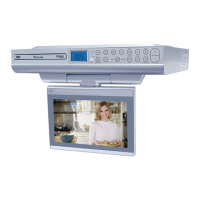
What to do if my Venturer KLV3915 TV DVD Combo has no picture and sound?
Here are some things to check: * Ensure the unit is plugged into an AC outlet. * Verify that you've selected TV mode. * Try tuning to a new channel to rule out station issues. * Confirm the antenna is properly connected. * Increase the volume. * Check if the antenna is broken. * Look for any local interference.
Why is my Venturer KLV3915 remote control not working?
Try the following: * Remove any obstructions between the remote and the unit. * Use the remote closer to the unit. * Point the remote directly at the remote sensor on the unit. * Replace the batteries with new ones.
What to do if Venturer KLV3915 TV DVD Combo disc does not play?
Consider the following: * Ensure a disc is inserted; the screen will display “No Disc” if empty. * Insert the disc correctly, label side facing up. * Clean the disc. * Check disc compatibility; a non-NTSC disc may be incompatible. * If there's been a sudden temperature change, condensation may have formed. Wait about an hour and try again.
How to fix Venturer TV DVD Combo when DVD has no sound?
Here's what you can do: * Ensure you've selected DVD mode. * If the system is paused, press the PLAY button. * If fast forward or reverse is active, press the PLAY button. * Note that the DTS DVD cannot be decoded to have speaker output. * If the unit is too hot, turn it off for 30 minutes to cool down.
How to fix snowy picture on Venturer KLV3915?
Check the antenna's location, direction, and connections.
Why is there no color on my Venturer KLV3915 picture?
Check the PICTURE SETTING in the TV SETUP MENU.
What causes colored patches on Venturer TV DVD Combo screen?
This may be due to magnetic interference from unshielded equipment. Try turning the unit OFF for 30 minutes, then turn it ON again.
Key warnings regarding electric shock, laser exposure, and fire prevention.
Advice on safe use of the polarized power plug and outlet compatibility.
Essential instructions for safe operation and handling of the unit.
Guidelines for safe battery handling and disposal.
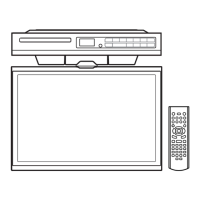
Steps for preparing the cabinet and drilling mounting holes.
Initial steps for securing the unit to the cabinet using screws.
Final steps for tightening screws and securing the unit.
Repeats the warning about heating apparatus below the unit.
Repeats tips for drilling and cabinet mounting.
How to adjust picture settings like mode, contrast, and brightness.
How to adjust audio settings like sound mode, bass, and balance.
How to set the clock, time zone, and OSD language.
How to set up and customize closed caption display.
How to restore defaults and set a parental control password.
Solutions for power and remote control problems.
Solutions for issues with DVD sound, picture, and playback.
Solutions for TV picture, color, and sound problems.
 General
| Screen Size | 39 inches |
|---|---|
| DVD Player | Yes |
| USB Port | 1 |
| Display Technology | LED |
| Inputs | HDMI, USB |
| Outputs | Headphone |
| Resolution | 1366 x 768 (720p) |
| TV Tuner | ATSC |
| Power Supply | AC 100-240V |