REMOTE CONTROL
CLEANING
SERVICE & SUPPORT
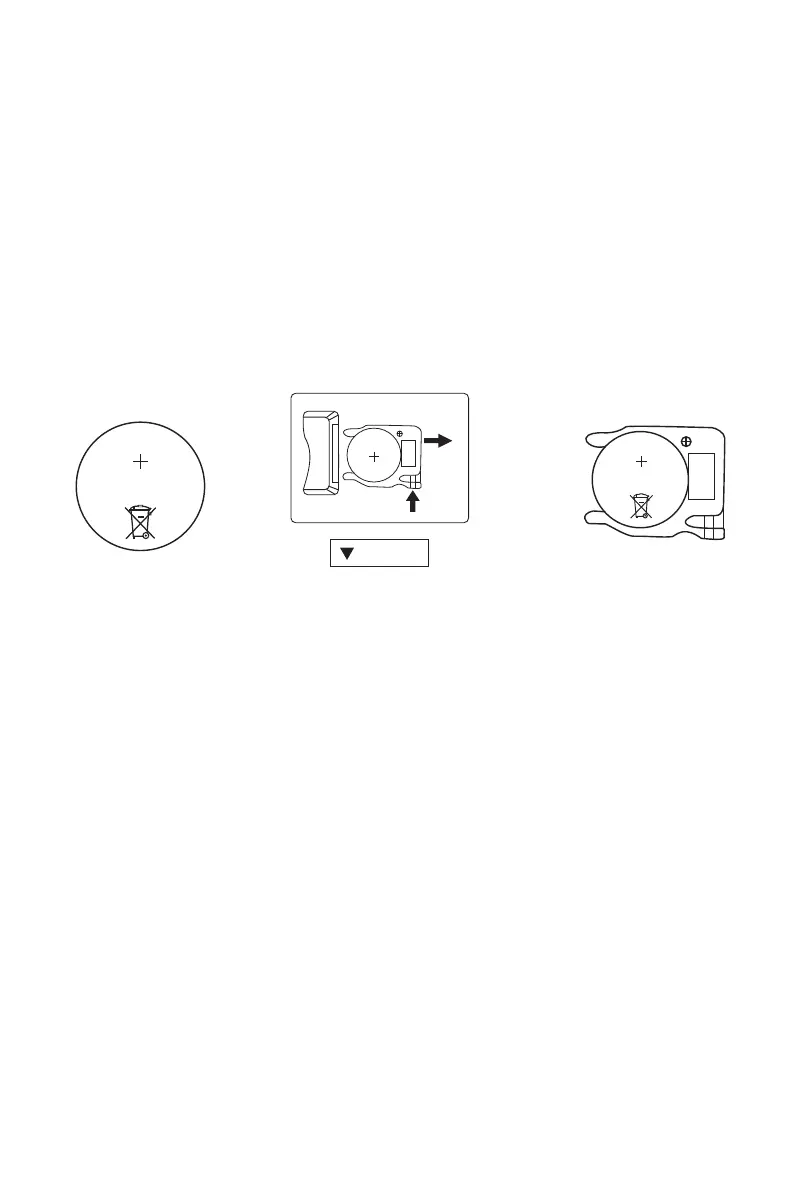
Figure 8 Figure 9 Figure 7
1. Install one “CR2025” battery as shown in (Figure 7).
2. All the functions performed with the Remote Control work identically to the Manual
Controls.
3. DO NOT DISPOSE OF BATTERIES IN FIRE. BATTERIES MAY EXPLODE OR LEAK.
4. HOW TO CHANGE THE BATTERY?(Figure 8)
a) Push the battery compartment Cover.
b) Insert the batteries, and make sure that the batteries are placed as shown in the(Figure 9).
c) Push back the battery cover.
5. Point the remote controller at the receptor on body of the fan and press the desired button.
The remote controller will work at distances of up to roughly 16FT(5m).
1. Be sure to unplug the power cord from the outlet before cleaning.
2. Plastic parts should be cleaned thoroughly with clean water, mild soap and damp
cloth or sponge.
3. Be sure not to get water or other liquid enter the inside of the motor.
4. Dry all parts completely before plugging into socket.
Have a Question? Need a Part?
Please Contact VEOHAUT Customer Service:
SERVICE@VEOHAUT.COM
WEB SITE: WWW.VEOHAUT.COM
AT ANY TIME
5


 To Next Page