| For extremely long runs, it may take a
few seconds to optimise the link.
| For more detailed connection information
refer to the current LONGSPAN Max
datasheet on www.veracityglobal.com
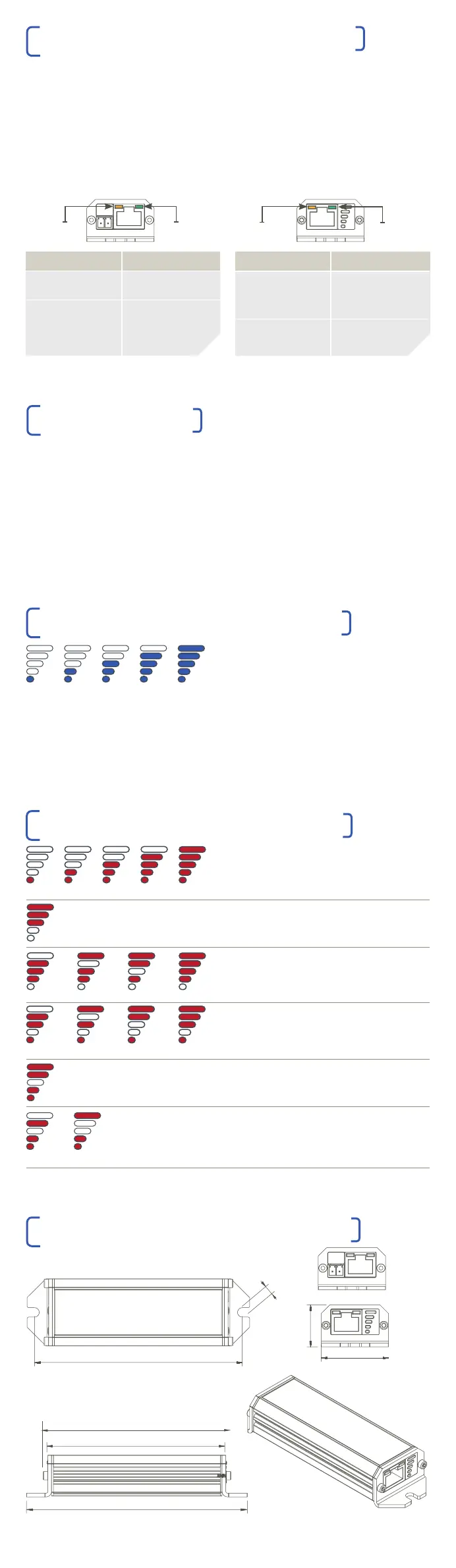
10 25 40 50 60
Blue LEDs show the POE power available for the
camera(s), or other POE-compliant device(s) in
watts. The power level is displayed after the
LONGSPAN Max Camera side unit has powered up.
10 25 40 50 60
Overload Short-circuit Signature High-temp
Overload Short-circuit Signature High-temp
Wiring Equipment
| The tables below show the LED status
for the Ethernet and LONGSPAN Max
ports on the LONGSPAN Base device.
| The green LONGSPAN Max LED may
blink quickly while connecting.
ETHERNET AND LONGSPAN MAX LEDS
SAFEVIEW ™ BLUE POE STATUS LEDS
Green
LED
ETHERNET LEDS FUNCTION
RJ45 Green Power
On Power Good
RJ45 Yellow Link / Activity
On Link Established
Flash Network Activity
In normal operation, the SAFEVIEW™ LEDs
display power available in flashing or steady blue.
ON = POE enabled to camera.
FLASH = POE available but not enabled,
no compliant device detected.
If the power displayed is less than your camera
or cameras require, then consider using a
local Veracity 54-57V DC PSU to power the
LONGSPAN Max device at the camera end.
SAFEVIEW ™ RED ERROR CODE LEDS
If LONGSPAN MAX detects an error or fault, a
diagnostic code will flash red on SAFEVIEW™
POE power draw has exceeded limit.
Power source must be upgraded.
Voltage too low, POE disabled. Check voltage
and polarity of power supply.
POE to camera refused or disconnected due to
error as indicated.
POE over LONGSPAN MAX refused or
disconnected due to error as indicated.
POE over LONGSPAN MAX enabled but no link.
Check cable length, wiring, and equipment.
Cable wiring error / inferior equipment detected,
connection refused.
LONGSPAN LEDS FUNCTION
RJ45 Green Power
On 100Mbps
Flash 10Mbps
Blink
No link
RJ45 Yellow Link / Activity
On Link Established
Flash Network Activity
Yellow
LED
SAFEVIEW ™ LEDS
| SAFEVIEW™ warning and error codes
are very rarely displayed in typical
installations.
| However, they can assist you to quickly
resolve any installation issues that may
occasionally arise.
LONGSPAN MAX (BASE) DIMENSIONS
36mm
23mm
111mm
Ø5mm
100mm
96mm
120mm
| The maximum POE power available for
connected devices is detected and
displayed automatically.
| SAFEVIEW™ LEDs display status and
diagnostic information for both the Base
and the Camera end LONGSPAN Max
units (i.e. the information is the same at
each end).
+
_
Green
LED
Yellow
LED
+
_
ETHERNET SIDE LONGSPAN SIDE


 To Previous Page
 Loading...