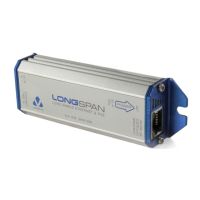
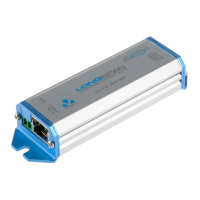
Where to use OUTREACH
TM
Cables in an Ethernet network are limited in length to 100 metres
(328 feet), however in some installations it is necessary to connect
network devices that are more than 100 metres apart.
OUTREACH solves this problem by acting as a signal repeater, which
can be used to join network cables together and create a longer
overall network link.
In the example above, a single OUTREACH allows a network camera
to be installed up to 200 metres (656 feet) away from a network
switch. The OUTREACH is connected in-line after the first 100
metres of cable have been laid, allowing a further length of up to
100 metres to be installed up to the camera.
The OUTREACH draws its own power from the network switch using
Power Over Ethernet (POE), and also forwards POE to the camera.
Power cable installation is only required at the network switch.
OUTREACH is compatible with all IEEE-compliant POE devices such
as IP phones and Wireless Access Points and requires no setting-up
on installation, as it configures its power and data forwarding
functions automatically.
In addition, two or more OUTREACH units may be connected in a
chain to extend cable reach beyond 200 metres (656 feet).
Maximum range and POE power can also be increased by installing
an OUTSOURCE power injector, as shown in the diagram below.
Installation
Quick installation sequence:
• Connect the POE IN connector to a POE source (such as a
network switch)
• Connect the POE OUT connector to a POE powered device (such
as an IP camera)
• Wait a few seconds for all devices to be enabled
• Check the status of the LED indicators
LED indicators
Connector LED OFF ON FLASHING
POE IN
POWER GOOD
no power power
good
power
marginal
LINK / ACTIVITY
no Ethernet
link
Ethernet
link good
network
activity
POE OUT
POE ENABLED
no POE
enabled
POE out
enabled
insufficient
power / error
LINK / ACTIVITY
no Ethernet
link
Ethernet
link good
network
activity
In nearly all installations both green power LEDs will light solidly and
both yellow network LEDs will light or blink, and no further action
needs to be taken.
If either green LED blinks, or any LED fails to light, consult the
detailed FAQ / troubleshooting section overleaf.
Range
Max device
power:
13 Watts
(Class 3)
6.5 Watts
(Class 2)
3.8 Watts
(Class 1)
0 Watts
(no POE)
Range with
POE switch:
N/A
300m
984ft
400m
1310ft
700m
2300ft
Range with
OUTSOURCE:
300m
984ft
500m
1640ft
700m
2300ft
1000m
3280ft
The maximum distances above are typical for installations using
24AWG Cat5 cable or better. Actual limits depend on cable and
device characteristics and may not necessarily be multiples of 100
metres.
When designing your network installation, use the table above and
locate an OUTREACH every 100 metres (328 feet) from the POE
source.
If extra power or range is required post-installation, it is very
straightforward to upgrade the link by fitting an OUTSOURCE.
Technical specification
Power Typical: 1 Watt, Maximum: 2.2 Watts
POE IEEE 802.3af Class 0 device (0 – 13 Watts)
Ethernet 100BASE-TX Full Duplex only
Auto-Negotiation and Auto-Crossover supported
Dimensions
( WxDxH )
70x34x20mm / 2.8x1.3x0.8”
100x37x20mm / 3.9x1.5x 0.8” inc. screws and tabs
Mounting Two 7mm / 0.28” dia holes, 84mm / 3.3” apart
Weight 85 g / 3 oz
Operating temp -10 to 50°C / 14 to 122°F
Relative humidity Up to 85%, non-condensing
INSTALLATION GUIDE
to
powered
dev ice
f rom
power
source
network
cable
network
cable
RJ45
connector
RJ45
connector
EC Declaration of Conformity
In accordance with EN 45014:1998
We, Veracity UK Ltd. of 6 Barns Street, Ayr, KA7 1XA
declare that the equipment “OUTREACH” Ethernet repeater
model number VOR-OR01
conforms to the essential protection requirements of the EMC Directive 89/336/EEC
as amended. The following EMC standards have been applied:
BS EN 55022:1998 Emissions (Class B Radiated)
BS EN 55024:1998 Immunity (BS EN 61000-4-2:1995 Immunity to ESD, BS EN
61000-4-3:2000 Immunity to Radiated RF Fields (3V/m))
I hereby declare that the equipment named above has been been found to comply
with the relevant sections of the above referenced specifications. The unit complies
with all essential requirements of the EMC Directive.
Responsible Person Mr Alastair McLeod, Director
Issued 17
th
December 2007 at Ayr
This device complies with Part 15 of the FCC Rules. Operation is
subject to the following two conditions: (1) this device may not cause
harmful interference, and (2) this device must accept any interference
received, including interference that may cause undesired operation.
NOTE: This equipment has been tested and found to comply with the limits for a
Class A digital device, pursuant to Part 15 of the FCC Rules. These limits are
designed to provide reasonable protection against harmful interference when the
equipment is operated in a commercial environment. This equipment generates,
uses, and can radiate radio frequency energy and, if not installed and used in
accordance with the instruction manual, may cause harmful interference to radio
communications. Operation of this equipment in a residential area is likely to cause
harmful interference in which case the user will be required to correct the interference
at his own expense.

 Need help?

 To Next Page
 General