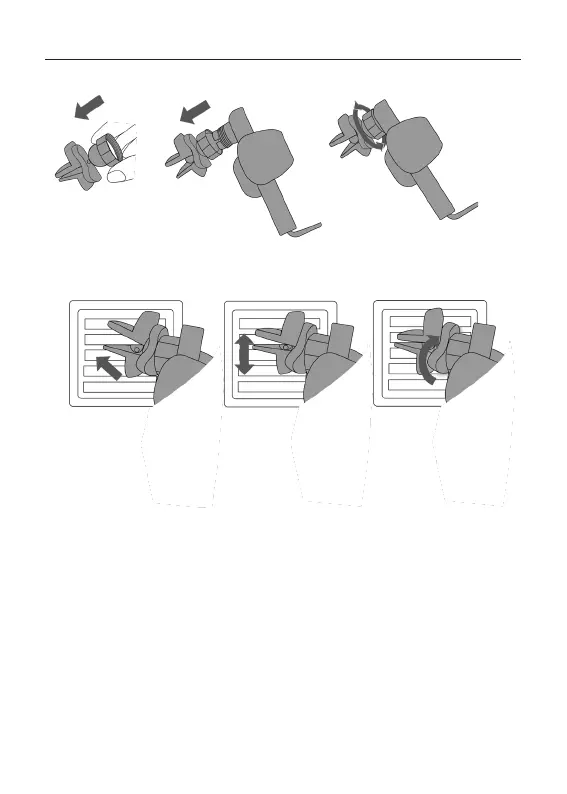
4. Mounting on air vent
Note
a. Unscrew angle pivot knob from car charger and put it over the ball joint adapter. Insert the
ball into the socket of the charger at the back and tighten the pivot knob.
b. Find a place on the air vent and clean the surface.
c. Insert the mount clips in the car air vent and turn the wheel until it is tightened.
At the end of the air vent holder you will find the eagle beak which will bite firmly into the air
outlet and will not fall off. This method of turning and locking the holder is suitable for a lot of cars.
d. Please go ahead with Step 5. (a)-(c) Power connection.
c.
b.
a.
• Confirm your car's air vents are compatible before purchasing.
• 5V / 1A car chargers are not sufficient to power the Verbatim Qi Fast Wireless Car Charger.
• A Quick Charge 3.0 car charger adapter (not included) or a QC 3.0 USB port in your car is
required for Fast Charge Mode.
• Metal attachments, Pop sockets, or credit cards will interfere with charging. Cases which
contain metal will trigger foreign object detection and interrupt charging.
• Please note that your device/smartphone needs to be compatible to Qi Standard, min. 5W.
• Fast Wireless Charging supported with 7.5 W to 15 W (power varies between manufacturers
of your device/smartphone).
3
4
5


 To Next Page
 Loading...