12
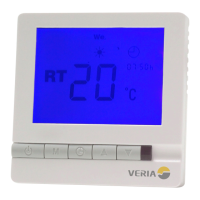
How to progamme the timer:
Hold the “ ” for 3 seconds, the number 1 and
“Mo Tu We Th Fr” are displayed.
This indicates that you can program the rst switching time for the
week-day.
Use Up/Down key to set the required start time.
Press “ ” to accept this setting.
Use the Up/Down key to set the required temp.
Press “ ” to accept this setting.
Repeat for switching times 2-4 week-day.
After you have programmed times 1-4 for the weekday, you are now
able to set the switching times for weekend “Sa Su” will be displayed.
Use Up/Down key to set the required start time.
Press “ ” to accept this setting.
Use the Up/Down key to set the required temp.
Repeat for switching times 2-4 for the weekend.
To disable the timer, select “Override” (Mode 01)
How to override settings in TIMER MODE
At any time you can change the preset timer temperature settings
by pressing the Up/Down key.
Your manual override will apply until the start of the next timer cycle.
Thereafter the thermostat will resume your programmed settings.
Timer functionality
EN


 To Next Page