990-03558-00 Rev B
DCO-00245
For devices with version 49.000 and above, if this feature is enabled, it uses the contact between your body and the
device to measure electrical activity of your heart. You must be wearing the Study Watch for the ECG reading to work
correctly.
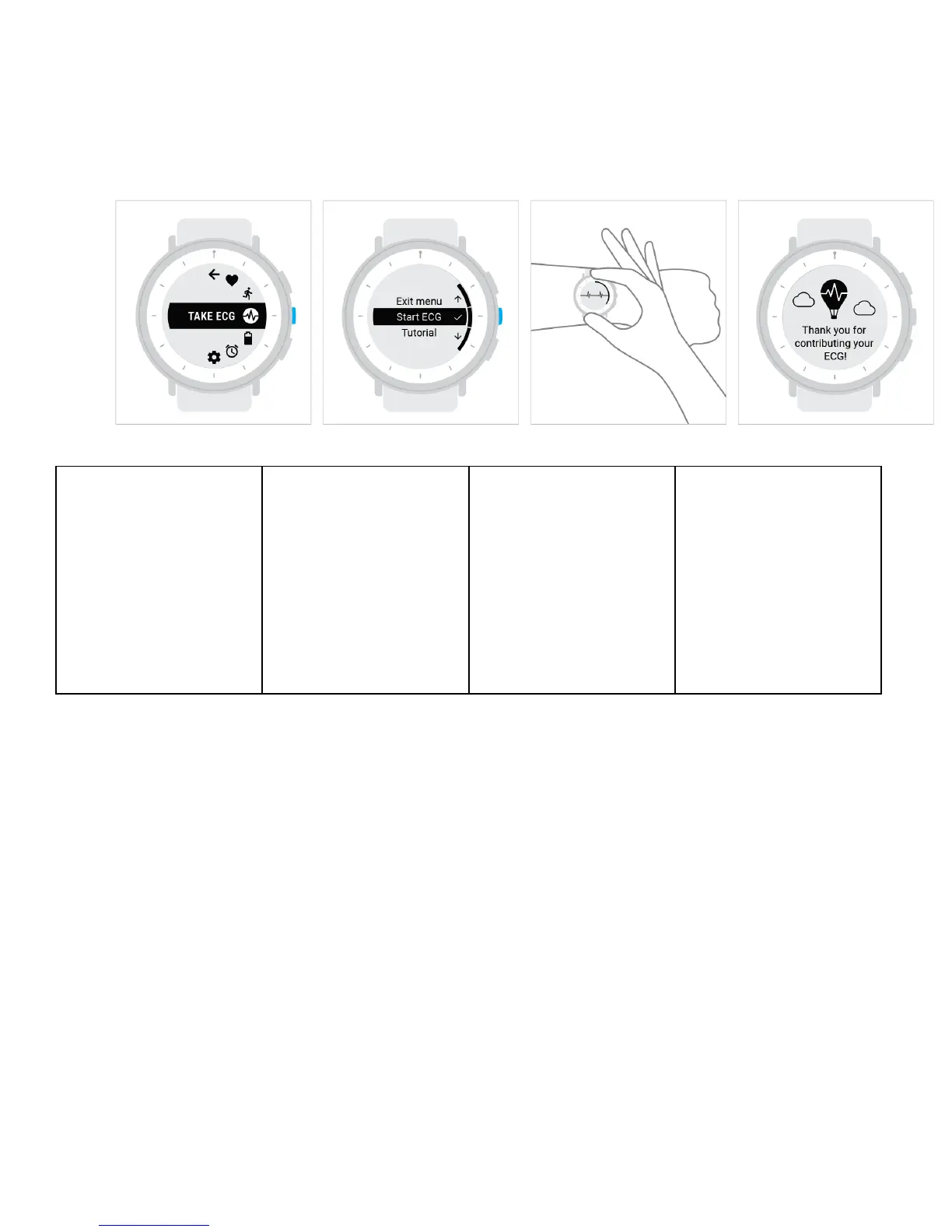
Enter the menu by pressing
the middle button. Scroll
with the Down button ↓ to
find Take ECG [ICON], and
press the Select button.
Find the Start ECG [ICON].
Press the Select button ✓
to begin the reading.
Hold the device’s polished
metal frame by positioning
your index finger at the top,
and your thumb at the
bottom.
Rest both hands on a flat
surface and continue to hold
for 60 seconds. After the ECG
is complete, you can let go of
the frame.
Delay an ECG reading
For devices with version 50.000 and above, if you began an ECG reading but aren't able to take it at that moment, you
can delay the reading for later.
During the ECG reading, do not hold the device's frame. Wait for the ECG menu to appear, then scroll the screen to Take
it later using the bottom button. Select the option using the middle button.
Change the reminder time for an ECG reading
For devices with version 49.000 and above, you can adjust the time of day that you receive reminders to take an ECG
reading.
1. Enter the menu by pressing the Select button ✓.
2. Scroll with the Down button ↓ to find Settings, and press the Select button ✓.


 To Next Page
 Loading...