4
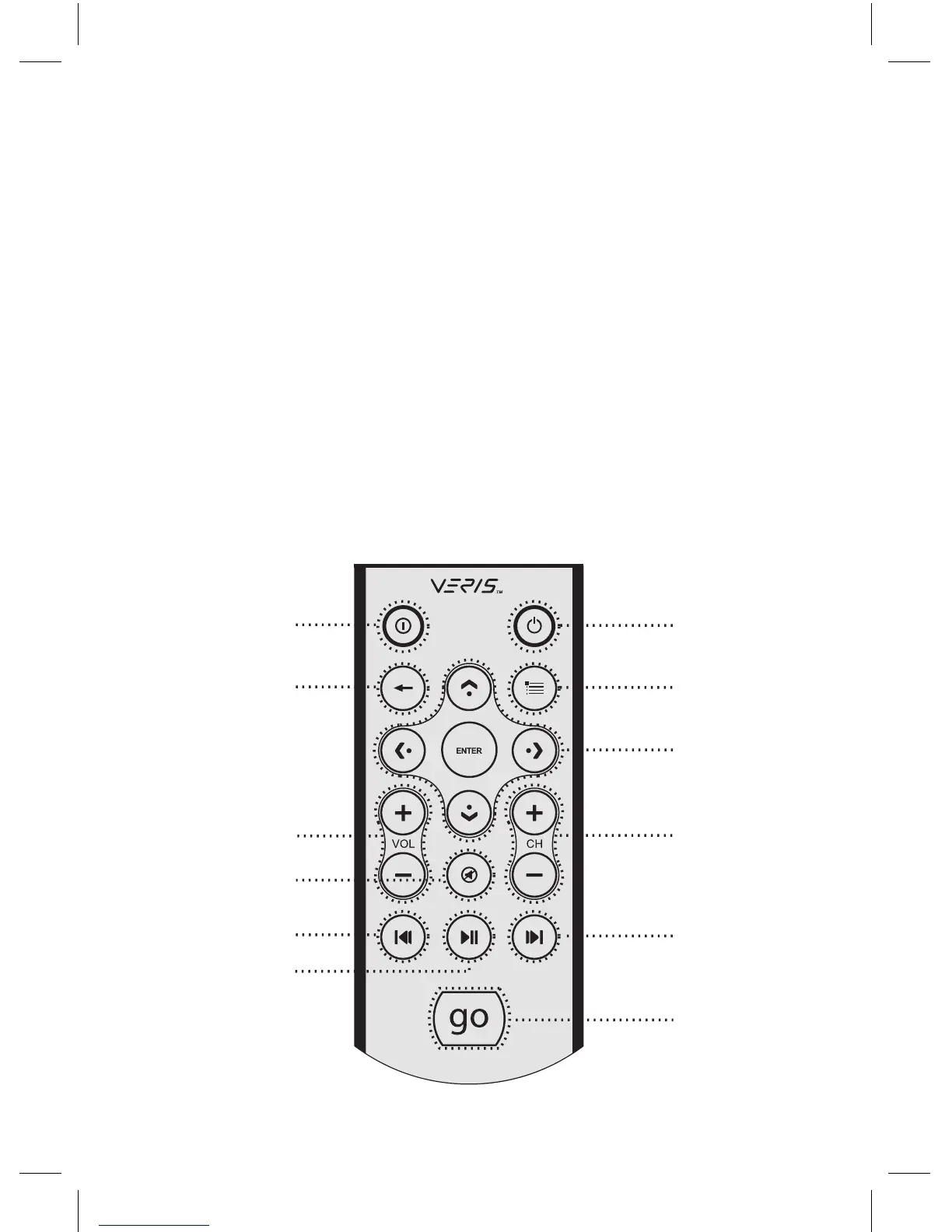
3. RM100 (IR Remote Control for PC)
1. Power: Turn the PC on/off
2. Application Exit: Close the active window, closing iMEDIAN HD
[ALT+F4]
3. Menu: Go to the menu page of iMEDIAN HD.
4. Back: Go back to the previous menu
5. 4 Way Navigation and Enter: Up/Down/Right/Left buttons to navi-
gate menus and Enter button to select a choice
6. Volume +/– : Increase or decrease volume
7. Mute: Mute or restore volume
8. Channel +/– : Change TV channel/page up/down in iMEDIAN HD
9. Play: Play/pause with a short press, stop with a long press
10. Prev/Rewind: Previous button with a short press, rewind with a
long press
11. Next/Fast forward: Next button with a short press, fast forward
with a long press
12. “go”: Starts iMEDIAN HD application
1
3
5
11
8
12
4
6
2
7
10
9



 To Next Page