pg
27
THE BASICS
Performing a soft reset
If your smartphone is not responding or you have trouble synchronizing with your
computer, a soft reset may help. All your info is retained when you perform a soft reset.
1:
Press
Power/End
to turn off the screen.
2:
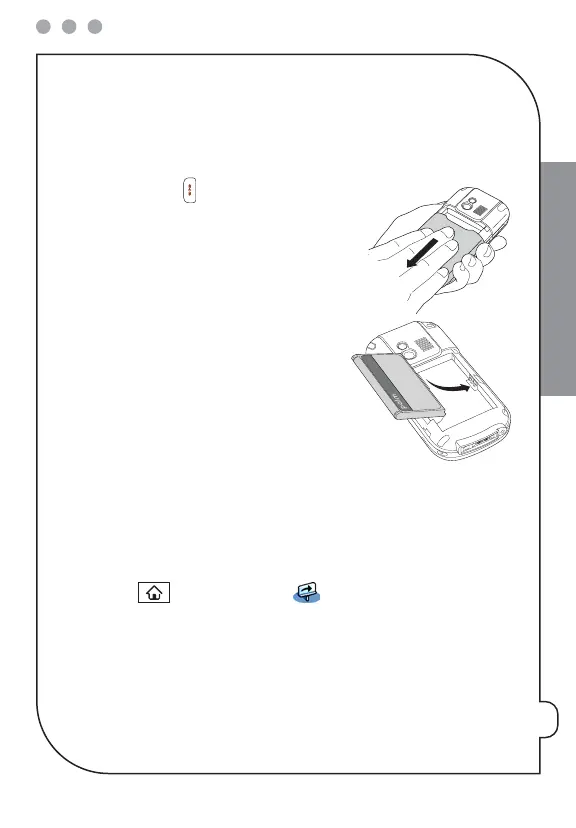
Slide the
battery door
downward to remove it
from your smartphone.
3:
Remove the battery from the battery
compartment.
4:
Align the metal contacts on the battery with the
contacts inside the battery compartment, insert
the battery, and then press it into place.
5:
Slide the
battery door
onto the back of your
smartphone until it clicks into place.
NOTE: If the phone and Bluetooth signals were on before a reset, these
signals automatically turn on after the reset.
Where to learn more
For a quick introduction
Quick Tour:
The Quick Tour introduces you to many of your smartphone’s features. It is
already installed on your smartphone, and you can open it anytime. Press
Applications
and select
Quick Tour
.
While using your smartphone
User Guide:
The
User Guide
provides complete information on using your smartphone,
including descriptions of advanced features not included in this guide. You can find the
User Guide
in the following locations:
•
On the Getting Started CD.



 To Next Page