Need help?
Do you have a question about the Vermona DRM1 MKIII and is the answer not in the manual?
Lists items included with the DRM1 MKIII, emphasizing the unit and manual.
Instructions for connecting the module to power, audio, and MIDI devices.
Guidance on safely connecting audio cables and powering on the unit.
How to connect MIDI devices to the DRM1 MKIII for external control.
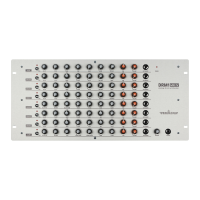
Details the controls and connectors located on the front of the unit.
Details the connectors and power input on the rear of the DRM1 MKIII.
Introduces the eight independent drum sound channels and their flexibility.
Details the KICK sound channel parameters and their functions for bass drum sounds.
Details the identical DRUM 1 and DRUM 2 channels for toms and percussions.
Details the versatile MULTI channel with three oscillators for various sounds.
Details the SNARE channel's parameters including noise, reverb, and filter.
Details the HI HAT channels for hi-hats and cymbals, using noise and oscillators.
Details the CLAP channel, simulating hand claps with reverb and filter.
Explains how to assign MIDI channels and note numbers to individual DRM channels.
Method for assigning MIDI notes to all DRM channels simultaneously.
Lists the default MIDI note numbers for each DRM channel.
How to use the OUT jack for individual channel outputs with different cable types.
How to use the OUT jack to insert external effect processors into a channel.
Illustrates KICK channel settings for Hard Dance and Long Kick sounds.
Illustrates DRUM channel settings for Moving Percussion and Space Tom sounds.
Illustrates MULTI channel settings for Cowbell, Lazer Zap, Metallic Tic, HP MiniChords.
Illustrates SNARE channel settings for Compact Snare, Old Scool Snare, Tunable Drum, Clave.
Illustrates HI HAT channel settings for Cymbal and Shine Hat sounds.
Illustrates CLAP channel settings for Full Claps, Hollow Clap, Short Guiro.
 General
| Type | Drum Synthesizer |
|---|---|
| Number of Voices/Instruments | 8 |
| Sound Generation/Synthesis Type | Analog |
| Weight | 3.5 kg |
| Analog Circuits | Yes |
| Audio Outputs | 8x individual outputs, Stereo Mix output |
| Inputs | MIDI In |
| Power Supply | 12V DC |

 To Next Page