5
4
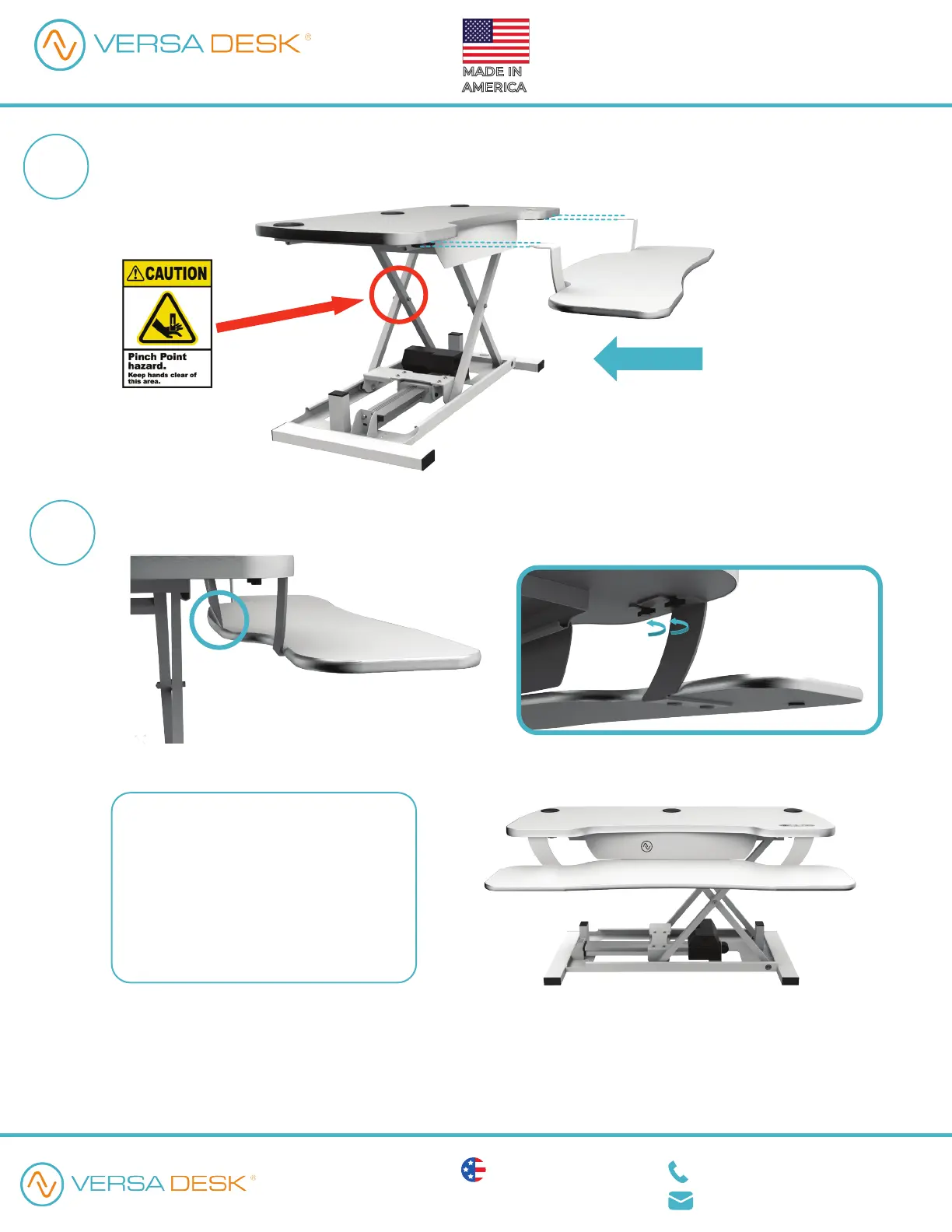
Make sure the keyboard tray is all the way in and the end of the keyboard tray is sitting under the
middle bracket. Secure the side brackets to the top surface by fully tightening all 4 thumb screws.
Before raising/lowering your unit,
make sure all cords are secured and
away from all moving parts.
We hope you enjoy your new
workspace and that it brings you
more well-being while working.
Pick up the keyboard surface. Align the slots on the side brackets to meet the loosened thumb screws
on both the left and right sides. Gently slide the keyboard tray brackets into the gap between the
thumb screws and the top surface.
Nice! You are all set.
Assembly Instructions
Assembly Instructions
VERSA DESK
1 (888) 506-2931
engineering@versaproducts.com
American Manufacturing Lifetime Warranty
Protected by US Patent No. 10,485,336 & 10,849,424
VDPP / VDPPD
REV. 02072022
POWER PRO
®
MADE IN
AMERICA
How can we improve our assembly instructions?
Your comments and suggestions are important to us.


 To Previous Page
 Loading...