
 Need help?
Do you have a question about the VersaLogic VL-EPU-4011 and is the answer not in the manual?
Ensures protection against electrostatic discharge damage during handling.
Guidelines for careful handling to prevent CMOS RAM corruption.
Requires connecting mounting standoffs to chassis ground for EMI purposes.
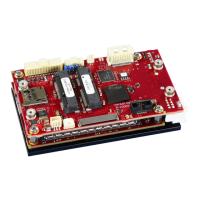
Highlights the Harrier's key features as a small, rugged, SWaP-optimized computer.
Refers to the Harrier Data Sheet for complete specifications, subject to change.
Provides access to general help and descriptions of BIOS menu options.
Details the top-level menu bar features available in the BIOS setup.
Configures boot-related options such as NumLock, Timeout, and Quick Boot.
Options to enable or disable UEFI Network Stack, IPv4, and IPv6.
Provides options to enable or disable the SMBIOS Event Log.
Configures CPU features, power management, and core-specific settings.
Manages graphics device configuration, including GOP and IGD settings.
Controls HD-Audio support, DSP, memory transfers, and clock gating.
Configures Graphics Memory Manager (GMM) support and clock gating.
Manages the Integrated Sensor Hub (ISH) controller settings.
Configures Low Power Sub System (LPSS) I2C and HSUART interfaces.
Settings for PCI Express clock gating, decode, and compliance modes.
Configures PCI Express root port settings, ASPM, and L1 substates.
Controls SATA controller mode, test mode, and port configurations.
Manages SD Card and eMMC support for the SCC.
Configures USB controller, modes, and port settings.
Configures system timers, clock gating, and other miscellaneous options.
Provides options for OS selection, silent boot, and EFI network support.
Configures settings related to TXE, PTT, and SeC.
Configures thermal trip points for system protection and throttling.
Configures component settings such as CRID, PMIC, PNP, and OS reset.
Provides options for kernel debugger, APEI BERT, and ACPI memory debug.
Settings for North Peak enable, trace destination, and recovery dump.
Configures ACPI features including Native PCIe, ASPM, and Ready Mode.
Configures slate and dock mode behavior for UltraBook events.
Configures CPU, Graphics, SATA, UART, and SDIO for PEP mitigation.
Configures Runtime D3 support, power resources, and delays.
Enables ECC error logging and halt on uncorrectable errors.
Manages Trusted Platform Module (TPM) state, actions, and parameters.
Provides options to enable or disable the secure boot function.
Configures UART ports, modes, base addresses, and IRQs.
Configures PCI interrupt routing numbers for various PIRQ entries.
Configures IPv6 Duplicate Address Detection and policy.
 General
| Brand | VersaLogic |
|---|---|
| Model | VL-EPU-4011 |
| Category | Single board computers |
| Language | English |

 To Next Page