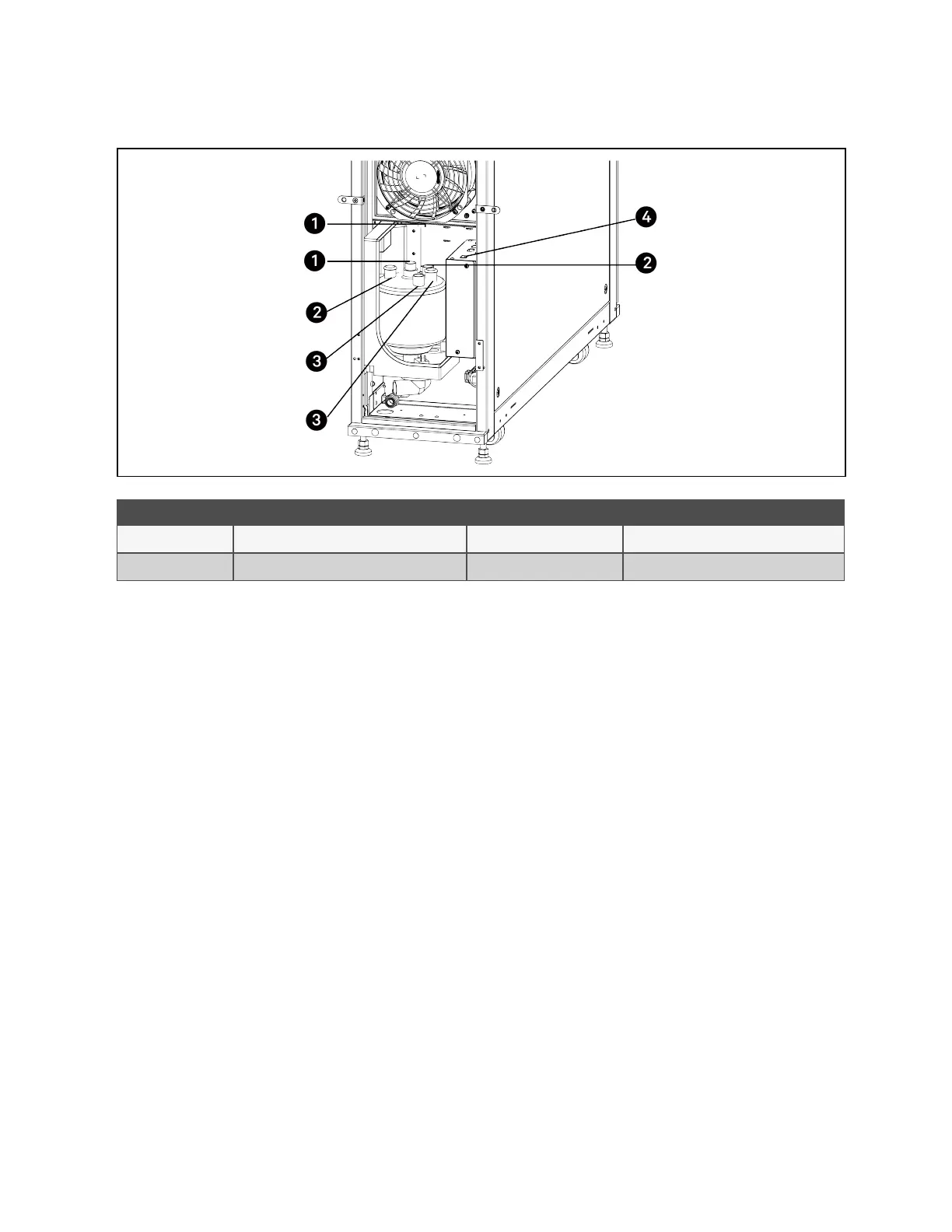
Figure 9.4 Removing Humidifier
Item Description Item Description
1 Steam hose connection 3 Power electrode wire connection
2 Level sensor wire connection 4 Power switch
NOTE: After replacing the filter, clear the operating time of the humidifier. Press the menu button on the HMI display,
choose Maintenance > Parameter Reset, and select Yes for Confirm Humidifier Maintenance.
9.8 Refrigeration Circuit
Note the following when maintaining the refrigerant circuit:
• When repairing the refrigeration circuit, collect all refrigerant in a container and do not allow the refrigerant to
escape.
• When either removing (for repairs) or charging refrigerant, this must be performed on both the high and low
pressure sides of the compressor simultaneously.
• The compressor copper plated steel connections should be brazed with a Silfos material containing a
minimum of 5% silver.
9 Maintenance
67
Vertiv™ Liebert®CRV CRD25 and CRD35 Row-Based Cooling System User Manual


 To Next Page