
 Need help?
Do you have a question about the Vesync Etekcity ESF-551 and is the answer not in the manual?
Details the maximum weight the scale can measure.
Specifies the precision of weight measurements.
Lists available units for weight display (lb, kg, st).
Describes the scale's platform material.
Indicates the type of batteries required for operation.
States the duration before the scale automatically turns off.
Provides the physical size of the smart scale.
Lists compatible operating systems for the VeSync app.
Item included in the package.
Batteries provided with the scale.
A guide to help users set up the scale quickly.
Precautions regarding medical use and body fat measurement.
Guidelines for safe operation and handling of the scale.
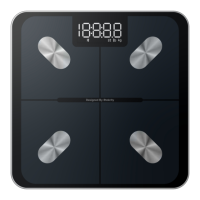
Identifies the part of the scale where the user stands.
Shows the weight and other information.
Features on the bottom of the scale for stability.
Location for installing batteries.
Indicates the display of the measured weight.
Shows the Bluetooth connection status.
Displays the units (lb, kg, st) of the measurement.
Instructions on how to obtain the VeSync application.
Steps to recalibrate the scale for accurate readings.
Solutions for when the scale fails to power on.
Reasons for temporary display messages.
Steps to resolve connectivity issues with the app.
 General
| Connectivity | Bluetooth |
|---|---|
| Tare Function | Yes |
| Auto Shut-off | Yes |
| Capacity | 400 lb / 180 kg |
| Unit | lb / kg / st |
| Graduation | 0.2 lb / 0.05 kg |
| App Compatibility | VeSync |
| Accuracy | ±0.2 lb / 0.1 kg |

 To Next Page