20
Cleaning the Dust Sensor
If not using the air purifier for an extended
period of time, wrap both the air purifier and
the filter in plastic packaging and store in a
dry place to avoid moisture damage.
Storage
Regularly cleaning the AirSight™ Infrared Dust
Sensor lens helps maintain the eciency of
the sensor. If the Air Quality Indicator is red
(indicating “Bad” air quality) more than usual,
you may need to clean your dust sensor.
Note: How often you clean the dust sensor
will depend on the air quality of your
environment. If your air is often polluted with
dust, dander, smoke, and other particles,
you may need to clean your dust sensor
more often.
Note: Do not remove the foam piece
attached to the dust sensor cover
unless instructed by Customer Support.
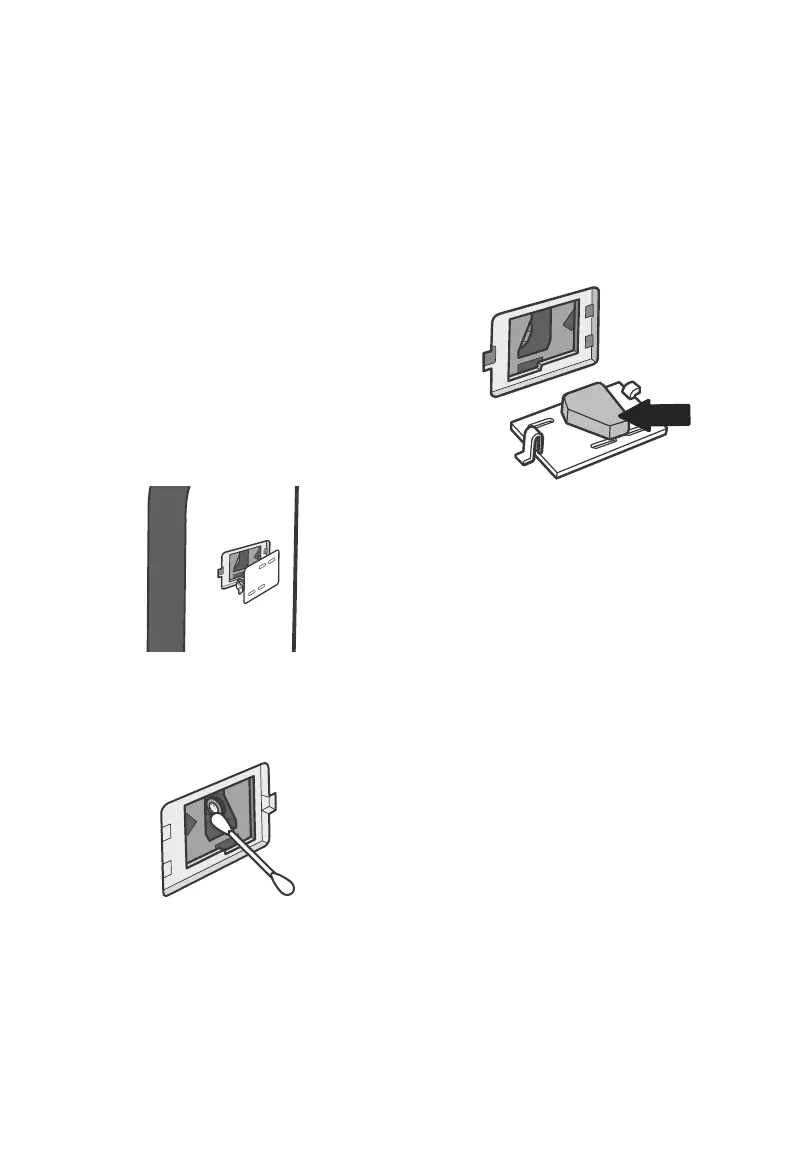
[Figure 3.3]
1. Unplug the air purifier.
2. Open the dust sensor cover. [Figure 3.1]
CARE & MAINTENANCE (CONT.)
Figure 3.1
Figure 3.2
Figure 3.3
3. Use a cotton swab dipped in water to
clean the dust sensor lens. [Figure 3.2]
4. Wipe the lens dry with a dry cotton swab.
5. Replace the dust sensor cover.


 To Next Page