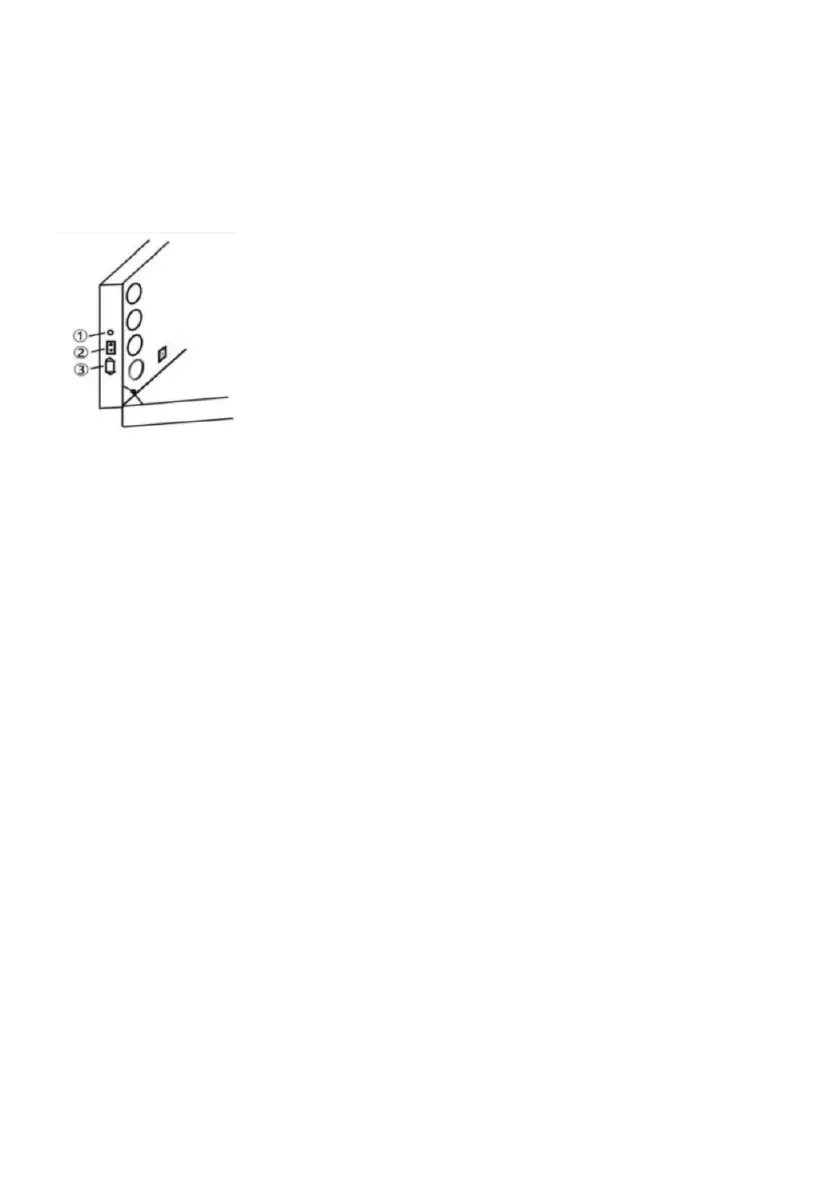
1 . Tap once to switch cool white , warm white and warm light
2 . Long press to adjust the brightness stepless.
Power Introduction :
1.Power cord plug, just open the slide cover( Only use with supplied Power
cord plug ).
2.Charge other devices ( plug and cable required
)
.
3.Headphone cable connector.
How to Adjustable Stand :
1 . Unlatch two doors located at the bottom of the case.
2 . Pull out four adjustable stands with one end semi-fixed at the bottom of
the case one by one.
3 . Rotate the stand clockwise to place and make sure it is tightly attached
to the bottom of the case without any shaking . Loosen the screw rings at
one end of the stand by unscrewing it counter-clockwise.
4 . Press the two height adjusted buttons located at upper part of the stand
and stretch out the lower part of it simultaneously so as to adjust the stand
to the right height,tighten the screw rings at the middle of the stand by
screw down them clockwise.
5 . Repeat steps No. 3-5 so as to make sure four support stands are of
exactly the same height .
6 . Lift up the case and make sure four support stands on the door evenly
and steadily .


 To Next Page